spring-ai-playground
description: MCP Server Proxy - re-publish tools from external MCP connections through the built-in server, governed per tool with risk level, HITL, logging, and secret masking.
MCP Server Proxy
Where: top navigation → MCP Server → select a connected server → the gear icon at the top-right of the MCP Server Info pane → Composed Tools.
The MCP Server Proxy re-publishes tools from the external MCP servers you’ve connected through the playground’s own built-in MCP server (spring-ai-playground-built-in-mcp, Streamable HTTP at /mcp). The built-in server fronts those upstream servers as a governed proxy - Agentic Chat, the MCP Inspector, and any external MCP client reach the proxied tools on one endpoint, alongside the tools you authored in Tool Studio. You control it per tool: which tools, under what alias, with what risk cap and human-approval setting.
flowchart LR
    E1["External MCP<br/>server A"]
    E2["External MCP<br/>server B"]
    PROXY["Built-in server<br/>= proxy at /mcp<br/>per-tool: alias ·<br/>risk cap · HITL"]
    CHAT["Agentic Chat"]
    INSP["MCP Inspector<br/>(built-in server)"]
    EXTC["External /mcp<br/>clients"]
    E1 --> PROXY
    E2 --> PROXY
    PROXY --> CHAT
    PROXY --> INSP
    PROXY --> EXTC
You pick the tools through the Composed Tools drawer; internally the selection is a composition (McpComposition) that wraps each chosen tool in a WrappedExternalToolCallback. “Proxy” is the user-facing idea - re-publish someone else’s tool through mine, per tool - and “composition” is the mechanism.
!!! info “Combine across connections”
You re-publish the tools you select - individually or with Select all, across one or several active connections - combined onto the one built-in /mcp endpoint. See Default MCP Servers → trust and risk.
Why proxy a tool instead of calling it directly
An external MCP server can be written in any language and run anywhere - you didn’t author it and can’t see inside it. Proxying it through the built-in server buys three things that a direct connection doesn’t:
- One endpoint, governed. Chat and external
/mcpclients reach the upstream tool alongside your own tools, without each client negotiating that vendor’s transport or auth. - A safety envelope. Every proxied tool is wrapped with a computed risk level, optional human approval (HITL), full logging and tracing, and secret masking - see the safe-wrapping contract.
- A review gate. Before a tool is published it passes a description poisoning scan, a fingerprint ledger (so a silently-redefined upstream tool is flagged for re-review), and composition shadowing rules.
The Composed Tools drawer
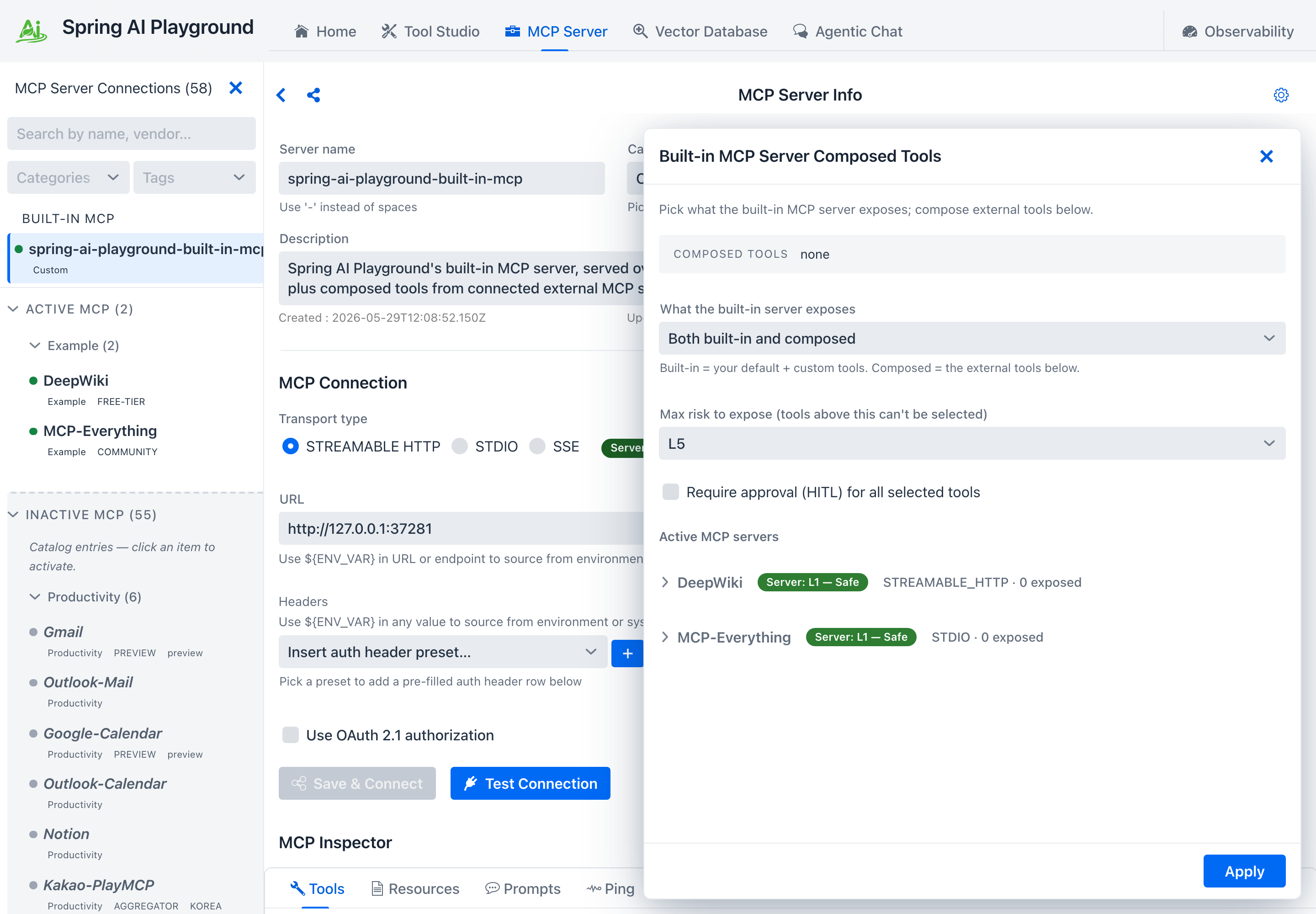
The gear icon on the MCP Server Info header opens the Composed Tools drawer.
 { loading=lazy }
- Max risk to expose caps which tools can be selected - any tool whose effective risk exceeds the cap (default
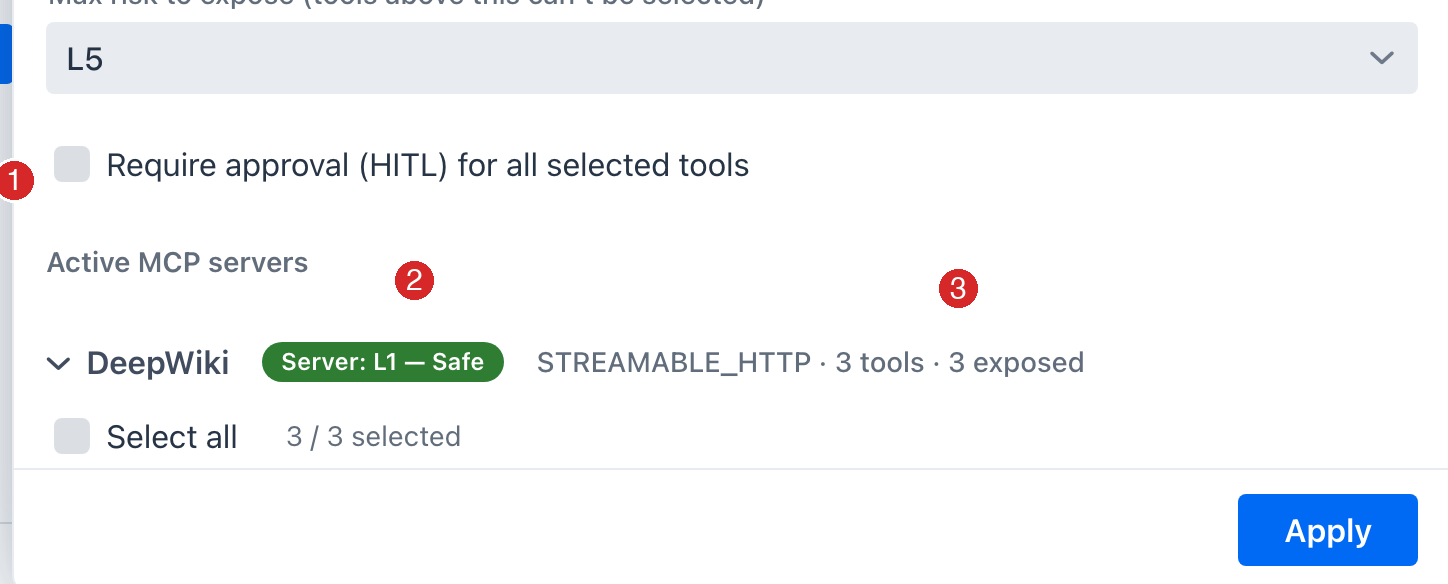
L3) is disabled in the list. - Require approval (HITL) can be set per tool, or for all selected tools at once via the header checkbox. Marking a tool HITL lowers its effective risk by one band and gates the call at runtime - external clients are asked via MCP elicitation, and chat on this device shows an approval dialog (see Human-in-the-Loop).
- Each server row expands to its tools; every tool shows its own risk chip plus an alias / description editor. The exposed alias defaults to
<server>_<tool>and the input schema passes through unchanged.
 { loading=lazy }
What the proxy adds to each tool
Re-exposing a tool wraps it - it doesn’t copy it. The upstream call is unchanged, but the wrapped tool now carries a composed risk level, emits start / done / crash spans tagged with its upstream origin and risk, masks upstream connection secrets in errors, and honors its HITL flag.
That wrapper - plus the risk scoring, poisoning scan, fingerprint ledger, and shadowing rules behind it - is the safety model, documented field-by-field on its own page so this one stays about using the feature: see MCP Server Safety → The safe-wrapping contract.
Who can reach the proxied tools
Once you click Apply, the selected tools join the built-in server and are reachable by:
- Agentic Chat - alongside your Tool Studio tools and any directly-selected MCP connections.
- The MCP Inspector - select the built-in server (
spring-ai-playground-built-in-mcp) in the MCP Server screen and the proxied tools show up in its Tools tab, where you can run them directly. (They display asL0 - Verifiedthere, since the built-in server bypasses the risk model - the upstream’s real level still shows on its own connection’s Inspector.) - External MCP clients - anything that connects to the playground’s
/mcpendpoint sees the proxied tools intools/list(under their exposed aliases).
This is how external tools reach external clients in practice; the trust-and-risk overview frames the same exposure at the catalog level.
Steps
- Connect the upstream server - activate a catalog entry or add a custom server, and confirm its tools work in the Inspector.
- Open the Composed Tools drawer - the gear icon on the MCP Server Info header.
- Set the ceiling - pick a Max risk to expose cap; optionally tick Require approval (HITL) for all selected tools.
- Select tools - expand a server, tick the tools you want. Each shows its effective risk chip; over-cap tools are disabled.
- (Optional) Rename / gate - edit the exposed alias or description, and toggle HITL per tool.
- Apply - the tools join the built-in server, visible at the top of the sidebar and callable from chat and
/mcp.
Configure exposure via YAML { #yaml-exposure }
The drawer’s selection is a composition you can also declare in application.yaml - handy for reproducible or scripted setups. Under spring.ai.playground:
spring:
  ai:
    playground:
      built-in-mcp-server:
        name: spring-ai-playground-built-in-mcp   # identity external /mcp clients see
        description: Curated tools for my team     # shown in clients' server list
        exposure-mode: both          # builtin-only | composed-only | both
      mcp-server:
        composed-tools-max-risk: L3  # cap (omit this key -> L5); tools whose risk exceeds this are skipped
        composed-tools:
          - server: DeepWiki         # connected server name
            tool: ask_question       # upstream tool name
            alias: deepwiki_ask      # exposed name (optional; defaults to <server>_<tool>)
            description: "..."        # optional description override
            hitl: true               # require human approval (optional, default false)
The built-in server’s name and description are sourced from this config (not the connection form) so the published identity stays stable and keeps matching the L0 - Verified self-bypass.
Each list entry wraps one upstream tool, exactly like a drawer row - same risk cap, alias, and HITL semantics. The upstream server must be connected for its tools to wrap. These keys are also in the Configuration reference → MCP built-in server & exposure.
Related
- MCP Server Safety - how composed risk, the poisoning scan, the fingerprint ledger, and shadowing rules are computed
- MCP Server - connections, transports, OAuth, the sidebar catalog
- MCP Inspector - exercise a connection’s tools (with per-tool risk chips) before proxying them
- Default MCP Servers - the 58 preset connections you can proxy from