spring-ai-playground
Self-equipping agents: dynamic tool discovery
A self-equipping agent doesn’t ship with a fixed toolset - it discovers and equips whatever a task needs, on demand, from a library that can grow without bound. That is what turns a chat model into an open-ended agent: once it can find tools, the size of your toolbox stops being the limit on what it can do. In the Playground this runs on Spring AI’s dynamic tool discovery (the Tool Search Tool pattern), and - the part that matters most here - it works even on a small local model.
As you expose more tools - the built-in catalog, your own Tool Studio tools, and tools re-exposed from connected external MCP servers - the list grows fast. By default the chat sends the model the full JSON schema of every exposed tool on every turn. That is cheap for a handful, but a broad agent setup easily reaches tens of thousands of tokens of tool definitions before the conversation even starts, and a model’s selection accuracy drops once it has to pick among dozens of similar tools.
Dynamic tool discovery removes that cost. Instead of listing the tools, the chat hands the model a single toolSearchTool. The model describes the capability it needs, gets back a short list of matching tool names, and only then calls one. Tools stay hidden until they are found, so the prompt stays small no matter how large the catalog grows.
Why it matters for agents
An agent gets its reach from tools - the more capabilities you connect, the more it can actually do. Spring AI 2.0 leans into this, treating tool calling as a composable, agentic building block rather than a single function-call step (see the Spring AI Tool Calling reference and Building Effective Agents). But reach has a cost: every connected MCP server and every built-in tool adds its definition to the prompt.
The Tool Search Tool pattern is Spring AI’s answer, pioneered by Anthropic and documented in the Spring AI Dynamic Tool Discovery guide. The Playground builds directly on it, so the same mechanism you read about upstream is what runs here.
How it works
Boot       every Local-Passed built-in tool + composed external tool
           is embedded once into a persistent tool index
              │
Each turn  the chat sends the model ONLY the toolSearchTool definition
              │
           model: "I need the current time"  ──►  searches the index
              │                                      │
           index returns matching tool names  ◄──────┘
              │
           those tool definitions are added to the next request
              │
           model calls the discovered tool, then answers
The index is built at startup (ToolIndexWarmup) and is content-addressed and persisted under ~/spring-ai-playground/tool-index/, so each tool is embedded once and reused across conversations and restarts - it is only re-embedded when a tool, the embedding model, or its dimensions actually change. Two search strategies are available through spring.ai.playground.chat.tool-search.index-type: HYBRID (an exact tool-name match first, then semantic vector search) and VECTOR (semantic only). Because matching is embedding-based, a capable chat model paired with a strong embedding model (for example bge-m3) gives the most reliable results.
How much it saves
Spring AI benchmarked the pattern across frontier models - a 28-tool setup (3 relevant, 25 unrelated) asked to plan clothing for Amsterdam - and measured a 34-64% reduction in total token consumption while every model still completed the task correctly:
| Model | Without discovery | With discovery (semantic) | Saved |
|---|---|---|---|
| Gemini 3 Pro | 5,122 | 2,214 | 57% |
| GPT-5-mini | 6,959 | 3,697 | 47% |
| Claude Sonnet 4.5 | 17,291 | 6,319 | 63% |
Most of the saving comes from prompt tokens (the definitions that are no longer inlined); the trade-off is one or two extra round-trips for the search step. Full numbers and methodology are in the Spring AI blog post Smart Tool Selection: Achieving 34-64% Token Savings.
What it unlocks for local models
Those numbers are on large hosted models. The bigger story for a local-first playground is what dynamic discovery does for small models running on your own machine.
The Playground ships 115 built-in tools (99 of them Local-Passed and callable), and you can add many more in Tool Studio or by connecting MCP servers. Inlining 70+ tool schemas every turn is exactly what a small local model handles worst: it floods a limited context window and the model loses the thread among similar tools. Dynamic discovery takes that wall away - the model searches the catalog and pulls in only what each step needs, so the size of your toolbox stops being a ceiling on what a local model can drive.
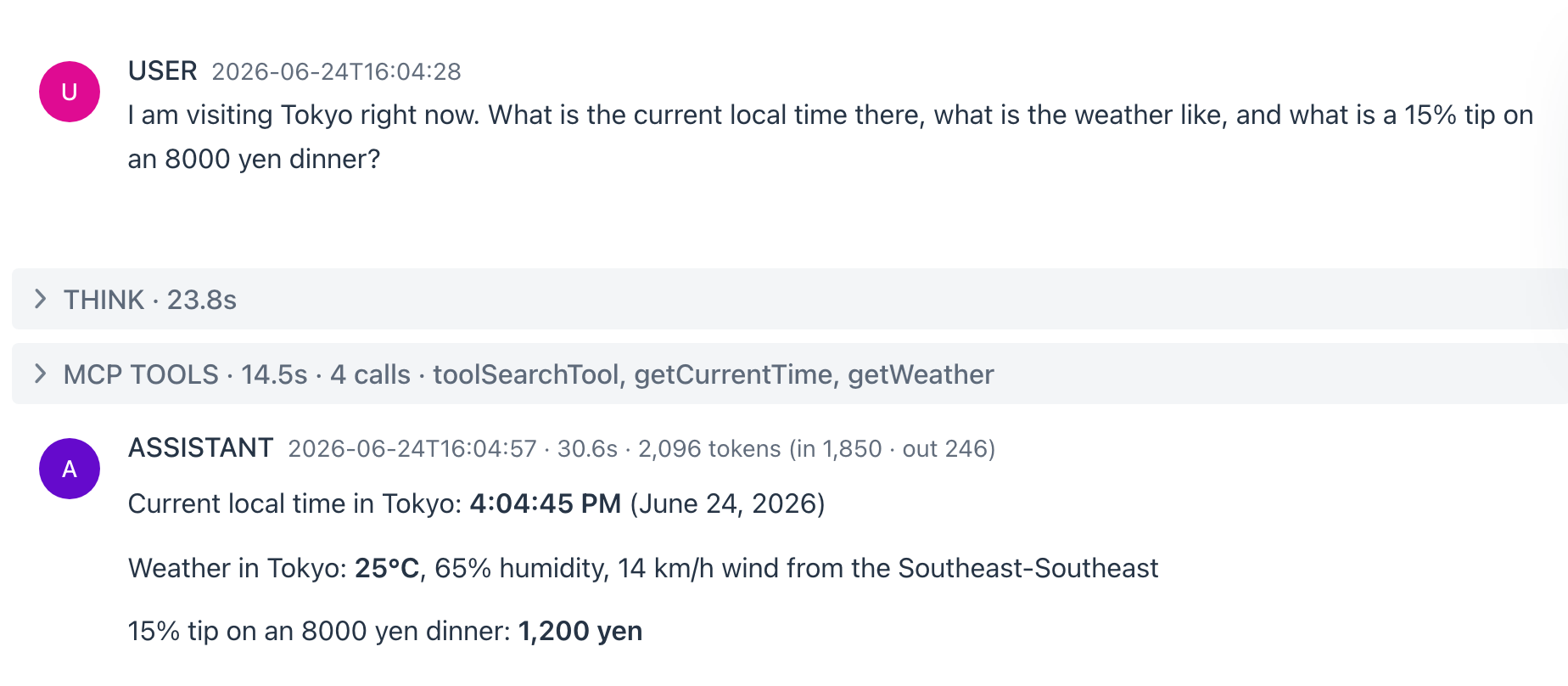
The result is a genuine local agent. Below, the default local model (qwen3.5:4b-mlx on Ollama) answers a three-part request - local time, live weather, and a tip calculation - by discovering and chaining the right tools out of the 72-tool catalog, using roughly 1,850 input tokens instead of inlining every definition:
 { width=”1084” }
The MCP TOOLS panel tells the whole story: the model called toolSearchTool to find what it needed, then getCurrentTime (for Tokyo), getWeather, and the arithmetic - three capabilities pulled in on demand. The full 72-tool catalog stayed searchable the entire time without ever inflating the prompt.
Try it
A brand-new chat already opens in this mode - the Self-equipping agent preset is the default for new chats - so you can just start asking. To pick it explicitly or re-apply it after switching, open the Prompt Library:
- Open the Prompt Library and apply the Self-equipping agent preset - it ships in dynamic mode.
- Ask for something that spans a few capabilities (for example, “I’m in Tokyo - what’s the time, the weather, and a 15% tip on an 8000 yen dinner?”).
- Watch the MCP TOOLS panel record
toolSearchToolfollowed by the tools it discovered. The exposed-tools box reads Dynamic - searching all tools.
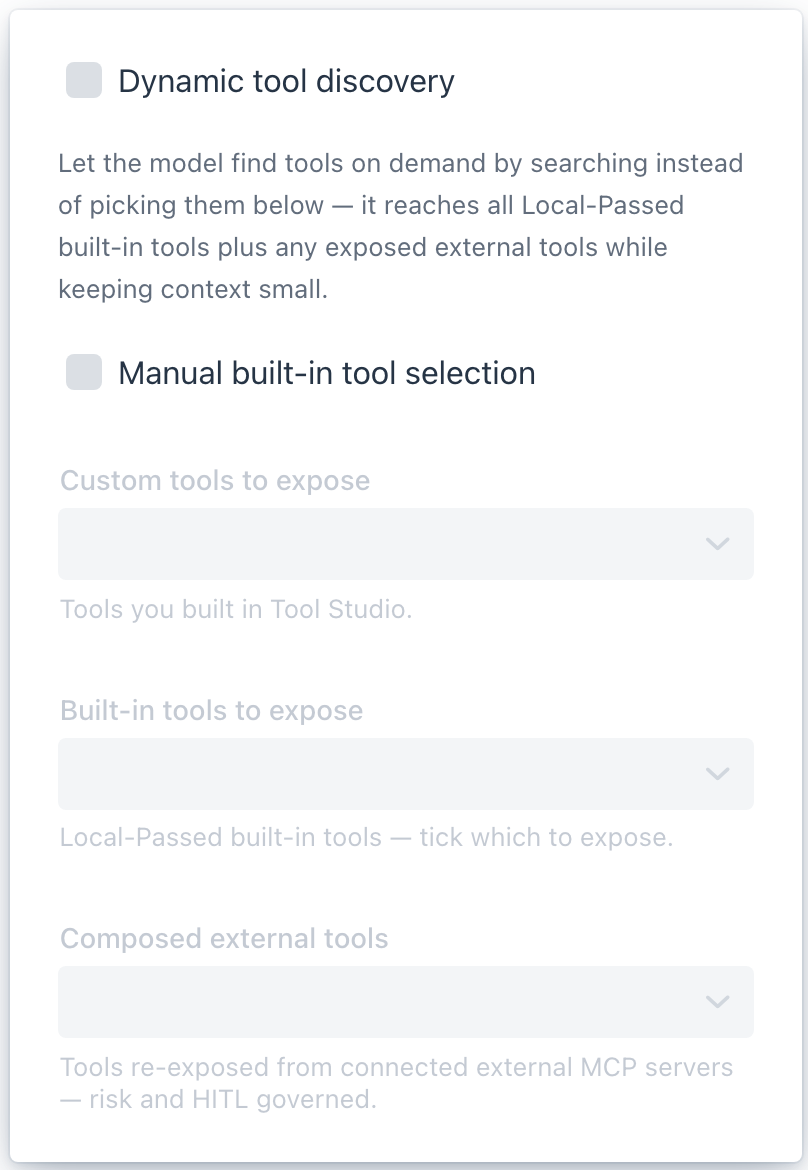
To turn it on for any chat, tick Dynamic tool discovery at the top of the tool selector popover:
 { width=”404” }
It reaches the whole searchable pool - every Local-Passed tool plus any composed external tool - with nothing to select by hand. Discovery only pays off with a real catalog to search, so the checkbox stays disabled until the pool clears the min-tools floor (default 10); add more tools in Tool Studio if it is greyed out. Any preset or template you save can also opt in with a single Use dynamic tool discovery checkbox.
Configuration
Dynamic discovery is configured under spring.ai.playground.chat.tool-search.* - the master switch (enabled), whether new chats start in this mode (default-on), the minimum catalog size (min-tools), how many names a search returns (max-results), the index strategy (index-type: HYBRID or VECTOR), and where the index lives (vector-store: a DEDICATED private index or the SHARED RAG store). See Configuration for the full table and Context Engineering → Tools for how the index fits the wider context-assembly picture.
References
- Spring AI - Dynamic Tool Discovery with Tool Search Tool (guide)
- Spring AI blog - Smart Tool Selection: Achieving 34-64% Token Savings (the experiment)
- Spring AI - Tool Calling and Building Effective Agents (reference)
- Spring AI blog - Tool Calling in Spring AI 2.0: A Composable, Agentic Architecture
- Anthropic - Advanced Tool Use (the origin of the pattern)
spring-ai-community/spring-ai-tool-search-tool(the implementation)