spring-ai-playground
description: How Spring AI Playground builds each chat turn’s context window: system prompt, retrieved documents, tools, conversation memory, and per-request options.
Context Engineering
Prompt engineering is about wording one instruction well. Context engineering is the broader job of deciding everything the model sees on a given turn - the system prompt, the documents you retrieved, the tools you exposed, the conversation so far, and the per-request options that shape how it answers.
Agentic Chat is where that context is assembled. This page is the architecture behind it: the sources a turn draws on, and the components that build each one. It is the design-side companion to the Prompt Templates and Prompt Presets feature pages.
Pages this one connects to:
- Agent Loop - the round governance around the tool calls this context exposes
- Human-in-the-Loop Approval - the gate a tool call passes before its result re-enters the context
- AI Agent Observability - where per-turn token counts and cost are attributed
- Application - where the chat services that assemble this context sit
The context a turn carries
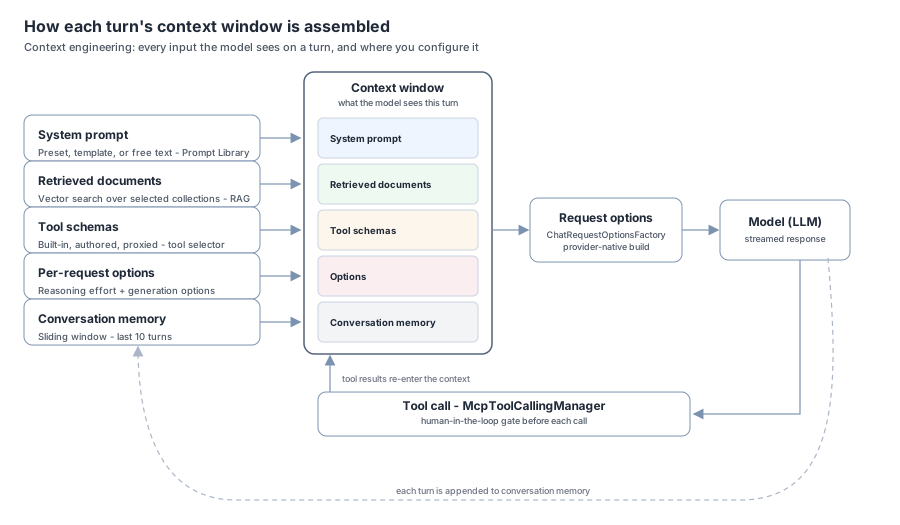
Every chat turn sends the model a context window composed from five sources, each configured in a different place. The diagram shows how they converge into the single input the model receives, and how tool results and memory feed back into the next turn:
 { loading=lazy }
| Source | Built from | Configured in | Reference |
|---|---|---|---|
| System prompt | a preset, a filled template, or free text | Prompt Library / settings drawer | below |
| Retrieved documents | vector search over selected collections | Vector Database | RAG grounding |
| Tools | built-in, authored, and proxied tool schemas | chat tool selector | Tools |
| Conversation memory | a sliding window of prior turns | Spring AI chat memory | Memory |
| Per-request options | reasoning effort + generation options | reasoning control / settings drawer | reasoning, generation |
The first one - the system prompt and the preset/template machinery that produces it - is owned entirely here; the rest are summarized below and detailed on their own pages.
System prompts, presets, and templates { #system-prompts-presets-and-templates }
The system prompt is authored through the Prompt Library - as a ready-made preset or a variable-driven template. Three components back it:
ChatSystemPromptPresetCatalogloads the built-in entries from the classpath resourcechat/system-prompt-presets.json. Each is aPresetrecord -id,displayName,description,prompt,kind, and atoolslist - wherekindisTEMPLATE(has ``) orEXAMPLE(ready to use). This mirrors theDefaultToolPresetCatalogpattern used for built-in tools.ChatSystemPromptPresetServicemerges those built-ins with the user’s own entries, persisted to<home>/spring-ai-playground/chat/save/system-prompt-presets.json. Saving derives a stable id from the display name (user-<slug>), so re-saving the same name updates in place; writes go through the shared non-daemon persistence executor.ChatSystemPromptTemplateRendereris a Spring AITemplateRendererfor the `` syntax.
Why double braces
Spring AI’s default StTemplateRenderer (StringTemplate) uses single braces {var}, which collides with the literal { } that prompts routinely contain - JSON examples, code, set notation. The renderer therefore uses the double-brace convention `` and leaves single braces untouched, so a template can show a JSON example without escaping.
Variable grammar
The token form is ,, or ``, each optionally ending in =default:
| Type | Args | Renders as |
|---|---|---|
text (default) |
- | single-line field |
multiline |
- | text area |
number |
(min,max) |
bounded number field |
select |
(a,b,c) |
dropdown |
list |
(a,b,c,max=N) |
multi-pick, up to N |
variableSpecs(template) parses the form fields; render(template, values) substitutes them, falling back to each variable’s =default when a value is blank - so a template is always renderable, even unfilled. The assembled string becomes the conversation’s system prompt.
Reasoning effort { #reasoning-effort }
ReasoningEffort (OFF, LOW, MEDIUM, HIGH) is chosen on the selector row and applied per turn - it is not baked into the saved conversation options. A null/OFF choice leaves the model default untouched, which keeps non-reasoning models safe.
Whether the control appears, and what it is called, comes from ChatProvider - resolved from the active ChatModel bean (OpenAiChatModel → OPENAI, OllamaChatModel → OLLAMA, else GENERIC). The level is mapped at request-build time:
| Effort | OpenAI (reasoning_effort) |
Ollama (thinking) |
|---|---|---|
OFF |
no override | disableThinking() |
LOW |
low |
thinkLow() |
MEDIUM |
medium |
thinkMedium() |
HIGH |
high |
thinkHigh() |
OpenAI reasoning models cannot be fully switched off, so OFF maps to “no override” there rather than a minimal effort.
Generation options { #generation-options }
Saved per conversation are the standard DefaultChatOptions (model, temperature, top-p, max tokens, frequency/presence penalties, top-k) plus ChatExtraOptions - seed, stop, and a free-form providerOptionsJson. A null extra-options block preserves prior behavior exactly.
ChatRequestOptionsFactory turns these into the provider’s native options object:
ChatProvider.from(chatModel)selects the branch.- OpenAI builds
OpenAiChatOptionswithstreamUsage(true)(so the streamed response carries token counts for the chat footer), plus seed, stop, and reasoning effort. - Ollama builds
OllamaChatOptions, mapping max tokens tonumPredict, carrying top-k, and applying the thinking level. - Generic builds a plain
DefaultToolCallingChatOptionswith the common fields. - The free-form provider-options JSON is overlaid last with Jackson
readerForUpdating(override wins).
The overlay mapper ignores connection fields through a mixin (baseUrl, apiKey, credential, proxy, …), so a provider-options override can tune request parameters but cannot touch the connection or inject credentials; a malformed override is logged and skipped rather than breaking the chat. The Ollama option keys bind through snake_case @JsonProperty names, so the JSON placeholder uses top_k, num_ctx, and the like. The full property surface is in the Configuration reference.
Retrieved documents (RAG)
When documents are selected, the SpringAiPlaygroundRagAdvisor retrieves from the vector store and augments the prompt; it short-circuits when nothing is selected, so retrieval is opt-in per conversation. Indexing, embedding models, and retrieval parameters are covered in Vector Database.
Tools
Tool schemas are added to the context from three sources - built-in tools, tools authored in Tool Studio, and tools proxied from external MCP servers. The chat tool selector decides which are exposed for a given conversation; every call runs through the AgentLoopManager round with the human-in-the-loop gate.
Static exposure vs dynamic discovery
There are two ways the exposed tools enter the context. The default is static exposure: each selected tool’s schema is inlined into the request - direct, but it grows the prompt in step with the toolset, and a broad agent preset can spend tens of thousands of tokens on definitions before the first turn. When a chat opts into dynamic tool discovery (the tool popover, or a preset/template that sets it), the request instead carries a single toolSearchTool. A ToolSearchToolCallingAdvisor then drives a discovery loop: the model searches for a capability, the advisor resolves the returned tool names against the full callback pool and binds just those for that round, and the loop repeats until the model answers. Both paths land in the same AgentLoopManager, so risk scoring, observation, round bounds, and the human-in-the-loop gate apply identically - discovery changes only when a tool’s definition enters the context, not how it executes.
The searchable pool is every Local-Passed tool (built-in and authored) plus composed external tools. In the default DEDICATED mode it is embedded into a dedicated in-memory vector store - kept separate from the RAG store - by PersistentToolIndex, which is content-addressed and persisted under <home>/spring-ai-playground/tool-index/: each tool is embedded once and reused across chats and restarts, re-embedding only when the embedding model changes, and the index is warmed at boot. Behaviour is tunable under spring.ai.playground.chat.tool-search (see the Configuration reference) - enabled, default-on, min-tools (the floor that gates the chat checkbox, default 10), max-results (tool names returned per search, default 3), index-type (HYBRID exact-then-vector, or VECTOR), and vector-store (DEDICATED or SHARED). Because matches come from embedding similarity, a capable chat model and embedding model give the most reliable discovery.
Conversation memory
Memory is split in two, so that what you keep and what the model sees are decided separately:
- The full conversation is retained locally - the screen and the on-disk history both read from it - bounded only by a generous safety cap (
spring.ai.playground.chat.history-max-messages, default 2000 messages). - Only the last N messages are handed to the model on each turn.
LlmWindowChatMemorywraps the store as aChatMemorydecorator and, in itsget(), returns just that tail window to theMessageChatMemoryAdvisor- so older turns stay on your machine without inflating every request.
The window is spring.ai.playground.chat.memory-max-messages (default 10), and each conversation can override it through the Recent messages field in the settings drawer (stored as ChatExtraOptions.memoryWindow, baked in on Apply & New Chat). This is the memory lever of context engineering: a longer window is more grounding but more tokens and latency on every turn.
Provider awareness and the conversation lock
Because options, reasoning, and even the model menu differ by provider, each saved conversation is stamped with the provider that produced it. Opening it while the app runs a different provider renders it read-only with a banner (see Agentic Chat → Provider lock) - the history is preserved, but you cannot append turns the current provider could not have generated.
Where it comes together
This is all assembled live in Agentic Chat, and captured after the fact in the Observability dashboards - so the context you engineered for a turn is the same context you can inspect once it has run.