spring-ai-playground
description: Turn on human-in-the-loop approval for a tool, then approve and decline its calls from inside Agentic Chat - the runtime safety gate that asks before a tool runs.
11. Approve a Tool in Chat (Human-in-the-Loop)
Goal: require approval on a tool, then watch Agentic Chat pause and ask you before it runs - and see what happens when you decline.
This is the runtime half of the safety story: the sandbox and risk model decide what a tool may do; human-in-the-loop (HITL) decides whether this call runs at all. See the feature page and architecture for the full picture.
Prerequisites:
- A published tool you can call from chat - the one from Tutorial 1 - Author a Tool is perfect. Any tool works.
- A chat model configured in Agentic Chat (see Tutorial 4 - Chat with Tools).
1. Require approval on the tool { #require }
- Open Tool Studio and select your tool.
- Expand Sandbox & Capabilities.
- Under Human-in-the-loop, choose Required - ask every run.
- (Optional) Set an Approval prompt such as
About to run '{toolName}' with {args}. Proceed?-{toolName}and{args}are filled in at call time. - Click Test & Update to save.
!!! note “Above L0, this may already be on”
A tool above risk L0 defaults to Required the moment you author it. If it’s already set, just confirm the mode and move on.
2. Make the tool reachable from chat { #reach }
Agentic Chat reaches your published tools through the built-in MCP server.
- Open Agentic Chat.
- In the tool menu above the prompt, tick Manual built-in tool selection.
- Confirm your tool appears in the exposed-tools list.
3. Trigger the tool and approve { #approve }
Ask the agent to do the thing your tool does - for example, “Use the tool to get me the current time.”
When the model decides to call the gated tool, chat stops and a dialog appears:
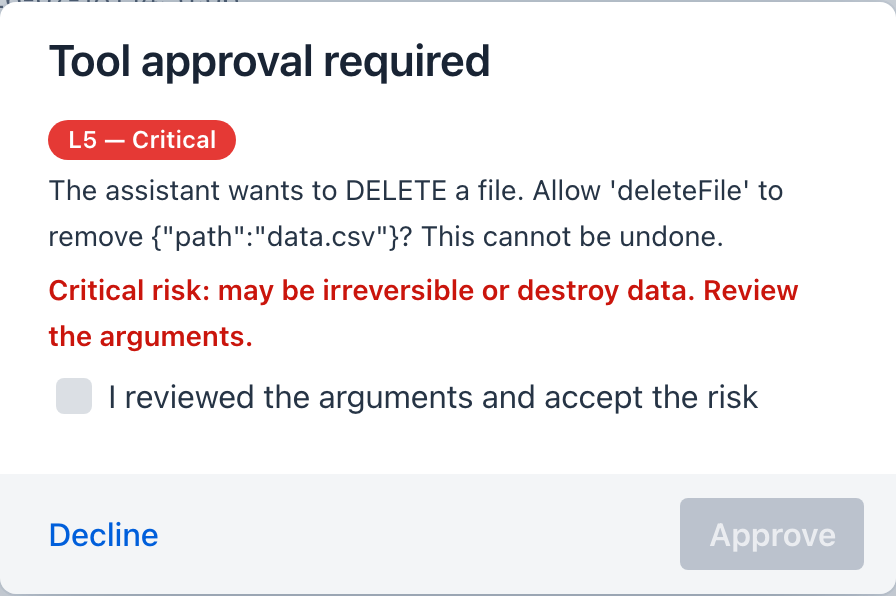
- Title: Tool approval required
- A colored risk-level chip (L0-L5) for the tool being called - hover it for the rationale
- Body: your approval prompt, with the real tool name and arguments
- Buttons: Approve and Decline
Click Approve. The tool runs, its result returns to the model, and the answer streams in as usual.
!!! tip “Inspect the arguments before you approve” The dialog shows the exact arguments the model chose. This is your chance to catch a wrong path, a bad amount, or an unintended recipient before the call fires.
The dialog escalates with the tool’s risk level: at L4 (High) a warning line appears and Approve turns red; at L5 (Critical) - the filesystem delete and move tools, for example - Approve stays disabled until you tick “I reviewed the arguments and accept the risk”. Try it with deleteFile from the filesystem tools to see the full escalation:
 { width=”420” }
4. Try declining { #decline }
Ask again, but this time click Decline.
The tool does not run. Instead the model is told you declined approval and that it should not retry - so it either finds another way or replies that the action couldn’t be completed because you declined. Nothing executed; the decline is recorded in the run.
!!! warning “Approval fails safe”
If you don’t answer within two minutes (the agent-loop.approval-timeout-seconds setting), or close the dialog, the call is treated as declined and does not run. A gated tool only runs on an explicit Approve.
What you learned { #recap }
- Set a tool’s Human-in-the-loop mode to Required in Tool Studio.
- Agentic Chat pauses on a gated call and asks you to Approve or Decline.
- Decline (and timeout) block the call and tell the model - execution is deny-by-default.
Next steps
- Re-expose an external tool with approval: Tutorial 10 - Proxy an MCP Server + the HITL column.
- Understand the two gates and loopback de-duplication: Human-in-the-Loop architecture.