Chat Memory and the Advisor Chain: The Core of Spring AI
LLMs do not remember state. Every call is independent, so even if you just told the model your name, it will not know it unless you send that conversation again with the next request. To build a chatbot that can carry on a conversation, the application has to keep earlier messages and add the right ones to each request.
Spring AI splits this work between two parts. ChatMemory decides what to remember, and an advisor puts that memory into the prompt before the request goes to the model. Advisors are not a mechanism just for memory. They are a general-purpose extension point that intercepts requests and responses, so logging, security, and RAG plug in the same way.
Continuing from the previous article, this article wraps up Chapter 2 by covering chat memory and the advisor chain, including execution order, implementation, and ordering strategy, with example code.
Short-term memory and long-term memory
You design conversation data in two parts, according to how it is used and how long it lives. A clear distinction lets you save tokens while giving the model only the context it needs.
- Short-term memory (chat memory): The few most recent messages that carry the context of the ongoing conversation. When a user asks "How much is it?", short-term memory tells the model that "it" means the product mentioned earlier. It is usually managed as a sliding window that keeps only the latest N messages.
- Long-term memory (chat history): The full record accumulated since the start of the conversation. It is kept permanently and used for analyzing past preferences, auditing and legal retention, and recalling information from long ago. There is too much of it to put into the prompt as a whole, so you retrieve only the parts you need with semantic search.
ChatMemory and repository types
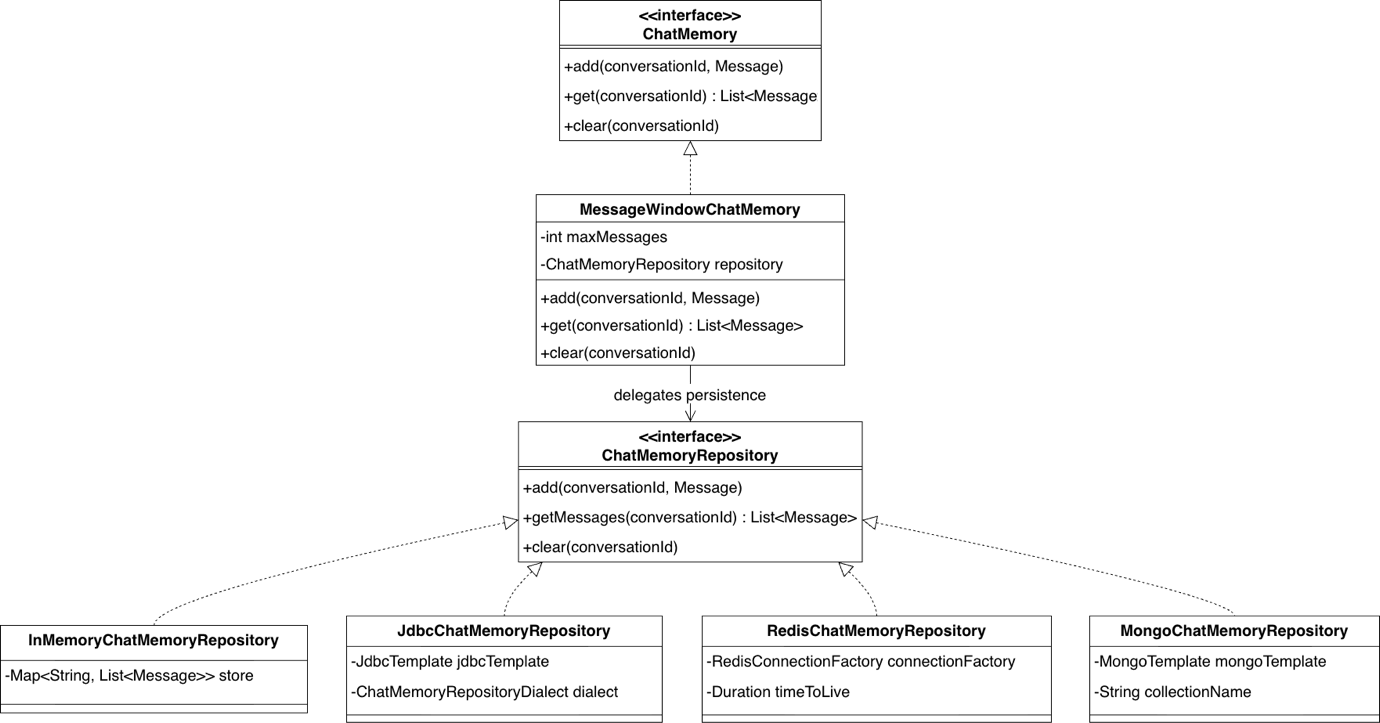
As the figure shows, chat memory in Spring AI separates policy from storage.
ChatMemory: The top-level interface that decides what to remember. It adds messages for each conversation ID, selects and returns the messages that meet its criteria, and clears conversations.MessageWindowChatMemory: The default implementation. It keeps as many of the latest messages asmaxMessagesspecifies and removes older messages beyond that. System messages are not evicted by the window, though, so a persona setting such as "You are a Java expert" stays in place even in a long conversation.ChatMemoryRepository: The interface that storage is delegated to. By switching implementations, you can move where messages are stored without changing business code.
| Type | Main implementation | Characteristics | Good fit for |
|---|---|---|---|
| In-memory | InMemoryChatMemoryRepository |
Stored on the heap, lost on restart | Local development, testing, PoCs |
| RDBMS | JdbcChatMemoryRepository |
Transactional guarantees, dialects absorb database differences | Enterprise systems where consistency matters |
| NoSQL | MongoChatMemoryRepository and others |
Flexible schema, horizontal scaling | Large volumes of conversation logs |
| Distributed memory | RedisChatMemoryRepository |
Sessions shared across servers, automatic TTL expiration | Services running on multiple instances |
To change the storage, you only replace the ChatMemoryRepository bean, and policy code such as "keep the latest 20 messages" stays the same. The in-memory implementation is included in Spring AI core, and the others need a starter dependency for their store.
Advisors that put memory into the prompt
ChatMemory and its repository only keep the record. The work of inserting memory into the actual conversation is done by advisors. Spring AI provides a separate advisor for each of the two kinds of memory.
MessageChatMemoryAdvisor: The standard approach for short-term memory. It puts the recent conversation into the prompt as is, in the form of aList<Message>. Because the distinction between user and assistant turns is preserved, even short replies such as "that one" or "no" are interpreted in context.VectorStoreChatMemoryAdvisor: Covers the past beyond the window. It stores conversations as vectors, searches for past conversation that is semantically close to the new question, and adds it to the system message. Vector search is covered in detail with RAG in Chapter 3.
Step 4 in the example repository adds short-term memory to the CLI chatbot with MessageChatMemoryAdvisor.
    private final ChatClient chatClient;
    private final String conversationId = UUID.randomUUID().toString();

    Ch2Step4_Memory(ChatClient.Builder builder) {
        ChatMemory chatMemory = MessageWindowChatMemory.builder()
                .chatMemoryRepository(new InMemoryChatMemoryRepository())
                // 최근 20개 메시지 유지
                .maxMessages(20)
                .build();

        this.chatClient = builder
                // 어드바이저 체인에 대화 메모리 어드바이저를 등록
                .defaultAdvisors(
                        MessageChatMemoryAdvisor.builder(chatMemory).build())
                .build();
    }
The code creates a memory that keeps the latest 20 messages in an in-memory repository, wraps it in MessageChatMemoryAdvisor, and registers it with defaultAdvisors(). From then on, the conversation history is added automatically to every request sent through this client.
    @Override
    public void run(String... args) {
        System.out.println("=== [Ch2] Step4: 대화 메모리 (다중 턴, stream) ===");
        System.out.println("Conversation ID: " + conversationId);
        System.out.println("종료하려면 /exit 입력\n");

        try (Scanner scanner = new Scanner(System.in)) {
            while (true) {
                System.out.print("> ");
                String input = scanner.nextLine();
                if ("/exit".equalsIgnoreCase(input.trim())) break;

                System.out.print("AI: ");
                chatClient.prompt()
                        .user(input)
                        .advisors(a -> a.param(ChatMemory.CONVERSATION_ID, conversationId))
                        .stream()
                        .content()
                        .doOnNext(System.out::print)
                        .blockLast();
                System.out.println("\n");
            }
        }
    }
Each request passes a conversation ID through the ChatMemory.CONVERSATION_ID parameter. If you pass a different ID for each user, their conversations do not get mixed up.
If you use ChatModel directly without advisors, you have to write each step by hand: adding the user message, reading the memory, calling the model, and saving the response. It takes more work, but this is the approach to use when you need a memory policy that the framework does not provide.
Structure of the Advisors API
Spring used AOP to separate cross-cutting concerns such as transactions, security, and logging from business logic. The Advisors API in Spring AI brings this idea to ChatClient: it intercepts prompt requests and model responses to modify or enrich them.
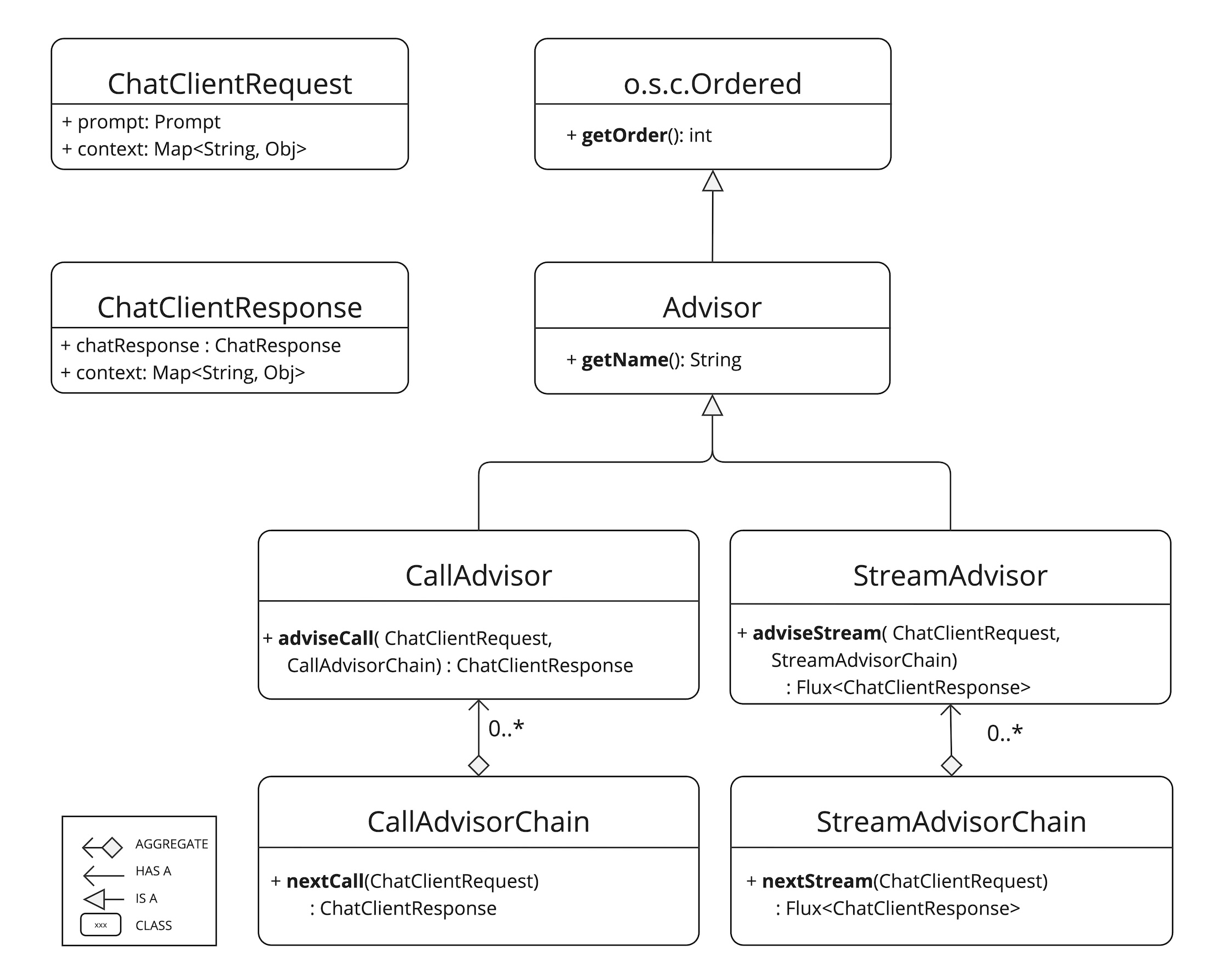
Advisor: The top-level interface for all advisors, which extends Spring'sOrdered.getName()returns a name, andgetOrder()returns an integer that sets the execution order.CallAdvisorandStreamAdvisor: Divided by execution style.adviseCall(), forcall(), returns a singleChatClientResponse, andadviseStream(), forstream(), returns aFlux<ChatClientResponse>. Each one invokes the next step throughnextCall()ornextStream()on the chain it receives.ChatClientRequestandChatClientResponse: Hold the request and the response. The request object is immutable, so to change its contents you make a copy withcopy()ormutate(). Both objects have acontextmap, which serves as a channel for advisors to pass state to one another.
The book recommends registering advisors at build time with defaultAdvisors() so that the client stays immutable, and changing only parameters at runtime with .advisors(a -> a.param(...)), as in Step 4.
Execution flow and the stack structure
The advisor chain combines the chain of responsibility pattern and the decorator pattern, and its execution behaves like a stack. The key point is that requests and responses are processed in symmetric order.
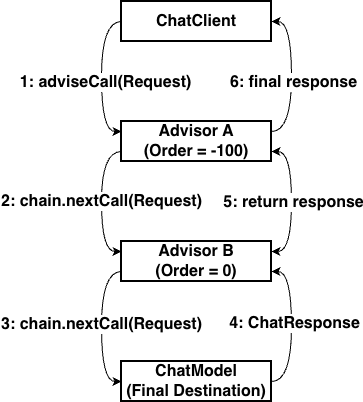
The figure shows advisor A, with an order of -100, chained with advisor B, with an order of 0. A has the lower value, so it receives the request first and passes it to B with nextCall(), and at the end of the chain, ChatModel makes the actual LLM call. The response comes back up in reverse order: B handles it first, and A receives it last and returns it to the client.
In Spring's Ordered, the lower the value, the higher the precedence. In the advisor chain, higher precedence means handling the request earlier and the response later, so an advisor with Ordered.HIGHEST_PRECEDENCE sees the request first and the response last. Execution order among advisors with the same order value is not guaranteed, so when the sequence matters, such as logging after a security check, you need to give them different values.
Each advisor can modify the request before passing it on, or it can block the flow by creating a response itself without calling the next step. The context created for the request also comes back with the response, so you can use it in post-processing on the response side as well.
Synchronous and streaming processing
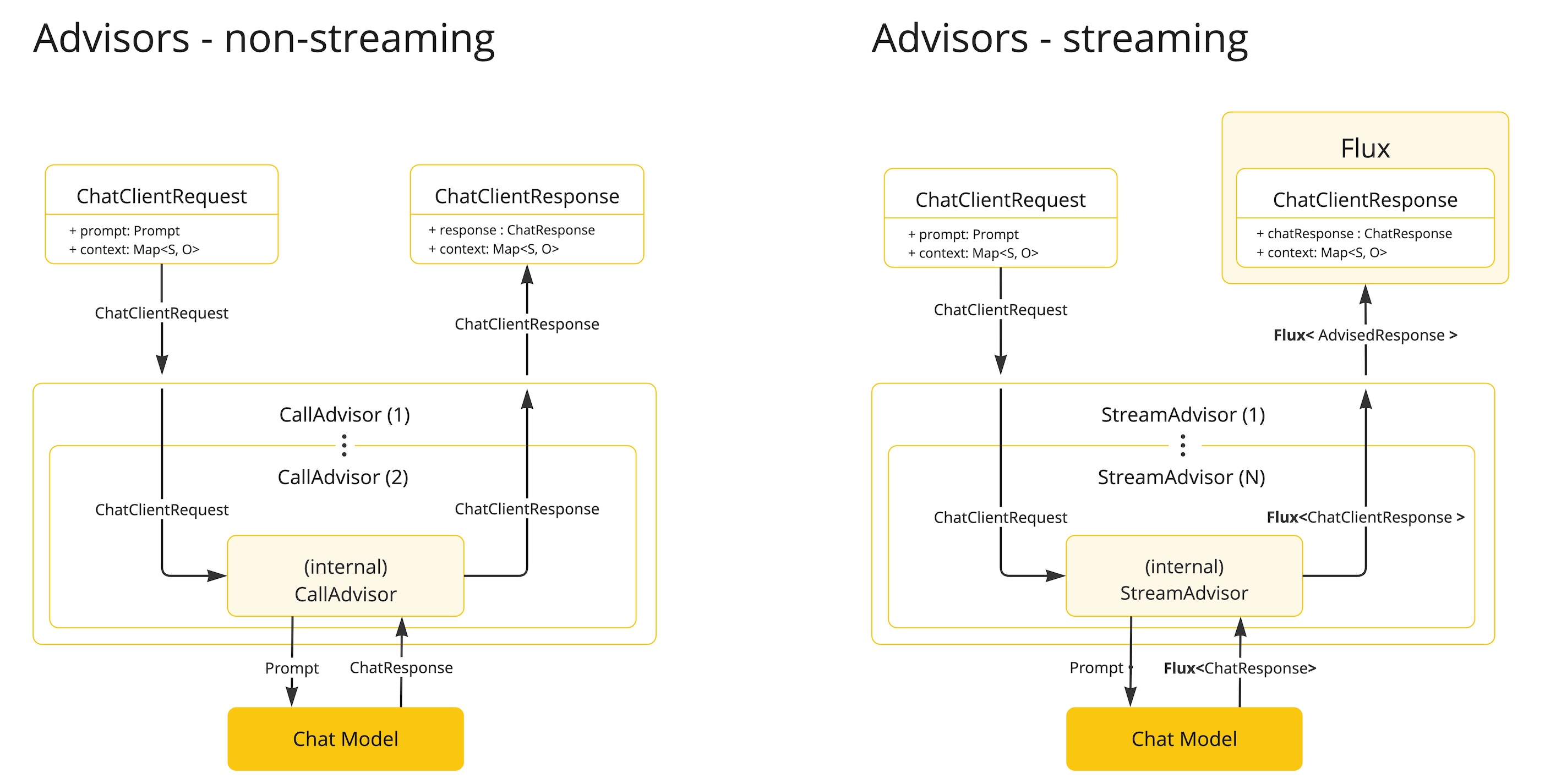
Advisors come in two kinds, matching the blocking call() and the reactive stream-based stream(). CallAdvisor, on the left of the figure, waits until a single complete response arrives, so it is easy to implement and suits analyzing the full text, validating JSON structure, and checking the whole response for personal information in one pass. StreamAdvisor, on the right, handles a Flux in which token-level chunks keep flowing in. It is trickier because you need to know Reactor, but you use it for work that steps in while the stream is still flowing, such as counting token usage in real time, filtering during streaming, and logging responses incrementally.
Implementing a custom advisor
The built-in SimpleLoggerAdvisor, which the book analyzes, shows the recommended shape for a custom advisor. It is an observer that only writes logs, and a single class implements both CallAdvisor and StreamAdvisor. For streaming, it uses ChatClientMessageAggregator to collect the response chunks and log the full content, without interfering with the original Flux flow. ElapsedTimeAdvisor in the example repository has the same shape.
public class ElapsedTimeAdvisor implements CallAdvisor, StreamAdvisor {

    @Override
    public ChatClientResponse adviseCall(ChatClientRequest request, CallAdvisorChain chain) {
        long start = System.currentTimeMillis();
        ChatClientResponse response = chain.nextCall(request);
        System.out.printf("%n[응답 시간] %dms%n", System.currentTimeMillis() - start);
        return response;
    }

    @Override
    public Flux<ChatClientResponse> adviseStream(ChatClientRequest request, StreamAdvisorChain chain) {
        long start = System.currentTimeMillis();
        return chain.nextStream(request)
                .doOnComplete(() -> System.out.printf("%n[응답 시간] %dms%n",
                        System.currentTimeMillis() - start));
    }
adviseCall() takes the time before and after nextCall() and prints the difference. adviseStream() only attaches doOnComplete to the Flux returned by nextStream() and prints the elapsed time at the moment the stream finishes. Because it does not block the flow, tokens pass through to the user unchanged. Of the remaining methods left out of the excerpt, getName() returns "ElapsedTimeAdvisor" and getOrder() returns 100.
    Ch2Step5_Advisor(ChatClient.Builder builder) {
        this.chatClient = builder
                .defaultAdvisors(
                        // 내장: 요청과 응답 DEBUG 로그
                        new SimpleLoggerAdvisor(),
                        // 커스텀: 응답 시간 측정
                        new ElapsedTimeAdvisor()
                )
                .build();
    }
Step 5 registers the built-in SimpleLoggerAdvisor together with this custom advisor. The conversation loop code is the same as in Step 1, and logging and timing happen only in the advisor layer. The execution order is decided by the order value, not by the order of registration. SimpleLoggerAdvisor defaults to 0 and ElapsedTimeAdvisor uses 100, so the logger sits on the outside and the timer on the inside. As a result, the request log is printed first, and when the stream ends, the response time is printed, followed by the response log.
Request rejection and fallback
An advisor can also cut the chain short or swap in a different result.
Rejecting a request means that when an advisor encounters a request that contains banned words or lacks permission, it returns a prepared response right away without calling nextCall() or nextStream(). Because the advisors further down the chain and the model never run, this also saves resources. The book's ContentSafetyAdvisor sets its order to -100 and checks both requests and responses. For streaming, it uses Flux.defer to keep a separate StringBuilder for each subscription and checks the accumulated text. When a banned word appears, it stops the stream with an internal exception and emits a rejection response through onErrorResume.
A fallback response means that when the model returns an empty answer or one that falls short of the criteria, the advisor replaces it with a prepared answer instead of showing it as is. In a synchronous call, the book's FallbackAdvisor replaces empty response text with an apology message. For streaming, it uses switchIfEmpty to replace a stream that ended without emitting anything with a fallback response.
Advisor ordering strategy
The book lists four implementation principles: single responsibility, sharing state through the context map, implementing both CallAdvisor and StreamAdvisor, and setting a clear order with getOrder(). To choose where an advisor goes, think of the stack structure.
- Security and observation on the outside (low order): Permission checks and personal information masking need to finish before other advisors such as RAG run. An observation advisor that measures the total time from the start of the request to the completion of the response also wraps everything from the outermost position.
- Retries and tools on the inside (high order): When the response format is wrong and the model has to be called again, retry logic placed on the outside reruns even the RAG search further inside on every retry. If you place it right next to the model, only the model call is repeated, which keeps retries light.
- To handle both the request and the response first, split the advisor: A single advisor cannot be the first to receive both the request and the response. Split it into an input-only advisor with
Ordered.HIGHEST_PRECEDENCEand an output-only advisor withOrdered.LOWEST_PRECEDENCE, and share state throughcontext.
Advisors, the core of the framework
The book sees advisors as an architecture that runs through all of Spring AI. If the model abstraction is responsible for portability, letting you swap providers, advisors standardize RAG, chat memory, security, and observability as a middleware layer independent of the model. The structure resembles Filter and HandlerInterceptor in Spring MVC, so it feels familiar to Spring developers, and you can add features the same way whether the underlying model is OpenAI or Ollama. Business code can keep only prompt().user(question).call().content() and leave search, conversation storage, and logging to advisors. RetrievalAugmentationAdvisor in Modular RAG and ToolCallingAdvisor, which runs the tool loop, also sit on the same extension point.
Where this fits in the 4-tier architecture
Chat memory and the advisor chain form the backbone of the Orchestration (T2) tier. For every request, the advisors registered with ChatClient add memory, block or change the flow, and record the execution. In Chapter 3, a retrieval advisor is added to the same chain to supply the model with knowledge from documents, and in Chapter 6, recursive advisors control the tool loop. The next article, RAG Architecture and the ETL Pipeline: Turning Documents into Knowledge, covers the first step of that work: reading, processing, and storing documents.
Hands-on project for this chapter
2.9 AI Chatbot CLI Project
By adding the concepts from Chapter 2 one at a time, you build a CLI chatbot that you talk to in the terminal. Starting from basic streaming chat (Step 1), you add a system prompt persona (Step 2), structured output (Step 3), chat memory (Step 4), and the advisor chain (Step 5) in turn, and the final ch2-final brings the persona, memory, advisors, and streaming together in a single ChatClient. The model is qwen3.5:4b on Ollama. For the full run-through, follow the README (in Korean) in chapter2/ of the example repository.
More in the book
Book sections 2.7-2.8
- A comparison table of short-term and long-term memory by purpose, processing approach, and lifecycle
- Characteristics and starter dependencies of the JDBC, MongoDB, Cassandra, Neo4j, and Redis repositories, and a configuration class for plugging in the repository you choose
- How to write a long-term memory template, and full code for managing short-term memory directly with
ChatModel - An analysis of the
SimpleLoggerAdvisorsource code and a list of built-in advisors - Full synchronous and streaming implementations of
ContentSafetyAdvisorandFallbackAdvisor - The advisor architecture compared with the chain and callback approaches of LangChain, and a
UserContextAdvisorexample that integrates with Spring Security
References
- Chat Memory: the Chat Memory documentation in the Spring AI reference, including the distinction between chat memory and chat history
- Advisors API: the Advisors API documentation in the Spring AI reference