From Naive RAG to Modular RAG: The Spring AI RAG Framework
The previous two articles processed documents with an ETL pipeline, created vectors with an embedding model, and loaded them into a vector database. The knowledge base is ready, but knowledge that just sits in a store does not change any answers. For the model to use that knowledge, the relevant documents have to be pulled out and put into the prompt the moment a user asks a question.
Spring AI implements this process as an advisor rather than as a separate system. Just as the chat memory advisor added the earlier conversation to the request, a RAG advisor retrieves relevant documents and inserts them into the prompt before the request goes to the model. This article first looks at how RAG has evolved through Naive, Advanced, and Modular RAG, then implements each approach with QuestionAnswerAdvisor and RetrievalAugmentationAdvisor. Finally, it points out the limits of a pipeline that only runs in a fixed order and introduces the Chapter 3 hands-on project.
The evolution of the RAG paradigm
RAG started as a technique for making up for two weaknesses of LLMs: hallucination and the knowledge cutoff. As its uses broadened, its structure also changed to fit the nature of the data and the requirements of each service. In a 2024 paper, Gao et al. divided this progression into Naive, Advanced, and Modular RAG, and proposed a structure that breaks RAG techniques down into modules and reassembles them as needed.
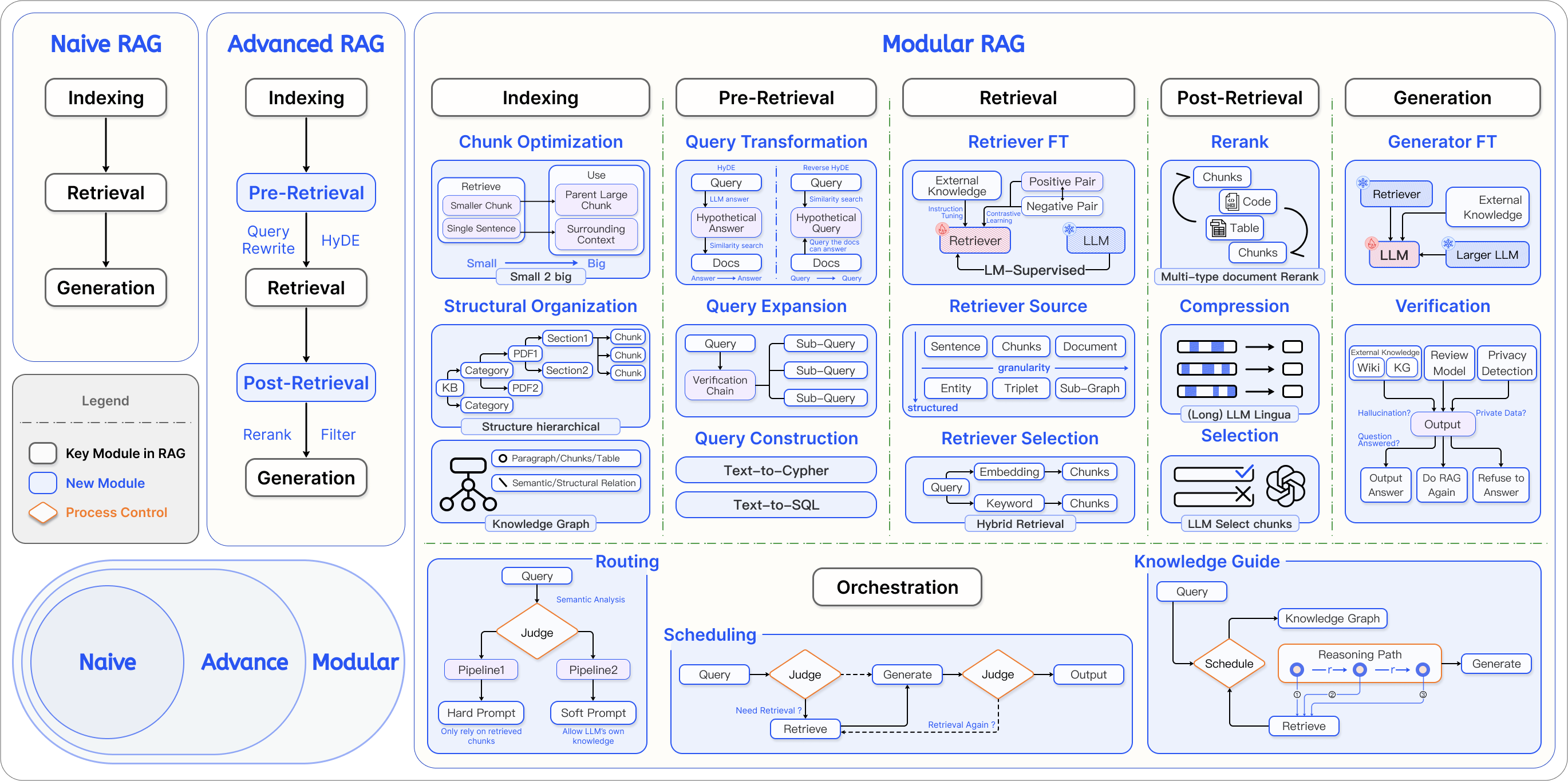
Naive RAG embeds the question, finds the top-k documents with the highest similarity, and sends them to the LLM by putting them into the prompt as they are. Despite its name, it is a basic approach that is widely used in practice. With few steps, it responds quickly and keeps token costs low, and for data with a clear structure and little duplication, such as internal company policies or FAQs, it is often enough. Spring AI's VectorStoreChatMemoryAdvisor also retrieves past conversations this way.
Its limits show up as data grows large and complex. With an ambiguous question that contains vague references, such as "What do I do if that doesn't work?", vector similarity alone has a hard time finding the right documents. If documents that score high but are actually unrelated get mixed in, the model may give an off-target answer, and because models tend to miss content in the middle of long inputs (lost in the middle), putting in more documents is not a solution either.
Advanced RAG reduces these limits by adding processing steps before and after retrieval. Before retrieval, it rewrites an ambiguous question into a sentence that works better for search, expands it into several similar questions, or translates it into the language of the documents. After retrieval, it reranks the results with a more sophisticated model such as a cross-encoder, removes sentences unrelated to the question, and discards documents that score below a cutoff.
However, implementing all of this processing yourself quickly bloats the pipeline code. Modular RAG splits functions such as rewriting, retrieval, and reranking into independent modules so that you assemble only the ones you need, and Spring AI's RAG framework follows this structure. The indexing stage in the figure is handled offline by the ETL pipeline from the earlier articles, and the RAG framework, implemented as advisors, takes care of the stages that follow.
Naive RAG with QuestionAnswerAdvisor
You can build Naive RAG with a single QuestionAnswerAdvisor from the spring-ai-vector-store-advisor module. It is an advisor that searches with the question, without rewriting or post-processing, and puts the documents it finds into the prompt.
    public NaiveRagService(ChatClient.Builder chatClientBuilder, VectorStore vectorStore) {

        // 정적 필터 및 검색 파라미터 설정(Advisor 생성 시 고정됨)
        var searchRequest = SearchRequest.builder()
                // 유사도 임계값(0.0 ~ 1.0)
                .similarityThreshold(0.8)

                // Top-K 설정
                .topK(6)

                // 정적 메타데이터 필터링
                .filterExpression("category == 'tech_docs'")
                .build();

        // QuestionAnswerAdvisor 생성 및 ChatClient에 기본 어드바이저로 추가
        this.chatClient = chatClientBuilder
                .defaultAdvisors(QuestionAnswerAdvisor.builder(vectorStore)
                        .searchRequest(searchRequest) // 위에서 정의한 검색 조건 주입
                        .build())
                .build();
    }
    public String askWithFilter(String question, String category) {
        return chatClient.prompt()
                .user(question)
                // 런타임에 동적으로 필터 표현식 주입(Advisor 컨텍스트 파라미터 활용)
                // Advisor 생성 시점의 정적 필터 설정을 덮어쓰는 방식으로 동작
                // 멀티 테넌트(Multi-tenant) 환경에서 데이터 격리를 구현할 때 필수
                .advisors(a -> a.param(QuestionAnswerAdvisor.FILTER_EXPRESSION,
                        "category == '" + category + "'"))
                .call()
                .content();
    }
The SearchRequest defined in the constructor is fixed in the advisor. This service searches for the top 6 documents with a similarity of 0.8 or higher under the condition category == 'tech_docs'. askWithFilter() passes a filter with each request through the QuestionAnswerAdvisor.FILTER_EXPRESSION parameter, overriding the fixed filter. You use this approach when the search scope needs to be divided by user permissions or tenant.
The default prompt template that combines the question with the retrieved documents is in English, so the model may sometimes answer a Korean question in English. When you change the template to Korean, be sure to keep the query placeholder, where the question goes, and the question_answer_context placeholder, where the retrieved documents go.
If you add code that wraps QuestionAnswerAdvisor every time you need query rewriting or translation, the structure quickly gets complicated. RetrievalAugmentationAdvisor works as the same Naive RAG when you plug in just a retrieval module, and lets you add modules one at a time when you need them. That is why the book recommends designing real-world projects around this advisor from the start.
The modules that make up RetrievalAugmentationAdvisor
RetrievalAugmentationAdvisor in the spring-ai-rag module defines four stages (Pre-Retrieval, Retrieval, Post-Retrieval, and Generation) and accepts modules for each stage through interfaces. You can use the built-in implementations or swap in your own.
| Stage | Interface | Configuration method | Built-in implementations |
|---|---|---|---|
| Pre-Retrieval | QueryTransformer |
queryTransformers() |
RewriteQueryTransformer, CompressionQueryTransformer, TranslationQueryTransformer |
| Pre-Retrieval | QueryExpander |
queryExpander() |
MultiQueryExpander |
| Retrieval | DocumentRetriever |
documentRetriever() |
VectorStoreDocumentRetriever |
| Retrieval | DocumentJoiner |
documentJoiner() |
ConcatenationDocumentJoiner |
| Post-Retrieval | DocumentPostProcessor |
documentPostProcessors() |
None (implement your own) |
| Generation | QueryAugmenter |
queryAugmenter() |
ContextualQueryAugmenter |
Pre-Retrieval modules refine the question so that it works better for search. QueryTransformer implementations call an LLM internally to transform the question. CompressionQueryTransformer combines the conversation history and the current question into a standalone question. For example, after a question about the capital of Denmark, it turns "What is the second-largest city there?" into "What is the second-largest city in Denmark?" RewriteQueryTransformer removes unnecessary parts such as greetings and rewrites the question around search terms, and TranslationQueryTransformer translates the question into the language the documents are stored in. It helps to set the temperature to 0.0 so that the transformation results stay consistent. MultiQueryExpander expands one question into several differently worded questions, so the search also finds documents that a single wording would miss.
In the Retrieval stage, VectorStoreDocumentRetriever supports a similarity threshold, top-k, and metadata filters. To change the filter per request, you use the VectorStoreDocumentRetriever.FILTER_EXPRESSION key. It is a different constant from the one in QuestionAnswerAdvisor, so if you use the wrong one, the filter may not be applied. When a question is expanded into several, the search also returns several sets of results, and ConcatenationDocumentJoiner concatenates them into a single list while filtering out duplicate documents. DocumentPostProcessor, which handles Post-Retrieval, is where you filter out less relevant documents or reorder them. It has no built-in implementation, so you implement it to fit your service. In the Generation stage, QueryAugmenter combines the remaining documents with the question to complete the final prompt.
Assembling an Advanced RAG pipeline
AdvancedRagService in the example repository is an Advanced RAG setup with a module plugged into each of the four stages. It starts by creating the Pre-Retrieval, Retrieval, and Post-Retrieval modules.
        // [Pre-Retrieval] 질문 재작성 모듈
        var queryTransformer = RewriteQueryTransformer.builder()
                .chatClientBuilder(chatClientBuilder.clone())
                .targetSearchSystem("Spring AI RAG vector store")
                .build();

        // [Retrieval] 문서 검색 모듈
        var documentRetriever = VectorStoreDocumentRetriever.builder()
                .vectorStore(vectorStore)
                .similarityThreshold(0.50) // 후보군 확보를 위해 관대하게 설정
                .topK(10)
                .build();

        // [Post-Retrieval] 문서 후처리 모듈
        DocumentPostProcessor activeDocumentFilter = (query, docs) -> docs.stream()
                .filter(doc -> "true".equals(String.valueOf(doc.getMetadata().get("isActive"))))
                .toList();
RewriteQueryTransformer calls the LLM through a cloned ChatClient.Builder to rewrite the question. The targetSearchSystem value is the name of the search target that goes into the rewrite prompt. To secure enough candidates, the retriever sets a low threshold of 0.5 and fetches up to the top 10. The post-processor is a DocumentPostProcessor written as a lambda that keeps only documents whose isActive metadata is true.
        // [Generation] 최종 RAG 프롬프트 생성 모듈
        var queryAugmenter = ContextualQueryAugmenter.builder()
                .promptTemplate(new PromptTemplate("""
                        당신은 IT 전문 기술 지원 AI입니다.
                        아래의 [기술 문서]를 기반으로 사용자의 질문에 친절하게 답변해 주세요.
                        문서에 없는 내용은 지어내지 말고 솔직하게 모른다고 답해 주세요.

                        [기술 문서]
                        {context}

                        [질문]
                        {query}

                        [답변]
                        """))
                .emptyContextPromptTemplate(new PromptTemplate("""
                        사용자의 질문에 대한 근거 문서를 찾지 못했습니다.
                        검색 가능한 문서 범위 안에서 다시 질문하도록 안내하세요.
                        """))
                .allowEmptyContext(false) // 검색 결과가 없으면 답변을 거부하도록 설정(안전장치)
                .build();

        // [Advisor 조립] 전처리 -> 검색 -> 후처리 -> 생성 순서로 파이프라인을 구축
        Advisor advancedRagAdvisor = RetrievalAugmentationAdvisor.builder()
                .queryTransformers(queryTransformer)      // 1. 전처리(변환)
                .documentRetriever(documentRetriever)     // 2. 검색
                .documentPostProcessors(activeDocumentFilter, new KeywordFilteringPostProcessor())   // 3. 후처리(필터링)
                .queryAugmenter(queryAugmenter)           // 4. 생성(프롬프트 결합)
                .build();

        // ChatClient에 Advisor 등록
        this.chatClient = chatClientBuilder.clone()
                .defaultAdvisors(advancedRagAdvisor)
                .build();
ContextualQueryAugmenter gets a Korean template. The retrieved documents go into the {context} slot and the question goes into the {query} slot. With allowEmptyContext(false), the augmenter sends emptyContextPromptTemplate instead of the question when the search finds nothing, so rather than answering without evidence, the model guides the user to ask again within the scope of searchable documents. If you set it to true instead, the original question is sent as is even when there are no search results, and the model answers without documents. The default templates are in English and quite restrictive, so for a Korean-language service, it helps to replace both templates.
Finally, the modules are passed to the RetrievalAugmentationAdvisor builder in stage order. The Post-Retrieval stage gets the isActive filter along with KeywordFilteringPostProcessor, a custom post-processor that, when the question contains 긴급 ("urgent"), keeps only documents whose content also contains 긴급. Once the finished advisor is added through defaultAdvisors(), every request sent through this ChatClient goes through the four stages.
Running the pipeline and checking the search results
        try (Scanner scanner = new Scanner(System.in)) {
            while (true) {
                System.out.print("> ");
                String input = scanner.nextLine();
                if ("/exit".equalsIgnoreCase(input.trim())) break;

                System.out.print("AI: ");
                ragService.stream(input)
                        .doOnNext(System.out::print)
                        .blockLast();
                System.out.println("\n");
            }
        }
The calling side has no search code. Ch3Step6_AdvancedRag just takes a question and prints the response that ragService.stream() streams back, while query rewriting, retrieval, post-processing, and prompt augmentation all happen inside the advisor. The flip side is that the intermediate results stay hidden, so Ch3Step5_AdvancedRagModules prints the pipeline configuration and shows the retrieved documents separately. The AdvancedRagService.retrieve() method it uses runs a vector search with the original question, without rewriting, and then applies the same threshold and the two post-processing rules. So the documents shown on screen may differ from the evidence behind the actual answer, which is retrieved with the rewritten question. In the book's run, the question "What information should an urgent incident response document record?" retrieves a chunk of a policy document that says to record when the incident occurred and the scope of its impact.
The final CLI also shows the retrieved documents this way before the answer. When an answer is wrong, this serves as a reference for gauging whether retrieval was already off, but to see the actual evidence precisely, you need a separate record of the documents the advisor retrieved.
The limits of linear orchestration

A pipeline built with RetrievalAugmentationAdvisor always runs its modules in the same order. The Modular RAG paper calls this structure the linear pattern. Because it takes the same path every time regardless of what the question is, it searches first even when it receives a greeting like "Hi there". Its behavior is easy to predict, but it cannot change its path to fit the situation. The paper argues that a system needs three patterns beyond the linear structure to become more mature. Conditional execution decides whether to search based on the type of question. Routing chooses between paths such as an internal wiki and web search. A loop rewrites the search terms and searches again when the results fall short.
This pipeline is a chain of responsibility fixed in code, so it has no step for making such decisions. You can also build conditional branching with a custom advisor or routing code, but to let the model decide whether to search, you provide search as a tool that the LLM chooses to use rather than as a fixed step. What decides the flow then shifts from the developer's Java code to the model's reasoning, and a structure that searched on every request becomes one that searches only when needed. The linear pattern suits a question-answering bot for a specific domain, while tool-based orchestration suits an AI assistant that handles many kinds of tasks.
Where this fits in the 4-tier architecture
RAG belongs to the T3 Capability tier of the 4-tier architecture, because it turns the embedding model and vector database set up in T4 Foundation into a knowledge search capability that an agent can use. In this article, that capability was attached to ChatClient as an advisor, which applied the same pipeline to every request. To make search a capability the model calls when it needs to, you have to connect it as a tool, as described above. The next article, Designing Tool Calling: How LLMs Connect to the Real World, covers how an LLM chooses a tool and how Spring AI runs it and returns the result.
Hands-on project for this chapter
3.8 RAG AI Chatbot CLI Project
A document-based RAG chatbot that brings together the flow of Chapter 3. On startup, an offline pipeline runs first: it reads text, JSON, Markdown, and HTML documents from src/main/resources/data, unifies their metadata, masks sensitive information, splits them into chunks, and loads them into SimpleVectorStore. Then, for each question, it shows the retrieved documents and their scores and streams an answer through this article's Advanced RAG pipeline. For the full run-through, follow the README (in Korean) in chapter3/ of the example repository.
More in the book
Book sections 3.7-3.8
- The structure of the default
QuestionAnswerAdvisorprompt template, and applying a custom Korean template with different delimiters - Configuring compression, rewriting, and translation transformers in sequence, and adjusting the temperature of a
ChatClientdedicated to transformation - Configuring
MultiQueryExpanderandConcatenationDocumentJoinerto broaden the search and merge the results - Separating data by tenant with a runtime filter on
VectorStoreDocumentRetriever - The content of the default English templates in
ContextualQueryAugmenterand its customization options - The step-by-step implementation and run results of the hands-on project, split into offline ETL and runtime RAG
References
- Modular RAG: Transforming RAG Systems into LEGO-like Reconfigurable Frameworks: the paper by Gao et al. that lays out the module structure and orchestration patterns of Modular RAG