Human-in-the-Loop (HITL): An Approval Gate with MCP Elicitation
The agent built in the previous article calls local tools and remote tools on MCP servers in the same way. Once the model picks a tool, the tool runs right away. That is fine for lookups, but operations that are hard to undo, such as changing system settings, making payments, or sending messages externally, cannot be left to the model's judgment alone.
Before operations like these, the agent should stop, wait for human input, and continue only after receiving explicit approval. The book calls this pattern a human-in-the-loop (HITL) workflow. This article builds an approval gate with MCP Elicitation and applies it to the purchase order tool in the example repository.
Why the approval gate belongs on the agent side
The MCP server example in Chapter 5 of the book (Section 5.3.6) also covered this feature. The analysis tool in that section (the article on building an MCP server mentions it only in a callout box) used exchange.createElicitation(...) during execution to ask whether to continue the analysis, and the client's @McpElicitation handler answered. That handler, however, was only meant to check the protocol behavior, so it was an auto-reply stub that returned approval (ACCEPT) right away without asking anyone.
When you build an agent, this very handler becomes important. That is because the agent you are building is the MCP host and connects to servers through the MCP client inside it. Tools on external MCP servers may be built by other teams or by the wider ecosystem, so their code is hard to change. The handler that answers the approval requests those tools send, however, is entirely agent-side code. All you need to do is turn this handler into an approval gate that asks a real person and can also decline. Because an approval request arrives right before the operation's code runs, this is a natural place to intervene. The gate reaches only tools that ask, though; for a server that never asks, the host has to apply its own policy before sending tools/call.
An approval gate inside the tool loop
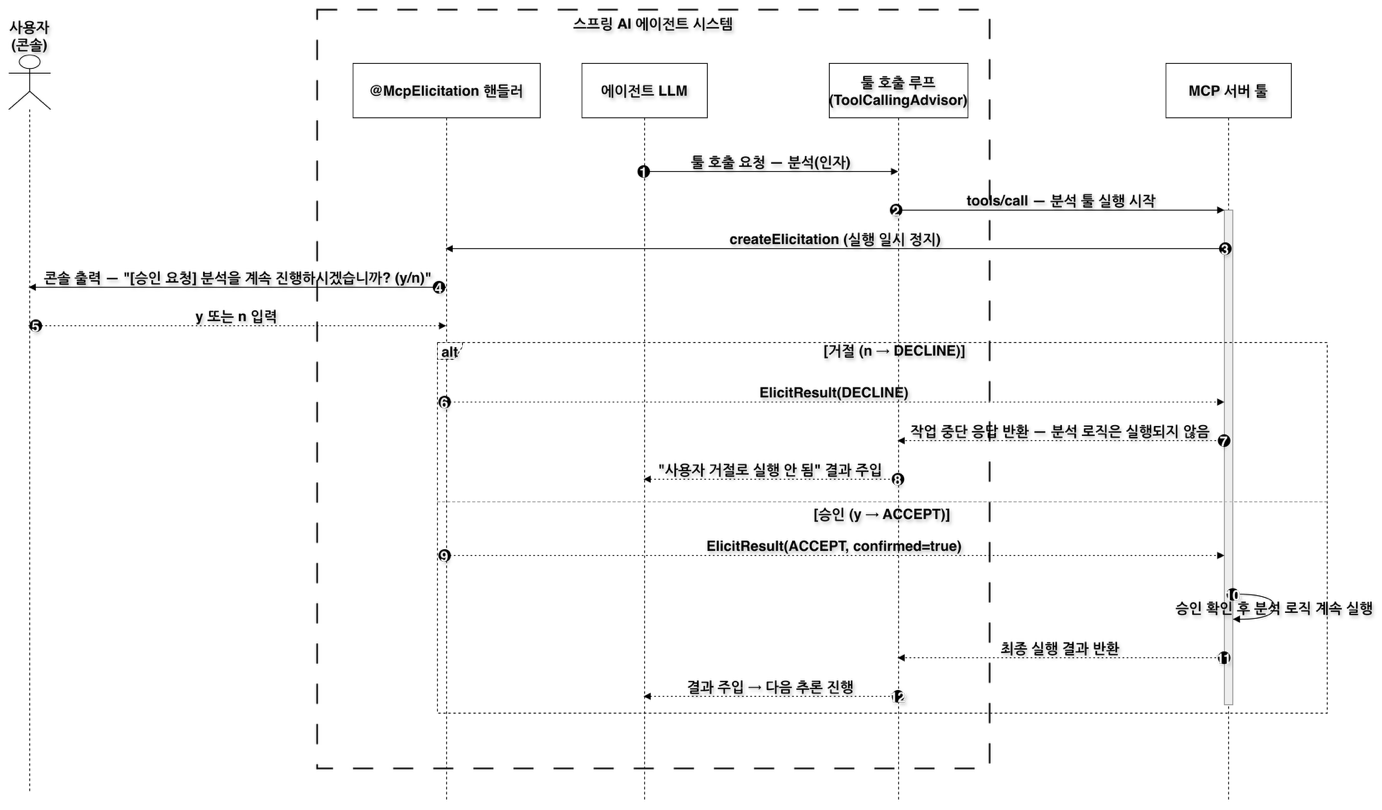
The figure shows the flow using the Chapter 5 analysis tool as an example. When the model requests a tool call, the tool loop (ToolCallingAdvisor) sends tools/call to the MCP server. Before running its logic, the server tool calls createElicitation and pauses until a response arrives. The @McpElicitation handler that receives the request prints an approval request to the console and waits for the user to enter y or n.
If the user enters n, the handler returns DECLINE, and the server tool returns a response saying the operation was stopped, without running the analysis logic. The tool loop passes the model a result saying that the tool did not run because it was declined. If the user enters y, ACCEPT is sent along with confirmed=true, and the server runs the rest of its logic and returns the final result. Either way, the model receives the tool result and moves on to its next reasoning step. In this structure, the agent serves as the call approval gate between the user and external tools.
The MCP Elicitation primitive
An MCP server does not stop at exposing its own features. It can also rely on features of the client it is connected to. The features used while handling a tool call fall into two kinds. Logging, progress notifications, and ping are notification-style features that report the server's status, while sampling and elicitation are interactive features in which the server calls on the client's features. Elicitation is the feature for getting input from the user on the client side during tool execution.
Along with a message, a request from the server carries the format of the input it wants, as a JSON schema (requestedSchema). A request that sends a form like this is an ElicitFormRequest, one kind of ElicitRequest. The client answers with an ElicitResult. There are three actions: accept (ACCEPT), decline (DECLINE), and cancel (CANCEL). If the schema has input fields, the client sends back values in that format in the content map. The server tool looks at the returned action and decides whether to continue or stop.
This feature assumes two-way communication. Even if the server sends a request, the feature does not work unless the client is ready to receive it. Also, a stateless MCP server in Spring AI (protocol=STATELESS) does not keep a connection open, so it cannot send requests to the client. The example's operations server runs with the STREAMABLE protocol under the ops profile.
server:
  port: 8085
spring:
  config:
    activate:
      on-profile: ops
  main:
    web-application-type: servlet
  ai:
    mcp:
      client:
        enabled: false
      server:
        enabled: true
        name: chapter6-operations-mcp-server     # 운영(주문, 재고) 서버: 코어 @McpTool
        protocol: STREAMABLE
        streamable-http:
          mcp-endpoint: /mcp
The operations server is a servlet web application on port 8085, and this profile turns off the MCP client and turns on only the server. The MCP endpoint is /mcp.
Server-side implementation: requesting approval right before execution
OperationsMcpTools in the operations server exposes two tools with @McpTool: check_stock, which looks up stock, and place_purchase_order, which places a purchase order. place_purchase_order is a mock tool that imitates a real purchase order, and it is an example of an operation that would cause trouble if it ran just because the model picked it.
    @McpTool(name = "place_purchase_order",
            description = "지정한 SKU를 지정 수량만큼 실제로 발주한다. 발주가 필요하면 이 툴을 직접 호출하라.")
    public String placePurchaseOrder(
            @McpToolParam(description = "발주할 상품 SKU", required = true) String sku,
            @McpToolParam(description = "발주 수량", required = true) int quantity,
            McpSyncServerExchange exchange) {
        McpSchema.ElicitResult approval = exchange.createElicitation(
                McpSchema.ElicitFormRequest.builder(
                        "place_purchase_order 툴로 %s %d개를 실제로 발주합니다. 진행할까요?"
                                .formatted(normalize(sku), quantity),
                        Map.of("type", "object", "properties", Map.of()))  // 승인만 받는 빈 폼
                        .build());

        if (approval.action() != McpSchema.ElicitResult.Action.ACCEPT) {
            return "사용자가 승인하지 않아 발주를 취소했습니다.";
        }
        stock.merge(normalize(sku), quantity, Integer::sum);
        return "%s %d개를 발주했습니다. (승인 완료)".formatted(normalize(sku), quantity);
    }
The method calls createElicitation() on the McpSyncServerExchange it receives as a parameter. The request message states which SKU to order and how many units, and the schema is left as an empty object with no properties, because this time only a yes or no is needed. The tool waits until a response arrives, and if the action is not ACCEPT, it returns a cancellation message without touching the stock. Only when the order is approved does it increase the stock and return a completion message. The user steps in not while the model is producing its answer but right before the actual operation runs.
Client-side implementation: the @McpElicitation handler
The approval request sent by the server travels back up across the MCP boundary to the agent side. On the client, a single method annotated with @McpElicitation receives this request.
@Component
@Profile("!ops & !knowledge")
public class ConsoleElicitationHandler {

    private final Scanner scanner = new Scanner(System.in);   // 콘솔 입력 공유(매 호출마다 새로 만들면 입력이 유실됨)

    @McpElicitation(clients = "operations") // 운영 서버 연결 이름
    public ElicitResult onElicitation(ElicitRequest request) {
        // 서버에서 전달받은 메시지를 콘솔에 출력하고 사용자의 응답을 대기
        System.out.println("[승인 요청] " + request.message() + " (y/n)");
        String answer = scanner.hasNextLine() ? scanner.nextLine().trim() : "n";   // 입력이 없으면 안전하게 거절

        // 사용자가 'y'를 입력하지 않으면 즉시 거절 처리
        if (!"y".equalsIgnoreCase(answer)) {
            // 거절 시 서버 툴이 나머지 작업을 즉각 중단하도록 지시
            return new ElicitResult(ElicitResult.Action.DECLINE, null);
        }
        // 정상 승인 시 5장 분석 툴이 요구한 confirmed 스키마 값과 함께 승인 지시
        return new ElicitResult(ElicitResult.Action.ACCEPT, Map.of("confirmed", true));
    }
}
The handler shows the server's message on the console and reads the user's input. It returns ACCEPT only for y, and treats any other input, or no input at all, as DECLINE. Because the default is to decline, a risky operation runs only when the user explicitly approves it. Scanner is shared as a single field because creating a new one on every call would lose console input. @Profile("!ops & !knowledge") makes sure this handler is registered only when running the client, not a server.
operations in clients = "operations" is the name of the operations server connection registered under spring.ai.mcp.client.streamable-http.connections in the client's application.yml. With this setting, the handler processes only requests that come from the operations server connection, and even if you attach more MCP servers, you can scope approval handling by connection name. Even as the number of servers grows, the approval policy stays in one place: the handler on the agent side. For a web service, you can extend the handler to show an approval dialog in the frontend over SSE or WebSocket instead of the console, and to wait for the response asynchronously.
Example run: approval before a purchase order
The Step 3 runner (Ch6Step3_ApprovalGate) sends the core agent the request "Order 10 units of SKU-300." Start the operations server first, then run the client in another terminal.
# Terminal 1: operations MCP server
./mvnw spring-boot:run -Dspring-boot.run.arguments="--spring.profiles.active=ops"
# Terminal 2: client
./mvnw spring-boot:run -Dspring-boot.run.arguments="--spring.ai.cli.step=ch6-step3"
Here is a summary of the run output shown in the book. The model calls place_purchase_order with SKU-300 and a quantity of 10. Before the tool result comes back, the console first shows [승인 요청] place_purchase_order 툴로 SKU-300 10개를 실제로 발주합니다. 진행할까요? (y/n) ("[Approval request] This will actually order 10 units of SKU-300 with the place_purchase_order tool. Proceed? (y/n)"). When you enter y, the tool result "Ordered 10 units of SKU-300. (Approved)" comes back, and the model summarizes the work based on it. If you enter n instead, the server cancels the order and leaves the stock unchanged.
In this flow, the model only decides what to do, and the authority to actually carry it out rests with the MCP server and the user's approval together. Human approval now forms a boundary between the tool call and the state change. The core agent's tool loop also has a safety guard that limits tool execution to 10 rounds per request, which keeps a loop that handles operations such as purchase orders from running endlessly. The model writes the final summary from scratch each time, so its wording can vary from run to run, and with a small local model, the SKU notation or Korean grammatical particles can also be inconsistent. What to check is not the wording but the flow in which execution passes through approval.
Where this fits in the 4-tier architecture
The approval gate does not belong to a single tier. It is a cross-cutting concern that spans several tiers, and within cross-cutting concerns it falls under governance. An approval request starts from an MCP server tool in the T3 Capability tier and reaches the user in the T1 Channel while the tool loop in T2 Orchestration waits for the result. In the example, too, OperationsMcpTools, which sends the request, is in the capability/remote package, and ConsoleElicitationHandler, which answers it, is in the channel package. As a first step in extending the agent's capabilities with a community library, the next article looks at Agent Skills: Agent Skills: Extending Agent Capabilities with Reusable Skills
More in the book
Book sections 6.4.4, 5.3.6, 6.6.4
- The process of turning the auto-reply handler for the Chapter 5 analysis tool into a console approval gate, and cases where form input comes back through
requestedSchema - An overview of MCP server features that depend on the client: watching for root changes, logging, progress notifications, ping, and sampling
- How to get the exchange in a programmatic tool with
McpToolUtils.getMcpExchange()and check whether the client supports a feature - Configuration that separates the operations server and the knowledge server by profile, and the Step 2 run output in which remote tools join the core agent
- The gaps that remain when an agent built only with core features is compared with commercial agent products, and how that leads to community tools