The Agent Loop and Context Engineering
An AI agent does not stop after calling the model once. The model looks at the situation, decides on the next action, carries it out with a tool, reads the result, and then decides again. This repetition is the agent loop, and it is also where the key design questions come from: when does the loop stop, and what should the model see on each iteration?
In the 4-tier architecture from the previous article, the tier that answers these questions is T2 Orchestration. This article distinguishes workflows from autonomous agents and looks at which Spring AI parts fit the four stages of the loop. It then moves on to context engineering, which designs the information that goes into the loop, and to ReAct.
Workflows and autonomous agents
In "Building Effective Agents", published in December 2024, Anthropic divides agentic systems into two kinds by their degree of autonomy.
- Workflows: LLMs and tools follow paths that developers define in code.
- Autonomous agents: The LLM decides which tools to use, in what order, and when to finish.
LLMs behave probabilistically, but a workflow fixes its execution path in code, so its flow is easy to predict and debug. In an autonomous agent, the model has control, so the tools it picks and their order can change even for the same question, and the model also decides when to end the loop. Among the book's examples, the Chapter 3 RAG CLI, which always searches and then answers in the same order, is close to a workflow. The CLIs in Chapters 4 and 5 also repeat tool execution and model calls, but they stop once they have answered a single request. Chapter 6 puts this loop at the center and adds planning, skills, delegation, approval, and observability to grow it into an agent system.
Autonomous agents suit open-ended requests that are hard to solve with a fixed procedure, and tasks where you cannot know the number of tool calls in advance. If the procedure and outcome are clear, if latency and cost need to be predictable, or if nondeterminism is a burden in the domain, a workflow is enough. Real systems use both together, for example by placing an autonomous agent inside one step of a workflow.
Five workflow patterns
Anthropic describes five workflow patterns, and complete examples implemented with Spring AI are in the Agentic Patterns repository.
| Pattern | How it works | Good fit for |
|---|---|---|
| Prompt chaining | Splits a task into steps and passes each step's output to the next step as input. You can put validation gates between steps. | Writing marketing copy, then translating it |
| Routing | Classifies the input and sends it to the prompt, tools, or model suited to its type. | Directing inquiries by type |
| Parallelization | Runs several LLM calls at the same time and aggregates the results in code. It comes in two forms: sectioning, which splits the task, and voting, which runs the same task several times. | Reviewing code from several security perspectives at once |
| Orchestrator-workers | An orchestrator LLM breaks the work into subtasks as it goes, hands them to worker LLMs, and combines the results. | Coding that changes multiple files, in-depth search |
| Evaluator-optimizer | A generator LLM revises its output based on feedback from an evaluator LLM until it meets the criteria. | Translation where nuance matters |
Parallelization and orchestrator-workers differ in who decides the subtasks: in parallelization the developer fixes them in code, while in orchestrator-workers the LLM decides them by looking at the request.

Of these patterns, the example repository includes prompt chaining.
public class ChainWorkflow {

    private final ChatClient chatClient;
    private final String[] systemPrompts;

    public ChainWorkflow(ChatClient chatClient, String[] systemPrompts) {
        this.chatClient = chatClient;
        this.systemPrompts = systemPrompts;
    }

    public String chain(String userInput) {
        String response = userInput;

        // 각 시스템 프롬프트를 순차적으로 적용
        for (String prompt : systemPrompts) {
            String input = String.format("{%s}\n {%s}", prompt, response);
            // 이전 단계의 결과를 다음 단계의 입력으로 전달하여 체이닝
            response = chatClient.prompt(input).call().content();
        }

        return response; // 최종 처리 결과 반환
    }
}
A for loop goes through the array of system prompts and inserts each step's response into the next input. The array and the loop decide the number and order of steps, and at each step the model only produces text without choosing what to do next. This is the deterministic control flow of a workflow.
The autonomous agent loop
Whatever form they take, autonomous agents repeat four stages.

- Plan: Looks at the current context, such as the request and memory, and chooses the next action: a tool call, a follow-up question, or a final answer.
- Act: Calls a tool or produces a message. It may also call another agent.
- Observe: Collects the responses the environment returns, such as tool execution results.
- Reflect: Adds the results to the context and checks the termination condition, stopping if it is met and going back to planning if not.
The more of the four stages the model handles, the more autonomous the system becomes, and most real-world systems sit somewhere between a chatbot that a person instructs every time and a fully autonomous agent.
The stage most easily left out is reflect. If you pile up tool results as they arrive, the context quickly swells and the model can no longer pick out the important information. You need processing that compresses the results down to the essentials, or extracts the information you need and keeps it in a separate memory.
The foundation of an autonomous agent is using tools again and again based on the actual results the environment returns, not on the model's guesses. That is why writing clear tool descriptions and parameters is the starting point for reliability. There are two ways out of the loop. Stopping when the work is done or when the maximum number of iterations is reached leads to safety guards, and asking a person at a point where the agent finds it hard to decide on its own leads to human-in-the-loop (HITL).
Assembling the agent loop with Spring AI
Spring AI already has components to handle each stage of the loop, so you only need to rearrange the parts you learned in the earlier chapters, this time from the loop's point of view.
| Stage | What it does | Spring AI components |
|---|---|---|
| Plan | Decides the next action | ChatModel |
| Act | Executes tools | ToolCallback, @Tool, ToolCallingManager, MCP client |
| Observe | Assembles the current context | ChatClient, Advisor, ChatMemory, VectorStore |
| Reflect | Processes results and decides when to stop | Advisor, ToolCallingManager |
If you write the loop yourself with ToolCallingManager, it becomes a while loop that repeatedly calls the model (plan), checks whether any tool calls remain (reflect), executes the tools (act), and updates the prompt with the conversation history containing the results (observe). This is the user-controlled approach covered in Implementing Tools and Controlling Execution. Usually you leave this repetition to ToolCallingAdvisor, and the main agent in Chapter 6 is assembled that way too.
    public SpringAIAgent(ChatClient.Builder builder,
                         String systemPrompt,                              // 시스템 프롬프트(코어/강화가 다름)
                         List<ToolCallback> tools,                         // 등록할 툴(로컬, 커뮤니티, MCP, 모두 ToolCallback으로 통일)
                         Supplier<ToolCallingAdvisor> loopAdvisorFactory,  // 툴 루프 어드바이저 팩토리(요청마다 새로)
                         ChatMemory chatMemory,
                         MeterRegistry meterRegistry) {
        this.loopAdvisorFactory = loopAdvisorFactory;
        this.chatClient = builder.clone()
                .defaultSystem(systemPrompt)
                .defaultTools(tools.toArray())
                .defaultAdvisors(                                  // 루프 어드바이저는 여기 말고 run()에서 요청마다 끼움
                        MessageChatMemoryAdvisor.builder(chatMemory)   // 루프 바깥, 1회
                                .order(BaseAdvisor.HIGHEST_PRECEDENCE + 200).build(),
                        new ToolCallTraceAdvisor(),                    // 호출된 툴과 결과를 CLI에 표시(+350, 루프 안)
                        new ThinkTraceAdvisor(),                       // 모델 사고를 CLI에 표시(+360, 루프 안)
                        new SimpleLoggerAdvisor(),                     // 반복별 원문 로깅(0)
                        new ToolLoopMetricsAdvisor(meterRegistry))     // 루프-레벨 지표(+400, 관측 6.6.7)
                .build();
    }

    public Flux<String> run(String userMessage, String conversationId) {
        return chatClient.prompt()
                .advisors(loopAdvisorFactory.get())   // 요청마다 새 툴 루프 어드바이저(+300, 안전 가드도 새 카운터)
                .advisors(a -> a.param(ChatMemory.CONVERSATION_ID, conversationId))
                .user(userMessage)
                .stream().content();
    }
Unlike ChainWorkflow, this code has no loop statement. It attaches behavior rules with defaultSystem, tools with defaultTools, and conversation history with MessageChatMemoryAdvisor, and the loop is run by the ToolCallingAdvisor that run() plugs in for each request. The next article explains what the order values in the comments (+200, +300) mean.
Step 1, Ch6Step1_SpringAIAgent, sends the request "Tell me the current time in Korea, check the stock of SKU-200, and then reserve 2 units." It needs the time lookup, stock lookup, and reservation tools, but the code does not say which tools to call in what order. The model decides. The second request, "What was the name of the product I just reserved?", is sent with the same conversation ID to check that chat memory carries over.
From prompt engineering to context engineering
Prompt engineering is the craft of writing a single question well, using personas, few-shot examples, and step-by-step instructions. An agent keeps using tools, retries when something fails, and has to remember the reasons behind its earlier decisions, so the wording of a question alone is not enough. Context engineering is designing and managing the structure, order, and constraints of the input information, along with tool results, so that the model makes good decisions at every moment along the way. Think of it not as a knack for talking to the model but as designing the environment the model works in.
| Aspect | Prompt engineering | Context engineering |
|---|---|---|
| Goal | Quality of a single answer | The whole workflow and state management |
| Main levers | Rewording, few-shot examples, personas | Memory, tool schemas, advisors, loops |
| Spring AI | PromptTemplate |
ChatClient, Advisor, ToolCallback, ChatMemory |
The core agent's system prompt is a good example.
      agent:                          # 에이전트 페르소나(시스템 프롬프트)를 코드 밖 설정으로 분리
        core:
          system-prompt: |
            당신은 사용자의 요청을 끝까지 처리하는 AI 에이전트입니다.
            - 작업에 필요한 툴이 있으면 직접 호출하고, 결과를 확인한 뒤 다음 행동을 결정합니다.
            - 툴로 확인하지 않은 사실은 단정하지 않습니다.
            - 모든 작업이 끝나면 수행한 내용을 한국어로 간결하게 요약합니다.
This prompt is not a trick for a particular question but a set of behavior rules attached to every call. The rule to check tool results and then decide the next action defines how the loop runs, and the rule not to assert facts that have not been verified defines what the agent's decisions are based on. This value is read from the configuration file and passed to defaultSystem in SpringAIAgent, so you can adjust the agent's character without changing code.
Chain of thought and reasoning models
Chain of thought (CoT) is a prompt engineering technique that has the model reason step by step instead of jumping to a conclusion. In an agent, you go beyond a loose instruction like "think step by step" and put the checks to go through before calling a tool into the system message as a policy. For example, an agent that queries financial data would be allowed to call a tool only after checking the permission level, the query period, and whether personal information is included.
Open source models such as Qwen3 and gpt-oss now also have the reasoning ability to verify and plan on their own before answering. You do not need to tell these models separately to think. The developer's work shifts toward giving them decision criteria, writing accurate tool definitions, and weaving execution results and failure history into the environment for the next round of reasoning. Models cannot call databases or APIs directly, so the loop that turns reasoning into execution and returns the results to the context is still the system's responsibility.
The qwen3.5:4b model that the example repository uses also goes through a thinking phase before answering, and ThinkTraceAdvisor shows this thinking in the CLI.
    @Override
    public Flux<ChatClientResponse> adviseStream(ChatClientRequest request, StreamAdvisorChain chain) {
        boolean[] open = {false};   // 이 라운드에서 [생각] 블록이 열려 있는지
        return chain.nextStream(request)
                .doOnNext(resp -> {
                    ChatResponse chatResponse = resp.chatResponse();
                    if (chatResponse == null || chatResponse.getResult() == null) {
                        return;
                    }
                    Object thinking = chatResponse.getResult().getOutput().getMetadata().get("thinking");
                    String token = thinking == null ? "" : thinking.toString();
                    if (!token.isEmpty()) {
                        if (!open[0]) {            // 사고 첫 토큰 → 블록 머리말
                            System.out.print("\n  [생각] ");
                            open[0] = true;
                        }
                        System.out.print(token);   // 사고를 흐르는 대로 출력
                    }
                    else if (open[0]) {            // 사고가 끝나고 툴 호출, 답변으로 넘어감 → 블록 닫기
                        System.out.println();
                        open[0] = false;
                    }
                })
                .doOnComplete(() -> {
                    if (open[0]) {
                        System.out.println();
                    }
                });
    }
OllamaChatModel puts thinking tokens under the thinking key in the metadata of each streaming chunk. The response aggregated per round does not keep this value intact, so this advisor reads the raw stream directly and prints the thinking tokens. It runs on every round inside the tool loop, so the CLI prints thinking, a tool call, more thinking, and the answer in turn. This flow, in which thinking and acting alternate, is ReAct, which comes next.
ReAct: turning thought into action
The plan, act, observe, and reflect loop follows the ReAct pattern published in 2022, and most commercial agent frameworks use a variation of it. If chain of thought is a way to refine reasoning, ReAct is an execution structure that alternates between reasoning and acting.
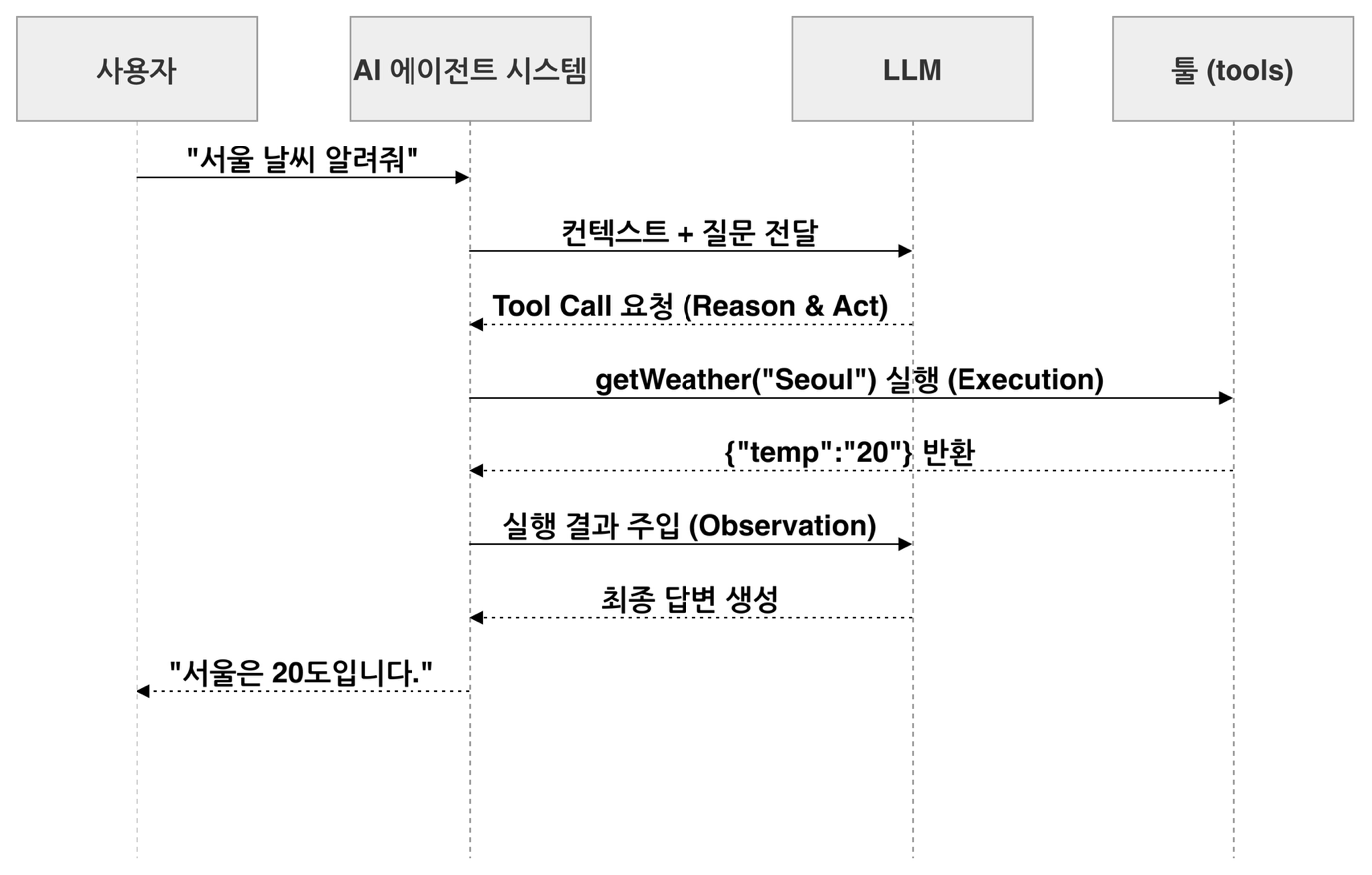
The key is the boundary between the model and the system. The model only decides that it needs weather information (reason) and produces a request to call getWeather("Seoul") (act). Executing the tool (execution) and putting the result {"temp":"20"} into the context (observation) are the system's job. In Spring AI, ToolCallingManager and advisors handle this boundary, so once a developer registers a tool, the model and the framework take care of whether to use it, which arguments to call it with, and how to turn the result into an answer.
Two areas where context is delivered
The context you design ends up in the model call as a system message, tool schemas, and a list of messages. LLMs do not remember state between calls, so ChatMemory adds the earlier conversation, and VectorStore and advisors find documents and add them. In Andrej Karpathy's analogy, the LLM is the CPU, the context window is the RAM, and context engineering is the operating system that decides what to load into memory and when. When agents fail, the cause often lies less in the model's intelligence than in needed information not reaching the context in time.
Looking one step closer, the elements of context fall into two areas. One influences the model's decisions through text instructions and tool schemas. The other is enforced by the agent system: which tools to expose, which files to read and when, and how to restrict permissions.

Instruction files such as AGENTS.md, which record build commands and coding conventions, are a good example. The file's contents are delivered to the model, but the system decides which files to look for, in what priority, and when to add them. Tools also span both areas. Their names, descriptions, and schemas become the basis for the model's decisions, while the system handles exposure filtering, execution, and permission restrictions. If you leave the delete tool's schema out entirely for a request from a user without delete permission, the model does not know the tool exists and has no definition to call. If writing "do not delete" in the prompt is a request, removing the schema is a block. It is not the whole of authorization, though: the execution side still has to check permissions, because a model can produce a tool name it was never shown, and Spring AI's tool resolver may resolve that name from the application context.
As the loop keeps running, context accumulates and can exceed the token limit, or the model can fail to use information placed in the middle of a long context, a problem known as lost in the middle. Strategies such as a sliding window, summarizing older conversation, and storing key facts can be implemented by combining ChatMemory and advisors. However, records of failed tool executions must be kept so that the model tries a different approach. Context is more than a conversation record: it is information that tells the agent what state it is in right now.
Where this fits in the 4-tier architecture
The agent loop and context design covered in this article are the foundation of T2 Orchestration. The LLM's reasoning loop decides what to execute, when, and in what order, and designing what context to load into that loop is T2's job. The tools the loop calls belong to T3 Capability, and the model that makes the plans belongs to T4 Foundation. The next article, Recursive Advisors and Tool Loop Control, looks at how Spring AI runs this loop inside the advisor chain.
More in the book
Book sections 6.1-6.2
- Spring AI implementation code for the routing, parallelization, orchestrator-workers, and evaluator-optimizer patterns
- An example that writes the tool loop by hand with
ToolCallingManagerto see the four stages - A table mapping the features of Claude Code, OpenClaw, and Codex CLI to Spring AI core and community extensions
- How the developer's responsibilities changed with the arrival of reasoning models
- Examples of writing AGENTS.md and SKILL.md, and a table mapping the two areas of context to Spring AI
References
- Building effective agents: the distinction between workflows and autonomous agents
- Building Effective Agents: a guide to implementing the workflow patterns with Spring AI
- Agentic Patterns: complete example code for the workflow patterns
- ReAct: Synergizing Reasoning and Acting in Language Models: the paper that proposed the ReAct pattern (2022)
- Andrej Karpathy, context engineering: the post that endorsed the term context engineering