Embedding Models and Vector Databases
The previous article used an ETL pipeline to read documents, clean them up, and split them into chunks. But simply piling up chunks does not let you pick the pieces that match a question. To connect a question and a document that are worded differently, such as "DI is a feature of Spring" and "dependency injection in the Spring Framework", you need to compare meaning, not the literal text.
Comparing meaning takes two parts: an embedding model that turns text into an array of numbers, and a vector database that stores those arrays and finds the ones that are close. This article looks at Spring AI's EmbeddingModel and VectorStore in turn, then follows how the Chapter 3 example project connects the two parts with Ollama's bge-m3 and SimpleVectorStore.
Turning text into vectors with embeddings
Embedding is a technique that converts unstructured data such as text and images into fixed-length arrays of real numbers, expressing the relationships between data as numbers. The number of values in the array is called the dimension. OpenAI's text-embedding-3-small creates 1536-dimensional vectors, and Ollama's nomic-embed-text creates 768-dimensional vectors. The higher the dimension, the more room there is to capture meaning in detail, but computation and storage also increase. Many models perform well at 768 dimensions or fewer, so rather than going by the dimension count, it helps to pick a model that fits your use case and resources and test it.
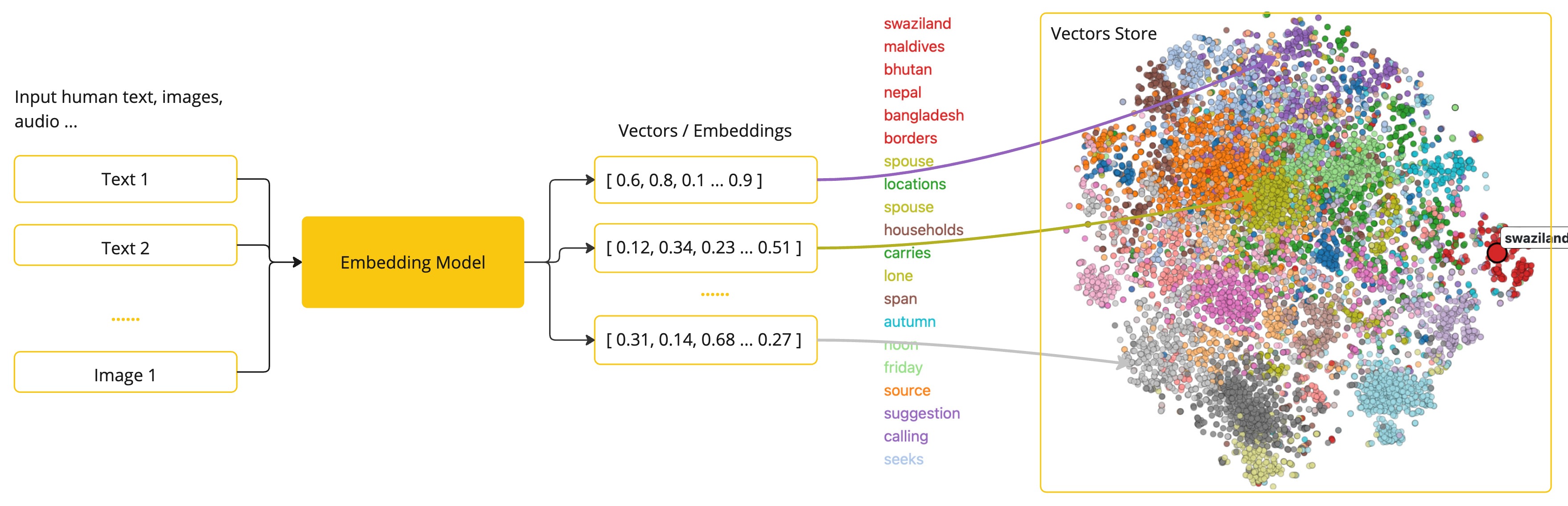
Embedding models are trained so that sentences with similar meanings are placed close together in vector space. That is why the two sentences above have nearby coordinates, while a sentence like "Lunch menu ideas for today" lands far away. Closeness is measured with cosine similarity (which looks at the angle between two vectors), Euclidean distance (which looks at the straight-line distance between two points), or the dot product (which reflects both magnitude and direction). Text search most often uses cosine similarity, which treats two sentences as similar when their vectors point in the same direction, even if the sentences differ in length.
In Spring AI, VectorStore calls the embedding model to handle this conversion. Documents are converted into vectors right before they are loaded, and a question is converted with the same model at search time so that the two can be compared.
The EmbeddingModel API
Like ChatModel and ImageModel, EmbeddingModel extends the general-purpose Model interface and sets its input and output types to EmbeddingRequest and EmbeddingResponse. Its design goals are portability and simplicity. You can move from OpenAI to Azure OpenAI or Ollama with almost no code changes, and a single embed() call returns a vector while steps such as tokenization stay hidden.
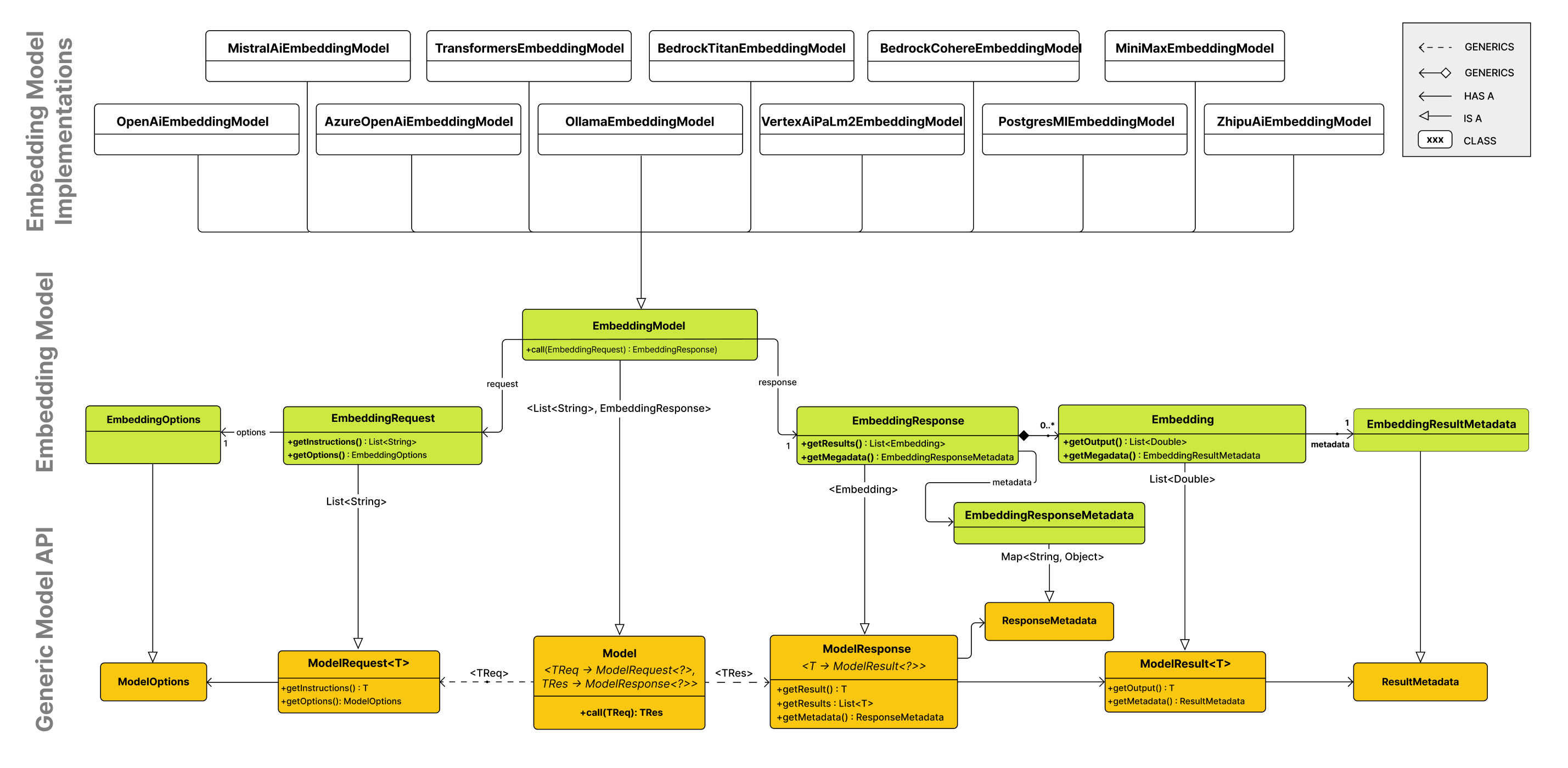
The core method is call(EmbeddingRequest). The request holds the list of texts to convert and EmbeddingOptions, and the response holds a list of Embedding objects and metadata such as token usage. Convenience methods such as embed(String), embed(List<String>), and dimensions() are provided as default methods that all call call() internally, which reduces the burden on implementations and keeps behavior consistent.
Cloud, local, and Korean-language embedding models
There are two broad ways to run an embedding model. A cloud API lets you use the latest models right away without a GPU, but your data is sent to external servers and costs grow with token usage. A self-hosted model keeps your data from leaving your environment and has no per-call cost. Spring AI offers two ways to run models locally. With Ollama, you call a model running in a separate process over HTTP, and because you can download a model with a single ollama pull command, it is easy to try out several models. The spring-ai-transformers module runs the model inside the Java process, so there is no network latency, but you have to prepare the ONNX model file and tokenizer separately.
Even without a GPU, local embedding runs well enough on a CPU. An LLM that generates text repeats the computation that predicts the next token once for every token, but an embedding model, which usually uses a BERT-family encoder, produces a vector after a single pass over the entire input. On Intel i7 and Apple silicon laptops, the author measured an average response time of 16-100 ms for bge-m3. For a service that loads millions of documents up front or handles thousands of searches per second, a GPU is worth considering.
Korean attaches a wide variety of particles and endings to words, so with a model trained mainly on English, search may not be as accurate as you expect. The book compares candidates that handle Korean well: text-embedding-3-small and Cohere embed-multilingual-v3.0 in the cloud, and bge-m3 and ko-sroberta-multitask for local use. The example project uses bge-m3. The bge-m3 model is about 1.1 GB, accepts up to 8,192 tokens of input, and performs well on Korean.
spring:
  ai:
    # 실행할 Step 선택 - 3장: ch3-step1 ~ ch3-step6 / ch3-final
    cli:
      step: ch3-final
    model:
      chat: ollama     # 채팅 모델 제공자 선택
      embedding: ollama  # 임베딩 모델 제공자 선택
    rag:
      documents-dir: src/main/resources/data  # 오프라인 인덱싱 대상 문서 디렉터리
    ollama:
      base-url: http://localhost:11434
      chat:
        think: false         # 추론 비활성
        model: qwen3.5:4b
      embedding:
        model: bge-m3
spring.ai.model.embedding: ollama selects the embedding provider, and spring.ai.ollama.embedding.model specifies bge-m3. The qwen3.5:4b model generates the answers, and bge-m3 handles the vector conversion.
The VectorStore interface
A vector database stores high-dimensional vectors and finds the vectors closest to a query vector. Where a relational database finds rows with matching values, a vector database finds data with similar meaning. Spring AI abstracts many products behind a common interface called VectorStore.
VectorStore extends both DocumentWriter, which handles loading, and VectorStoreRetriever, which handles search. So the object that adds documents with add() at the end of the ETL pipeline is the same object that pulls out context with similaritySearch() when a question comes in. In effect, offline preparation and runtime search meet at this interface. For a service that only reads, you can also narrow its permissions by passing it only the read-only VectorStoreRetriever.
@Configuration
class Chapter3RagConfig {

    @Bean
    VectorStore vectorStore(EmbeddingModel embeddingModel) {
        return SimpleVectorStore.builder(embeddingModel).build();
    }
}
So that it runs without any infrastructure, the Chapter 3 project registers SimpleVectorStore as a bean. The bge-m3 model auto-configured by the Ollama starter is injected as the EmbeddingModel that the bean method receives, and from then on, add() and similaritySearch() both create vectors with this model. Even if you switch to an external store such as pgvector or Redis, the search code depends only on the VectorStore interface, so it does not need to change.
SearchRequest and metadata filters
You can pass just a question string to similaritySearch(), but to fine-tune the search, you use SearchRequest. It is an immutable object created with a builder, and it holds the query, topK, similarityThreshold, and a filter expression.
topK: The maximum number of documents to return. The default is 4. In RAG, this is the amount of reference material handed to the LLM. Too few can leave the model short of evidence and lead to hallucinations, while too many mix in unrelated documents and increase token costs and response time. Typically, you start somewhere between 3 and 10 and adjust.similarityThreshold: The minimum score (0.0-1.0) a document needs to be included in the results. With the default of 0.0, the score filters practically nothing. The score is not a percentage but a relative score whose distribution depends on the embedding model and the distance calculation, so you first look at all the results at 0.0, then use real data to find the score at which unrelated documents start to drop out.- Filter expression: A condition that narrows down candidate documents in advance by metadata values rather than by content. It is similar to a SQL WHERE clause, and because it is applied before similarity is calculated, it helps both speed and accuracy.
    public static SearchRequest basic(String query) {
        return SearchRequest.builder()
                .query(query)
                .topK(5)
                .similarityThreshold(0.5)
                .build();
    }

    public static SearchRequest withTextFilter(String query, String category) {
        return SearchRequest.builder()
                .query(query)
                .topK(5)
                .similarityThresholdAll()
                .filterExpression("category == '" + category + "' && isActive == true")
                .build();
    }

    public static SearchRequest withTypeSafeFilter(String query) {
        FilterExpressionBuilder builder = new FilterExpressionBuilder();
        Filter.Expression filter = builder.and(
                builder.in("category", "tech_docs", "product_catalog"),
                builder.eq("isActive", true)
        ).build();

        return SearchRequest.builder()
                .query(query)
                .topK(8)
                .similarityThreshold(0.50)
                .filterExpression(filter)
                .build();
    }
The three methods attach different conditions to the same question. basic() finds the top 5 documents with a score of 0.5 or higher, with no filter. withTextFilter() removes the threshold and narrows the scope with the string expression category == 'tech_docs' && isActive == true. withTypeSafeFilter() builds IN and AND conditions with FilterExpressionBuilder. The string style is short and easy to read, while the builder style reduces syntax mistakes and is convenient when you assemble conditions dynamically. category and isActive are metadata that RagKnowledgeBase attached when it loaded the documents. Ch3Step4_VectorStore prints the results of the three requests in turn so you can compare them.
Filter expressions are also portable. Even though query syntax differs from product to product, Spring AI's standard expressions are converted at runtime into the native query of the implementation in use. However, arithmetic operations between fields, such as addition or subtraction, are not supported, and support for IS NULL-style operators may be limited depending on the implementation.
Schema, batching strategy, and data lifecycle
Most vector databases require you to define the vector dimensions, indexes, and metadata columns before you insert data. Spring AI implementations come with a standard default schema, which usually consists of four columns: ID, content, metadata, and embedding. To prevent accidents such as wiping production data by mistake, automatic schema creation is off by default, and you turn it on with an implementation-specific setting such as spring.ai.vectorstore.elasticsearch.initialize-schema: true.
Loading also calls for some care. Even if each chunk is within the model's limit, putting thousands of them in one request can push the total token count of the request over the limit. So vectorStore.add() uses its internal BatchingStrategy to split the document list into sub-batches of a safe size before sending them. The default implementation, TokenCountBatchingStrategy, groups documents so that each batch stays within OpenAI's input limit of 8,191 tokens minus a 10% reserve, and throws an exception if a single document exceeds the limit on its own. To change the criteria, you register your own BatchingStrategy bean.
Documents you have loaded will sometimes need to be deleted or updated. You can delete specific documents by ID, or delete all documents that match a filter condition at once. When content changes, the entire embedding has to be recalculated, so instead of a partial update, you make changes by deleting the old version and loading the new one. To make this possible, you put a document identifier and a version in the metadata.
    public void addVersion(String docId, String version, String text) {
        Document document = new Document(text, Map.of(
                "docId", docId,
                "version", version,
                "isActive", true,
                "lastUpdated", LocalDate.now().toString()
        ));
        vectorStore.add(List.of(document));
    }

    public void replaceVersion(String docId, String oldVersion, String newVersion, String newText) {
        vectorStore.delete("docId == '" + docId + "' && version == '" + oldVersion + "'");
        addVersion(docId, newVersion, newText);
    }

    public List<Document> searchActiveVersion(String docId, String query) {
        return vectorStore.similaritySearch(SearchRequest.builder()
                .query(query)
                .topK(3)
                .similarityThresholdAll()
                .filterExpression("docId == '" + docId + "' && isActive == true")
                .build());
    }
replaceVersion() deletes the old version with a filter on docId and version, then adds the new version. searchActiveVersion() combines a condition on the document identifier with isActive == true to find only the current version. If you need to keep a change history, you can use a soft delete, which keeps the old version and sets its isActive to false. In that case, the same search condition still returns only the latest version.
SimpleVectorStore and other vector databases
The vector databases that Spring AI supports can be grouped into three types. Native databases designed solely for vector search (Qdrant, Milvus, Pinecone, and others) offer strong search performance at scale but need separate infrastructure. Integrated databases that add vector search to an existing database (pgvector, Redis, Elasticsearch, and others) let you keep using the infrastructure you already operate, along with features such as backups. There are also utility databases for special purposes such as development convenience or archiving, and SimpleVectorStore, which is meant for development, belongs to this group.
This implementation is a pure Java in-memory store that keeps each document's content, metadata, and embedding in a ConcurrentHashMap keyed by document ID. At search time, it embeds the question, filters candidates with the metadata filter, computes cosine similarity against every remaining document, and returns the top-k documents that meet the threshold. Because it compares everything without an index, it slows down as data grows, but it returns exact results with no approximation. Since save() and load() store the contents in a JSON file and restore them, you can open the file and check it yourself when search results look wrong. It is limited by memory and cannot scale out horizontally, but it works well for CI tests, for learning, and as a reference for verifying search results from production databases.
Score ranges also differ by implementation. SimpleVectorStore returns the cosine value as is, so its theoretical range is -1.0 to 1.0, while other implementations convert the score to a similarity from 0.0 to 1.0 and store it as the Document score. Recent embedding models also tend to cluster scores on the positive side, with only a small gap between the scores of relevant and unrelated documents. For that reason, the book recommends using the threshold only to drop documents that are clearly unrelated, and letting a reranker or an LLM make the final selection from the candidates narrowed down by top-k.
Where this fits in the 4-tier architecture
Embedding models and vector databases belong to the T4 Foundation tier of the 4-tier architecture, the tier that holds underlying resources such as models, data, and infrastructure. Because Spring AI abstracts the two as EmbeddingModel and VectorStore, you can move a setup that started with local bge-m3 and SimpleVectorStore to a cloud model or a production database with almost no changes to the code in the tiers above. When a question comes in, documents are retrieved from this foundation and added to the prompt. The next article, From Naive RAG to Modular RAG: The Spring AI RAG Framework, assembles that process with advisors.
More in the book
Book sections 3.5-3.6
- The code of the
EmbeddingModelinterface and the fields of its request, response, and result classes - A comparison of cloud embedding providers and ways to run models locally (Ollama, ONNX), and the steps for converting a model to ONNX
- The complete table of metadata filter operators, and building groups and OR conditions with
FilterExpressionBuilder - Tuning a custom schema and customizing
TokenCountBatchingStrategy - A product-by-product comparison of native, integrated, and utility vector databases
- The internal code of
SimpleVectorStore, and a comparison of how each database returns similarity scores
References
- Embeddings: the concept of embeddings
- Embedding Model API: the API structure and its implementations
- Ollama Library: the list of Ollama models
- Transformers (ONNX) Embeddings: running ONNX embedding models
- Export a model to ONNX: converting models to ONNX with Hugging Face Optimum
- Understanding Vectors: the formulas for calculating vector similarity