Recursive Advisors and Tool Loop Control
Recall the ReAct sequence from the previous article: the model only requests tool calls, and the system executes the tools and puts the results back into the context. This article covers where and how Spring AI handles that system-side work.
Spring AI runs this loop inside the advisor chain. This is the job of a recursive advisor, which can call the rest of the chain after it multiple times, and its implementation is ToolCallingAdvisor. Because the loop lives inside the chain, you can plug memory, logging, and metrics advisors into the loop as they are. The same pattern is also used for the self-correction loop, which has the model fix its structured output when the output is wrong.
Two approaches to the tool loop
The tool loop is a repeating cycle of tool call, execution, result injection, and another model call. It is less a new feature than the tool execution control covered in Implementing Tools and Controlling Execution, extended into a loop, so you set it up the same way. There are two approaches, depending on where control of the loop lies.
- User-controlled manual loop: The developer writes a while loop by hand that calls
ChatModel, executes any tool calls in the response withToolCallingManager, and calls the model again. This is for special cases where you need full control over the flow, such as getting administrator approval before a tool runs. - Framework-controlled advisor loop: You add
ToolCallingAdvisorto the advisor chain and leave loop control to the chain. This is the recommended approach for building autonomous agents.
The difference shows up in the middle of the loop. In a manual loop, you have to write all the code yourself to log individual tool calls and results or to save them to memory. In an advisor loop, existing advisors that save conversation history or publish events take part in the loop as they are.
The processing flow of a recursive advisor
A regular advisor is an interceptor that is passed through once as the request goes in and once as the response comes out. A recursive advisor calls the advisors after it and the model repeatedly until a condition is met. It does not run the whole chain again. Instead, it uses a sub-chain created with CallAdvisorChain.copy(CallAdvisor after) that copies only the advisors after itself.
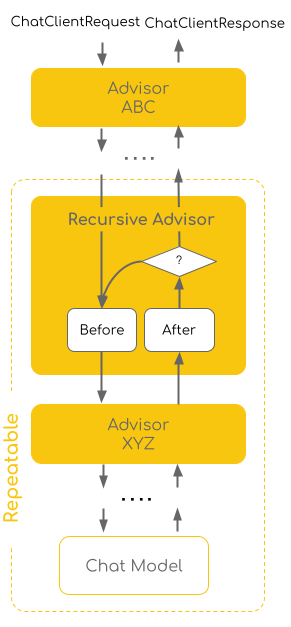
In the figure, Advisor ABC is passed through only once in each direction, as the request goes in and as the response comes back. In the Repeatable area inside the dashed line, the recursive advisor checks the condition at the question mark each time it receives a response. If another pass is needed, it goes back to Before and calls Advisor XYZ after it and the model again. Because of this structure, the processing flow falls into three stages.
- Outside the loop: Advisors placed before the recursive advisor run only once per request.
MessageChatMemoryAdvisor, which handles conversation history, belongs here. - Inside the loop: The advisors in the copied sub-chain and the model run repeatedly until the condition is met.
- Exit and return: When there are no more tools to call or validation passes, the flow leaves the loop and returns the final response to the advisors in front.
If the chain were run again from the start, the memory advisor at the front would save the user's first question again on every iteration. A recursive advisor prevents this kind of duplicate execution by splitting advisors into those that should run only once, outside the loop, and those that should run every time, inside it.
Controlling the tool loop with ToolCallingAdvisor
ToolCallingAdvisor is the same advisor used to control tool execution in Chapter 4, and it implements the recursive advisor pattern. Its default order value is HIGHEST_PRECEDENCE + 300. The following figure shows the flow of a chain with MessageChatMemoryAdvisor (+200), ToolCallingAdvisor (+300), and StructuredOutputValidationAdvisor (+1000) in that order.
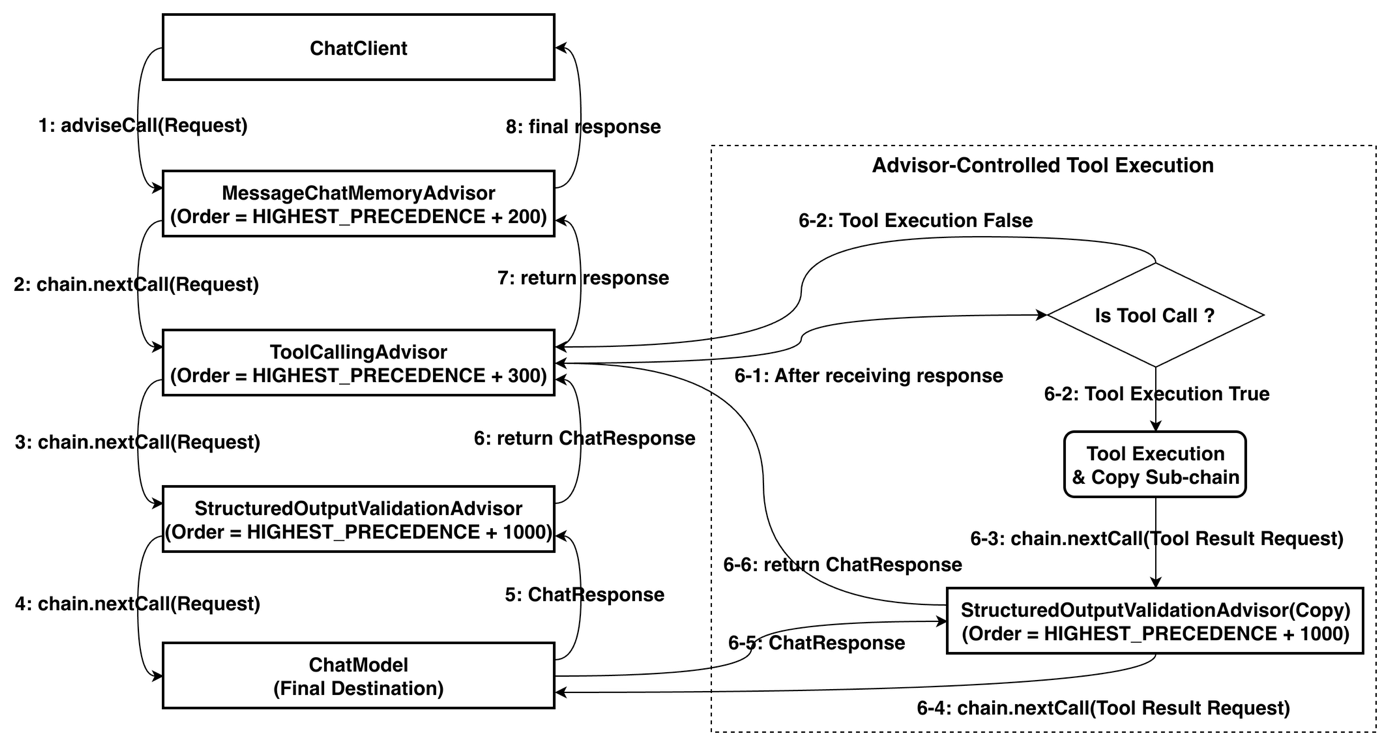
A response without tool calls passes through steps 1 to 8 once. If the response contains tool calls, ToolCallingAdvisor executes the tools, uses chain.copy(this) to copy only the StructuredOutputValidationAdvisor that sits inside it, and calls the model again (steps 6-3 to 6-6). This repeats until the model stops calling tools.
There is one placement rule. An advisor with a lower order value than ToolCallingAdvisor runs once outside the loop, and one with a higher order value runs on every iteration inside the loop.
- Memory advisor outside the loop (default): It loads the earlier conversation once before the loop and, after the loop ends, saves only the user message and the final answer. Tool requests and responses within a turn are managed by the internal conversation history of
ToolCallingAdvisor. - Memory advisor inside the loop: To save the tool call history as well, for auditing or debugging, give the memory advisor a higher order value such as +400. In that case, the history it saves must not overlap with the internal history of
ToolCallingAdvisor. IfToolCallingAdvisorwas registered automatically,DefaultChatClientdetects the memory advisor inside the loop and turns off the internal history. If you configured it yourself, call.disableInternalConversationHistory(). - Why
StructuredOutputValidationAdvisorgoes inside the loop: When the final JSON is wrong, only the model is called again, inside the loop. If the advisor sat outside, the tool execution results would be lost and the tools would have to run again, which costs more tokens and money.
The Chapter 6 main agent, SpringAIAgent, also places its advisors by this rule (+N means HIGHEST_PRECEDENCE + N).
| Advisor | Order value | Position | Role |
|---|---|---|---|
MessageChatMemoryAdvisor |
+200 | Outside the loop | Loads and saves conversation history |
ToolCallingAdvisor |
+300 | Controls the loop | Executes tools and calls the model again |
ToolCallTraceAdvisor |
+350 | Inside the loop | Shows tool calls and results in the CLI |
ThinkTraceAdvisor |
+360 | Inside the loop | Shows the model's thinking in the CLI |
ToolLoopMetricsAdvisor |
+400 | Inside the loop | Publishes loop-level metrics |
SimpleLoggerAdvisor |
0 | Inside the loop | Logs the request and response of each iteration |
The loop advisor itself is created in AgentConfig.
    private static Supplier<ToolCallingAdvisor> loopAdvisorFactory(boolean useToolSearch, VectorStore vectorStore) {
        if (useToolSearch) {
            ToolIndex toolIndex = new VectorToolIndex(vectorStore);   // 1회 생성, 공유
            return () -> withSafetyGuard(
                    ToolSearchToolCallingAdvisor.builder().toolIndex(toolIndex).maxResults(TOOL_SEARCH_MAX_RESULTS));
        }
        return () -> withSafetyGuard(ToolCallingAdvisor.builder());
    }

    /**
     * 빌더에 두 어드바이저의 공통 설정(요청별 안전 가드 + 순서)을 더해 루프 어드바이저를 완성한다.
     * 팩토리가 요청마다 호출하므로 매 호출이 새 안전 가드(요청별 카운터)를 끼운다. 공통 꼬리를 한곳에 모아 중복을 없앤다.
     */
    private static ToolCallingAdvisor withSafetyGuard(ToolCallingAdvisor.Builder<?> builder) {
        return builder
                .toolExecutionEligibilityChecker(AgentSafety.maxToolRounds(MAX_TOOL_ROUNDS))
                .advisorOrder(LOOP_ADVISOR_ORDER)
                .build();
    }
withSafetyGuard sets the order value LOOP_ADVISOR_ORDER (HIGHEST_PRECEDENCE + 300) and a toolExecutionEligibilityChecker on the builder. The checker, AgentSafety.maxToolRounds, ends the loop when the response has no tool calls, and also when the number of tool execution rounds exceeds MAX_TOOL_ROUNDS (10). To keep requests from sharing this round counter, a Supplier creates a new advisor for each request. The branch that switches to ToolSearchToolCallingAdvisor when there are many tools is covered under dynamic tool discovery in the next article.
Observing the tool loop
ToolCallingAdvisor completes the loop inside the chain and returns only the final answer to the caller. So even if you use .stream(), you do not see the intermediate steps of calling tools and passing along their results. In production, you need to know how many times the loop ran for a request, which tools are called often, and how much token usage grows as iterations increase, so you place advisors for observability inside the loop.
For logging, the built-in SimpleLoggerAdvisor is enough. Its default order value is 0, so it sits inside the loop and records the request and response on every iteration. If you move it outside with a value such as HIGHEST_PRECEDENCE + 250, only the initial request and the final response are logged, once. The ToolCallTraceAdvisor in the example repository shows in the CLI what goes back and forth in one pass of the loop.
    @Override
    public ChatClientRequest before(ChatClientRequest request, AdvisorChain chain) {
        List<Message> messages = request.prompt().getInstructions();
        for (int i = messages.size() - 1; i >= 0; i--) {   // 가장 최근 ToolResponseMessage만
            if (messages.get(i) instanceof ToolResponseMessage toolResponses) {
                toolResponses.getResponses().forEach(response ->
                        System.out.printf("  [툴 결과] %s → %s%n", response.name(), response.responseData()));
                break;
            }
        }
        return request;
    }

    @Override
    public ChatClientResponse after(ChatClientResponse response, AdvisorChain chain) {
        ChatResponse chatResponse = response.chatResponse();
        if (chatResponse == null || chatResponse.getResult() == null) {
            return response;
        }
        chatResponse.getResult().getOutput().getToolCalls()
                .forEach(toolCall -> System.out.printf("%n  [툴 호출] %s %s%n",
                        toolCall.name(), toolCall.arguments()));
        return response;
    }

    @Override
    public int getOrder() {
        return BaseAdvisor.HIGHEST_PRECEDENCE + 350; // ToolCallingAdvisor(+300) 안쪽 = 매 라운드 실행
    }
after() prints the names and arguments of the tool calls in this round's model response. Tool execution results come attached to the message list of the next round's request as a ToolResponseMessage, so before() takes the most recent results from that request and prints them. Because the advisor is inside the loop, a tool call, its result, and the next tool call are printed in order during a single request.
ToolLoopMetricsAdvisor publishes the metrics.
    @Override
    public ChatClientResponse after(ChatClientResponse response, AdvisorChain chain) {
        ChatResponse chatResponse = response.chatResponse();
        if (chatResponse == null) {
            return response;
        }
        // 루프 1회 반복마다 한 번 집계
        registry.counter("agent.tool.loop.iterations").increment();
        chatResponse.getResult().getOutput().getToolCalls()
                .forEach(toolCall ->
                        registry.counter("agent.tool.calls", "tool", toolCall.name()).increment());
        Usage usage = chatResponse.getMetadata().getUsage();
        if (usage != null && usage.getTotalTokens() != null) {
            DistributionSummary.builder("agent.tool.loop.tokens")
                    .baseUnit("tokens")
                    .register(registry)
                    .record(usage.getTotalTokens());
        }
        return response;
    }

    @Override
    public int getOrder() {
        // ToolCallingAdvisor(+300) 안쪽이므로 매 반복 실행
        return BaseAdvisor.HIGHEST_PRECEDENCE + 400;
    }
Because it is implemented as a BaseAdvisor, it works for both calls and streaming, and with an order value of +400 it sits inside the loop, where after() runs on every iteration. There it records the number of iterations (agent.tool.loop.iterations), the number of calls per tool (agent.tool.calls), and the tokens per iteration (agent.tool.loop.tokens) in the MeterRegistry. In effect, it adds loop-level metrics to the gen_ai.* instrumentation that Spring AI records automatically for every LLM call, and the metrics can be sent to an external observability system through the OTLP exporter. This topic continues in Observability for AI Agents.
There is also a path that ends the loop early. If every tool executed in a round has returnDirect=true, ToolCallingAdvisor returns the results as they are without passing them to the model, and the loop ends. If even one does not, it sends all the results to the model and continues the loop. Preventing endless repetition is the job of the iteration limit described earlier, not of this option.
Hooks and tool argument augmentation
In principle, the tool loop ends when the model stops calling tools, but failures also happen in which a hallucinating model calls the same tool endlessly. ToolCallingAdvisor has hook methods that you can override at each stage of the loop, so you can add safety guards like this in a subclass.
| Hook method | When it is called | Example use |
|---|---|---|
doInitializeLoop |
Right before entering the loop (once) | Initialize the iteration counter and start time |
doBeforeCall |
Right before calling the sub-chain (every iteration) | Stop with an exception when the iteration limit is reached |
doAfterCall |
Right after calling the sub-chain (every iteration) | Stop when accumulated tokens or cost exceed the budget |
doGetNextInstructionsForToolCall |
When building the next input after tool execution | Summarize or filter large tool results to save context |
doFinalizeLoop |
Right after the loop ends (once) | Record the total execution time and total cost |
The example repository implements the iteration limit with the checker shown earlier instead of a hook, and the hooks are used by the enhanced agent's OrchestrationToolCallingAdvisor. This advisor overrides doBeforeCall and doBeforeStream to add meta-tools to the tool list on every round. Enterprise Spring AI Agent CLI covers the details.
If hooks deal with the execution flow, tool argument augmentation draws out the model's thinking. When you want to record why the model chose a tool, you wrap the existing tools with AugmentedToolCallbackProvider without changing business code. If you define extra parameters such as the reasoning process (innerThought) or confidence (confidence) as a record, the model sees a schema with these fields added to the original parameters and sends values for them along with the rest. argumentConsumer receives those values and logs them. If you then remove the processed extra arguments with removeExtraArgumentsAfterProcessing(true), the original tool method receives only the parameters it was originally designed with.
The structured output validation and self-correction loop
The recursive advisor pattern is also used for structured output. The existing StructuredOutputConverter approach adds instructions that require output in a JSON schema and only parses the result. When the model left out a field or broke the format, an exception was thrown, and the application had to catch it and run everything again. Now, when you add validateSchema(), the framework automatically registers StructuredOutputValidationAdvisor and runs a self-correction loop.
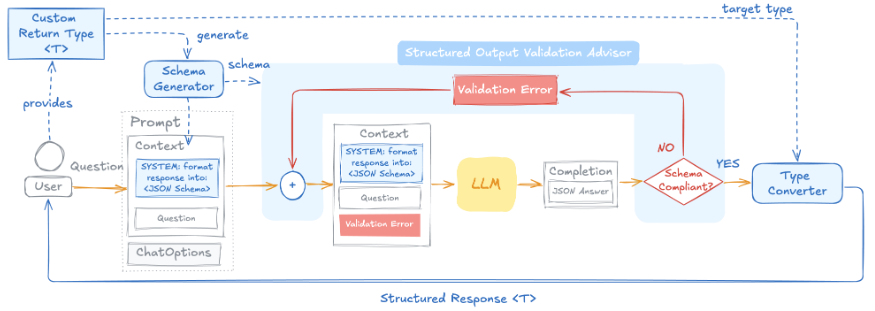
The JSON schema generated from the target type goes into the prompt, and the advisor validates the response against that schema. If the response passes, a type converter turns it into an object. If it fails, the advisor appends the validation error messages to the prompt and calls the sub-chain again. Because the model sees what it got wrong and fixes it, this differs from a retry that repeats the same request. The default number of retries is 3. To change it, register the advisor yourself with maxRepeatAttempts set on StructuredOutputValidationAdvisor.builder(). In the example repository, the Chapter 2 example covered in Tokens and Structured Output uses this approach together with provider-native structured output.
                Recipe recipe = chatClient.prompt()
                        .user("'" + input + "' 요리의 정보를 알려줘. 조리 시간(분)과 대표 재료를 알려줘.")
                        .call()
                        // 네이티브 구조화 출력: JSON 스키마를 Ollama 의 format 옵션으로 전달해 응답을 스키마에 맞게 강제
                        .entity(Recipe.class, spec -> spec.useProviderStructuredOutput().validateSchema());
There are limitations too. JSON can be validated only after the whole response has been assembled, so this advisor throws UnsupportedOperationException with .stream(), and .entity() can follow only .call(). That makes it a better fit for places that return the response all at once, such as batch-style agents or REST APIs, than for chat UIs that need a real-time typing effect.
Where this fits in the 4-tier architecture
ToolCallingAdvisor is the part that actually runs the T2 Orchestration loop. It repeats plan, act, observe, and reflect inside the advisor chain, and depending on order values, memory sits outside the loop while observation and validation sit inside it. Metrics published inside the loop feed into observability, a cross-cutting concern. The next article, Spring AI Agent Architecture, Implementation, and Dynamic Tool Discovery, brings these parts together into an agent architecture and looks at how to find and use only the tools you need once there are many of them.
More in the book
Book section 6.3
- An example that assembles memory, tool calling, and structured output validation advisors into one chain, with a step-by-step explanation of the flow diagram
- The flow of messages recorded in the memory repository when the memory advisor sits inside the loop
- Full code for extracting tool call reasoning with
AugmentedToolCallbackProvider - An example that registers
StructuredOutputValidationAdvisoryourself to change the number of retries - Benefits of the advisor loop: observability, memory integration, and event-driven intervention in the middle of the loop
References
- Recursive Advisors: reference documentation for recursive advisors
- Tool Calling in Spring AI 2.0: A Composable, Agentic Architecture: the tool loop and memory advisor placement
- Self-Correcting Structured Output in Spring AI 2.0: the structured output self-correction loop