Agent Skills: Extending Agent Capabilities with Reusable Skills
The agent built up through the previous article runs on Spring AI core alone. Chat memory, local and MCP tools, dynamic tool discovery, and the approval gate are all core features. Now it is time to add capabilities specialized for agents.
Outside the core, the Spring AI Community supports several incubating projects, such as examples, security, and the Playground. Among them, spring-ai-agent-utils provides the following as tools: skills that bundle capabilities, clarifying questions for ambiguous requests, task planning, and delegation to subagents. Of these, this article covers reusable Agent Skills first. It looks at how skills differ from tools, how an agent finds and loads skills, and how tool calls chain together when a skill runs, and then examines the restock procedure skill in the example repository.
What a skill is: how it differs from a tool
The familiar way to give an agent a new capability is to write a tool class and register it as a bean. Reusable Agent Skills start from a different place. You describe the capability in a Markdown file called SKILL.md and, if needed, put helper scripts and reference material in the same folder. At startup, the agent scans the specified directories to find the skills it can use, and later picks the skill that fits the context of a request and loads it at that moment.
This skill file is a concrete implementation of the "context externalized as Markdown" discussed in the context engineering article. A skill folder holds procedural knowledge and context that differs by organization or user, and it is easy to move as a whole folder or to put under version control. The agent pulls in this folder only when a task needs it. That is why you can see a skill as context engineering in packaged form.
Placing the two approaches side by side makes the differences clear.
| Aspect | Tools implemented in code | Reusable Agent Skills |
|---|---|---|
| Form | Write a class and register it as a bean | SKILL.md and supporting files |
| Changes | Edit the source and recompile | Add files, then restart or load them dynamically |
| Author | Developers | Domain experts, or even users who are not developers |
| Reuse | Bound to the Spring Framework | Reusable across many AI agents and IDEs |
| Context efficiency | Low | High |
The biggest advantage is that you can add or change capabilities without compiling. Put a skill folder into the directory, and the agent recognizes the new capability from its next run. Domain experts who are not developers can write and refine the agent's behavioral guidelines themselves. The skill format is spreading in similar forms across many agent products, so it does not tie you to a particular platform either.
Skill discovery and registration
Skills save context by revealing only as much as is needed, one stage at a time. At startup, the model sees only metadata such as each skill's name and description. The body is read when a task needs that skill, and of the supporting files, only the ones needed during execution are read. Thanks to this approach, known as progressive disclosure, token usage can stay light even with hundreds of registered skills.
This structure consists of three basic tools.
SkillsTool: Finds and registersSKILL.mdfiles in the specified directories, and informs the model of the skills by putting their names and descriptions into its own tool description.FileSystemTools: Lets the model read the skill body and the reference documents the skill points to.ShellTools: Runs helper scripts in the skill folder, such as shell or Python scripts.
Because this structure follows the existing tool specifications as they are, most skill folders you have already written can be reused in Spring AI.
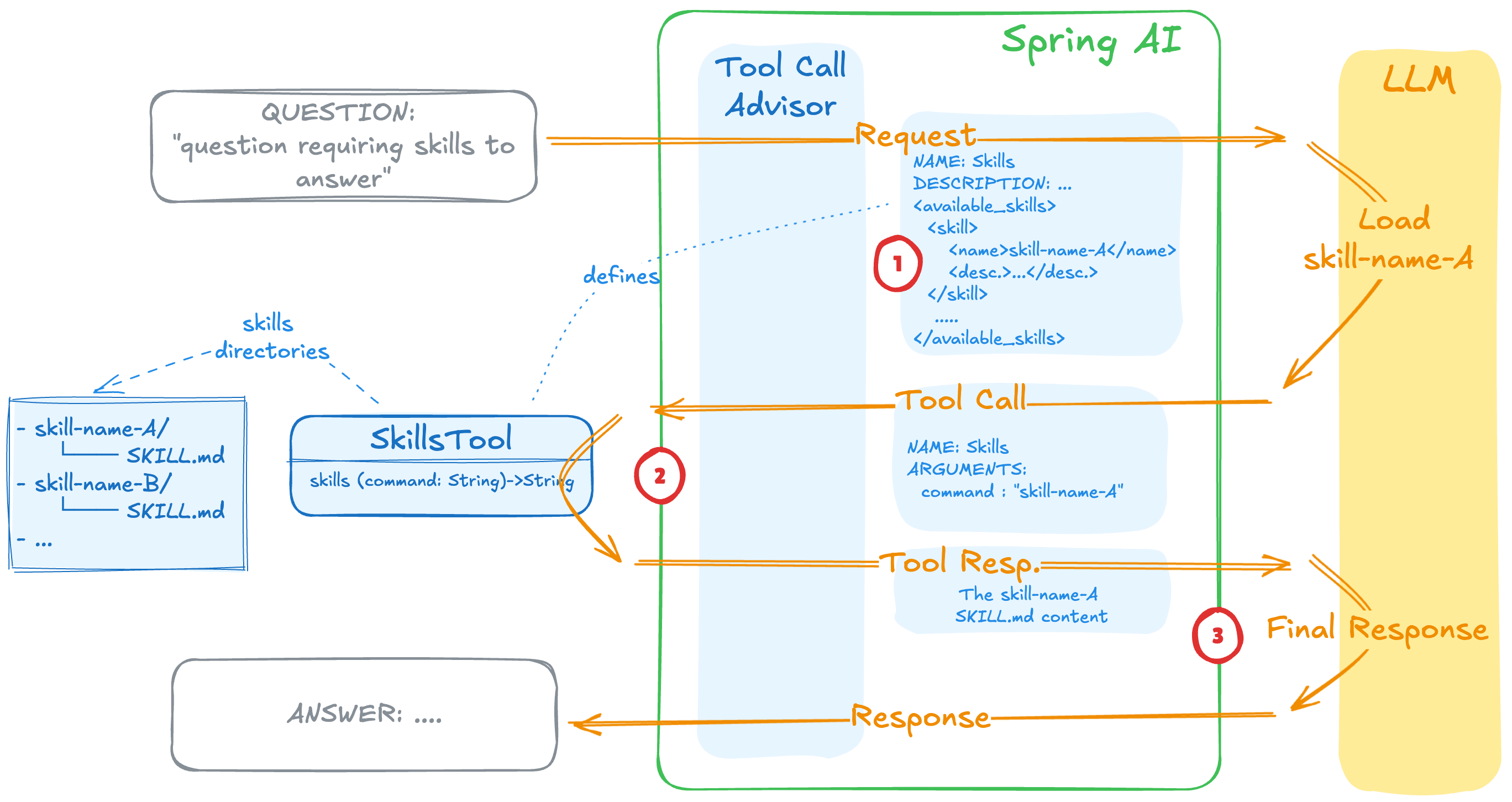
As step 1 in the figure shows, the description of SkillsTool contains the list of available skills, with their names and descriptions. If a skill fits the question, the model calls this tool with the skill name as an argument, as in step 2, and the tool returns the contents of that skill's SKILL.md. Based on these contents, the model produces the final answer in step 3. The model decides which skill to call by reading these descriptions, so the description in the front matter should state clearly both what the skill does and when to use it.
The example repository first adds the community library dependency.
        <dependency>
            <groupId>org.springaicommunity</groupId>
            <artifactId>spring-ai-agent-utils</artifactId>
            <version>0.10.0</version>
        </dependency>
Because the library is still at the incubating stage, builder method names and signatures can change between versions. The example is based on 0.10.0, so for a real project it helps to check the official documentation for the latest version. spring-ai-bom manages the versions of the Spring AI core modules, so even if this library pulls in a lower core version, dependency resolution lines up with the BOM.
The skill tool is created in the metaTools bean of AgentConfig.
    @Bean   // 메타 툴 묶음 - 위임(Task)에 절차, 계획, 질문을 더해 완성
    List<ToolCallback> metaTools(ChatClient.Builder chatClientBuilder) {
        // 위임: 한 작업을 격리된 컨텍스트의 하위 에이전트에 통째로 맡김
        // 하위 에이전트가 쓸 모델, 스킬은 ClaudeSubagentType에서 정함
        var claudeType = ClaudeSubagentType.builder()
                .chatClientBuilder("default", chatClientBuilder.clone())
                // .chatClientBuilder("fast", fastBuilder.clone())
                // .skillsDirectories("src/main/resources/skills")
                .build();
        ToolCallback taskTool = TaskTool.builder()
                .subagentTypes(claudeType)
                .subagentReferences(
                        ClaudeSubagentReferences.fromRootDirectory("src/main/resources/agents"))
                .build();
        // 절차: SKILL.md가 메인 에이전트의 기존 툴을 어떤 순서로 엮을지 알려줌
        ToolCallback skillsTool = SkillsTool.builder()
                .addSkillsDirectory("src/main/resources/skills")
                .build();
Pass a skills directory to SkillsTool.builder() and call build(), and you get a ToolCallback right away. This path is resolved against the file system, not the classpath, so write it as a path relative to the project, such as src/main/resources/skills, rather than classpath:/skills. TaskTool above it is the tool for delegating to subagents, and if you uncomment skillsDirectories(...) in the ClaudeSubagentType builder, you can give skills to subagents as well. The SkillsTool built this way is bundled into a single List<ToolCallback> together with the delegation, planning, and question tools, and goes into the enhanced agent.
The enhanced agent does not include this set of meta-tools among the tools that dynamic tool discovery searches. Instead, it exposes them in every round. A description along the lines of "loads a skill" is semantically distant from a user's domain question, so it may not rank near the top of the search results. For example, a request such as "Go ahead with the restock procedure" needs SkillsTool first, but if that tool is hidden behind search, the model can easily miss it.
The chain of tool calls when a skill runs
Running a single skill is also a flow in which several tool calls follow one another. The model first checks the SKILL.md body through the skill tool. If it needs more reference documents, it calls the read tool, and if there is a script to run, it runs it with the execution tool.
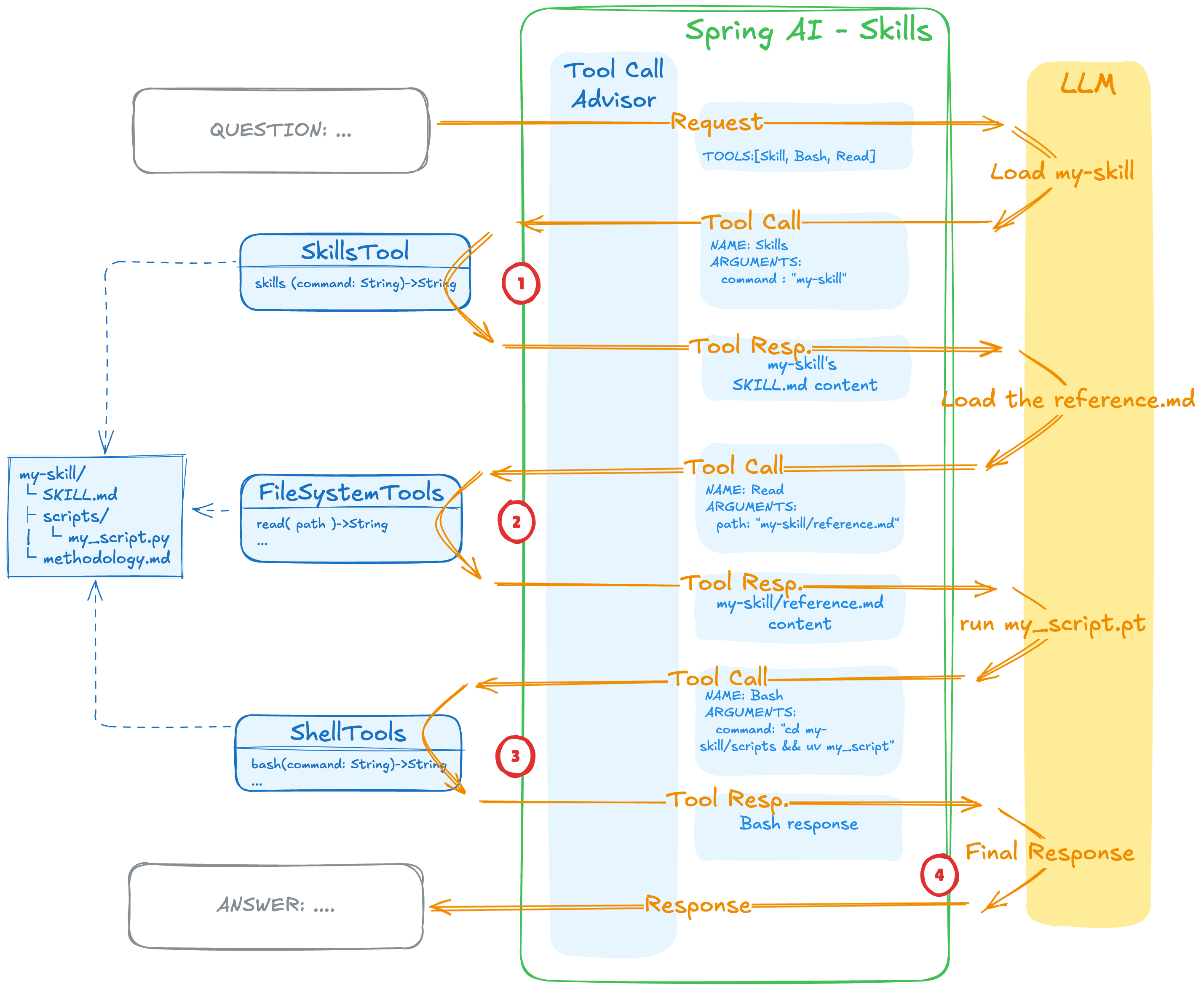
In the figure, the first request the model receives includes only three tools: Skill, Bash, and Read. The model loads the SKILL.md of my-skill in step 1, reads the reference document that the procedure points to in step 2, runs the script in step 3, and then gives the final answer in step 4. The read and execution tools are invoked only when the procedure requires that step. The result of each call accumulates in the context as text, so even as the chain grows longer, all the model receives is the procedure and the execution results.
One thing to note is that the script's source code does not enter the context window. Only the execution result is added to the prompt, so this uses far fewer tokens than putting a long Python script into the prompt in its entirety. In effect, progressive disclosure applies not only to finding skills but equally to running them.
Writing an example skill: the restock procedure
In the example repository, src/main/resources/skills contains one skill, restock-policy. It is a procedure that calculates the restock quantity for items running low on stock according to internal company standards and goes on to place the order.
---
name: restock-policy
description: 재고가 소진된 품목의 재발주 수량을 사내 기준으로 산정하고 발주까지 진행하는 절차. 재발주와 발주를 검토하거나 처리할 때 사용한다.
---
재발주를 검토하고 처리하는 사내 절차입니다. 아래 순서대로 툴을 사용해 진행합니다.

1. `check_stock` 툴로 대상 SKU의 현재 재고를 조회합니다.
2. 재발주 수량을 산정합니다. 안전재고 기준은 50개이며, 현재 재고가 안전재고보다 적으면 그 부족분(50 − 현재 재고)을 발주 수량으로 합니다. 현재 재고가 50개 이상이면 발주하지 않습니다.
3. 발주 수량이 0보다 크면 `place_purchase_order` 툴을 직접 호출해 그 수량을 발주합니다. 사용자에게 되묻지 말고 호출하세요. 실행 승인은 시스템이 자동으로 처리합니다.
4. SKU, 현재 재고, 발주 수량을 한국어로 정리해 보고합니다.
name in the front matter is the name the model passes when it calls the skill tool, and description states both what the procedure does and when to use it. The body has four steps: check the stock with check_stock, set the order quantity to however much the stock falls short of the 50-unit safety stock, place the order with place_purchase_order, and report the result.
This skill does not create any new tools. check_stock and place_purchase_order are remote tools that the operations MCP server already exposes, and the skill only tells the agent in what order to use them. The agent's tool loop makes the actual calls. Step 3 instructs the model not to ask the user before placing the order and states that the system handles execution approval. In fact, place_purchase_order goes through the approval gate from the previous article right before it runs. This skill also consists of a single SKILL.md with no helper scripts or reference documents, and the metaTools bean registers only SkillsTool, without FileSystemTools or ShellTools.
The enhanced agent's system prompt (spring.ai.cli.agent.enhanced.system-prompt) also contains rules for using skills.
        enhanced:
          system-prompt: |
            당신은 사용자의 요청을 끝까지 처리하는 AI 에이전트입니다.
            - 사내 절차, 정책(재발주, 재고 산정 등)에 관한 일이면, 먼저 SkillsTool로 관련 스킬을 불러와 그 절차를 그대로 따릅니다. 절차서에 기준, 수치(예: 안전재고)가 있으면 사용자에게 되묻지 말고 그대로 적용합니다.
            - 여러 단계가 필요한 작업은 작업 계획 툴로 할 일 목록을 만들고 단계별로 처리합니다.
            - 무엇을 원하는지 자체가 불분명할 때만 명확화 질문을 던집니다. 따라야 할 절차가 스킬에 있으면 질문하지 않습니다.
            - 명확화 질문의 답을 받으면 멈추지 말고, 그 답을 반영해 나머지 작업을 툴로 끝까지 진행합니다.
            - 보고서 작성처럼 독립적인 하위 작업은 하위 에이전트에 위임할 수 있습니다.
            - 작업에 필요한 툴이 있으면 직접 호출하고, 결과를 확인한 뒤 다음 행동을 결정합니다.
            - 툴로 확인하지 않은 사실은 단정하지 않습니다.
            - 모든 작업이 끝나면 수행한 내용을 한국어로 간결하게 요약합니다.
The first item instructs the agent that, for work involving internal procedures or policies such as restocking or stock calculations, it should first load the relevant skill with SkillsTool and follow it, and should not ask for clarification when the procedure already specifies the standard figures. Clarifying questions are narrowed to cases where what the user wants is itself unclear, so that work for which a skill already provides the procedure goes ahead without questions.
The run step that uses this skill is ch6-step6. Start the operations MCP server first, then run the client with --spring.ai.cli.step=ch6-step6. The Ch6Step6_Orchestration runner then asks the agent to check the stock of one of SKU-100, SKU-200, and SKU-300 and, following the internal restock policy, to go as far as placing an order if needed. The next article shows, together with the run output, how the skill, clarifying questions, and the approval gate work together within a single request.
Cautions for production environments
Skills offer a lot of freedom, since they can extend an agent's capabilities with nothing but Markdown and scripts, without changing any code. In an enterprise production environment, that very freedom becomes a risk that needs strict control, because letting the model decide on its own to run arbitrary shell commands through ShellTools can lead to security incidents that are hard to predict.
So it helps to run scripts in a sandbox isolated from the main service and to keep file and network access permissions to a minimum. The community library does not provide a built-in safeguard that gets user approval before running a tool. For operations that change data or system state, design them to go through human approval by combining them with a human-in-the-loop workflow. Also worth thinking through are policy-based controls that block certain tools from running at all, according to the organization's security policy, and governance that adjusts tool exposure so that the wrong operation does not run among the many skills.
Where this fits in the 4-tier architecture
Skills belong to the T3 Capability tier. A SKILL.md folder is a bundle of capabilities that sits outside the code, and SkillsTool connects that bundle to the agent as a tool it can call. The enhanced agent in T2 Orchestration always exposes SkillsTool as a meta-tool and calls domain tools following the procedure the skill provides. The next article bundles clarifying questions, task planning, and delegation to subagents, together with skills, as meta-tools to complete the agent CLI: An Enterprise Spring AI Agent CLI: Multi-Agent and Meta-Tool Orchestration
More in the book
Book sections 6.5, 6.5.1, 6.6.5
- An example
SKILL.mdfor acode-reviewerskill, and code that registersSkillsTool,FileSystemTools, andShellToolstogether on aChatClient - Step 4, which connects the RAG subagent on the knowledge MCP server as a single tool, and its run output
- Step 5, which hands report writing to a subagent with
TaskTooland thereport-writerdefinition file - The implementation of
OrchestrationToolCallingAdvisor, which always exposes meta-tools and searches only domain tools, and why it overrides the system prompt suffix
References
- Spring AI Agentic Patterns (Part 1): Agent Skills: how to combine
SkillsTool,FileSystemTools, andShellToolsto build reusable Agent Skills