RAG Architecture and the ETL Pipeline: Turning Documents into Knowledge
The previous article showed how MessageChatMemoryAdvisor attaches the earlier conversation to the prompt before sending it. That is a basic way to pass information the model does not know along with the question. Gigabytes of accumulated internal documents, however, cannot fit into a prompt as a whole, so you have to select only the parts related to the question. This way of searching for the parts you need and attaching them is retrieval augmented generation (RAG), the topic of Chapter 3.
Spring AI does not treat RAG as a single search feature. It designs RAG as a data pipeline that collects, refines, and stores documents in advance, then pulls them out when a question comes in. This article looks at why LLMs need external data and at the RAG architecture. It then walks through the ETL pipeline at the front of that architecture in the order DocumentReader, DocumentTransformer, and DocumentWriter, with example code.
Questions LLMs cannot answer
When you try to use an LLM for business work, you run into three limitations.
- It does not know what happened after training. Its knowledge stops at the point when training ended (the cut-off date), so it does not know today's stock prices or newly amended laws. Retraining a model every day would cost far too much.
- It makes up plausible falsehoods. An LLM is not a database that stores facts. It is a generation engine that picks, by probability, the word that follows the preceding context. Hallucination, where a model gives answers that sound factual even about things it does not know, becomes a legal and financial risk in medical, legal, and financial services.
- It has never seen the data inside your company. Internal wikis and private policy documents are not in the training data of public models, so no model can answer a question about "our company's refund policy."
To get past these three limitations, you need a way to give the model information it was not trained on, safely and accurately. In the book, this area that the model does not know is called the data gap.
Why inject knowledge into the prompt instead of fine-tuning
There are two main ways to fill the data gap.
The first, fine-tuning, adjusts a model's weights with a prepared dataset so that it learns specialized terms or a company's own tone. Once training ends, however, the knowledge stops again, so you have to retrain every time a policy changes. GPUs and training time are expensive, and forcing domain knowledge in can cause catastrophic forgetting, where learning new information degrades knowledge and abilities the model already had. For that reason, Spring AI does not support model training and instead focuses on integrating already trained models into applications.
The second, prompt stuffing, injects reference documents into the prompt at the time of the question and sends them along. It is less like a closed-book exam you answer from memory and more like an open-book exam. Putting in a huge set of documents, though, exceeds the token limit and drives up cost, so you search the vector database for just a few chunks that are semantically close to the question and put only those in. This is RAG. It works well for text you can collect in advance, such as manuals and internal wikis, and when documents change, you only need to update the vector database.
Tool calling also puts external information into the prompt, but who makes the decision differs. In RAG, the system searches according to rules the developer defines. In tool calling, the model requests the execution of an external API when it decides that it needs one. Tool calling, which suits real-time lookups and system control, is covered in the article on designing tool calling.
The offline phase and the runtime phase
The RAG architecture in Spring AI is divided into an offline phase, which prepares data in advance, and a runtime phase, which answers questions in real time.
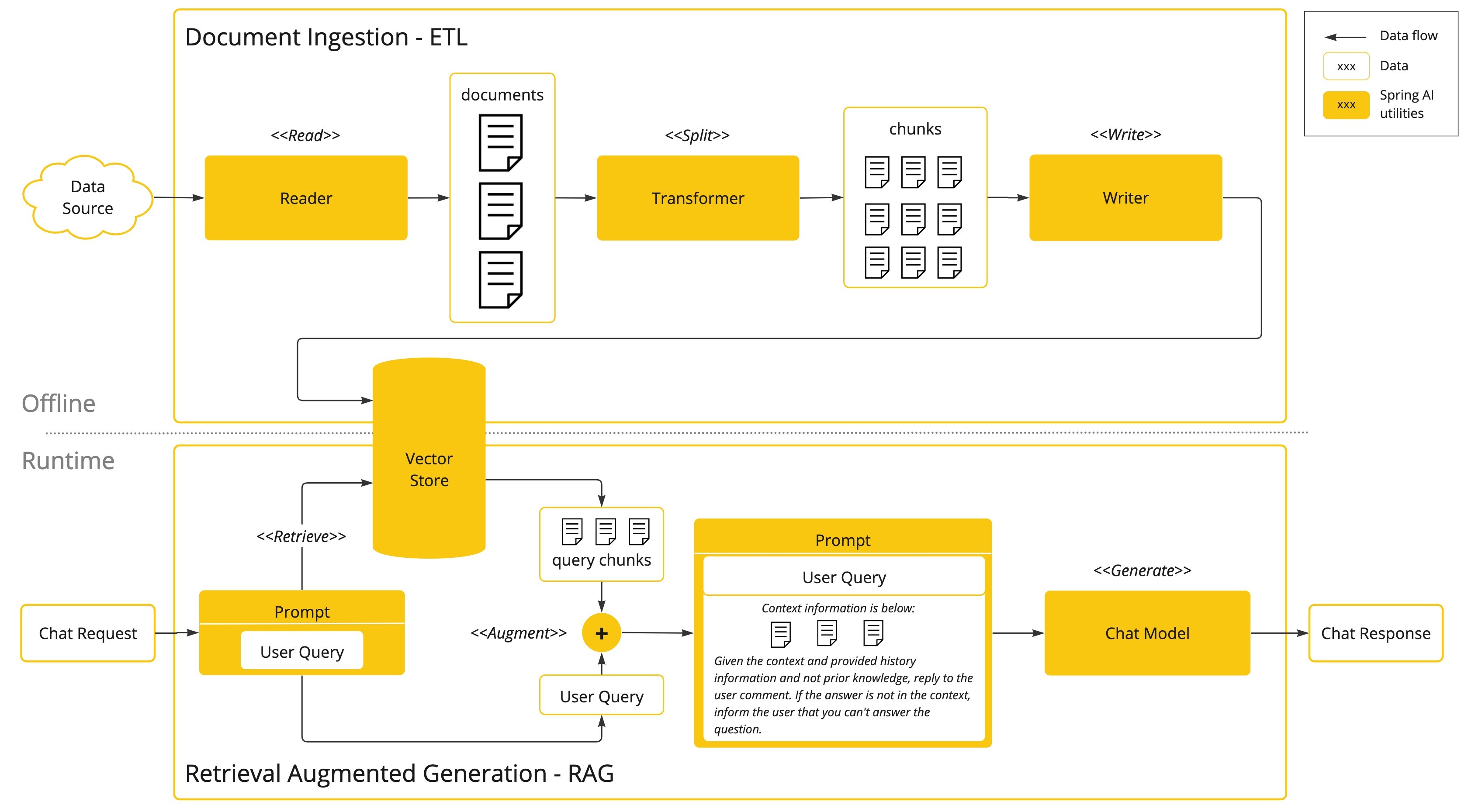
The offline phase at the top of the figure is the ETL pipeline. It is a batch job that runs once or periodically. It takes time and money, but this is where the accuracy of runtime search is decided.
- Extract: Reads the original content from files or URLs through Spring's resource abstraction, parses it, and preserves metadata such as the source.
- Transform: Splits documents into chunks that follow units of meaning and token limits, adds metadata such as keywords and summaries, and then converts each chunk into a vector with an embedding model.
- Load: Stores the vector, the original text, and the metadata as a single record and builds an index for search.
The embedding model and dimensions used at storage time must be the same ones used later to convert questions into vectors. With a different model, the vector space is different, and the search returns irrelevant documents.
The runtime phase at the bottom of the figure runs for every question. It converts the question into a vector with the same embedding model and retrieves the N closest chunks from the vector database. Instead of a LIKE search that matches words, it measures the distance in meaning with calculations such as cosine similarity, so it finds content with the same meaning even when the wording differs. When the retrieved chunks are assembled with the question into a prompt template (augmentation), the model generates an answer based on that context (generation).
Because the two phases are separate, you can also fix problems separately. If answers draw on irrelevant documents, you adjust the offline splitting and metadata strategy. If responses are slow, you tune the runtime search settings and ChatModel parameters. Each phase is abstracted behind interfaces, so even if you change the embedding model or the vector database, you can leave the pipeline code almost unchanged.
Document and the three interfaces
The unit of data that the stages of the ETL pipeline pass between them is Document.
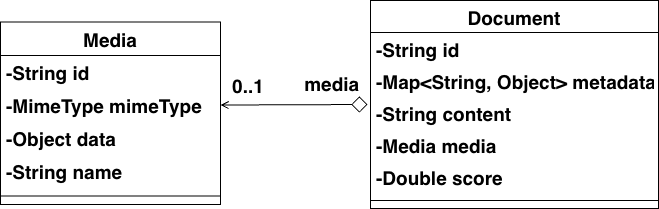
A Document consists of an id identifier, the body text, media for images or audio, key-value metadata such as the source, and a score that holds the similarity of a search result. Either text or media, but not both, is used as the main content. metadata serves as a filter condition in RAG search. There is no field for the vector. The embedding is created when the document is stored in a VectorStore and is managed inside it.
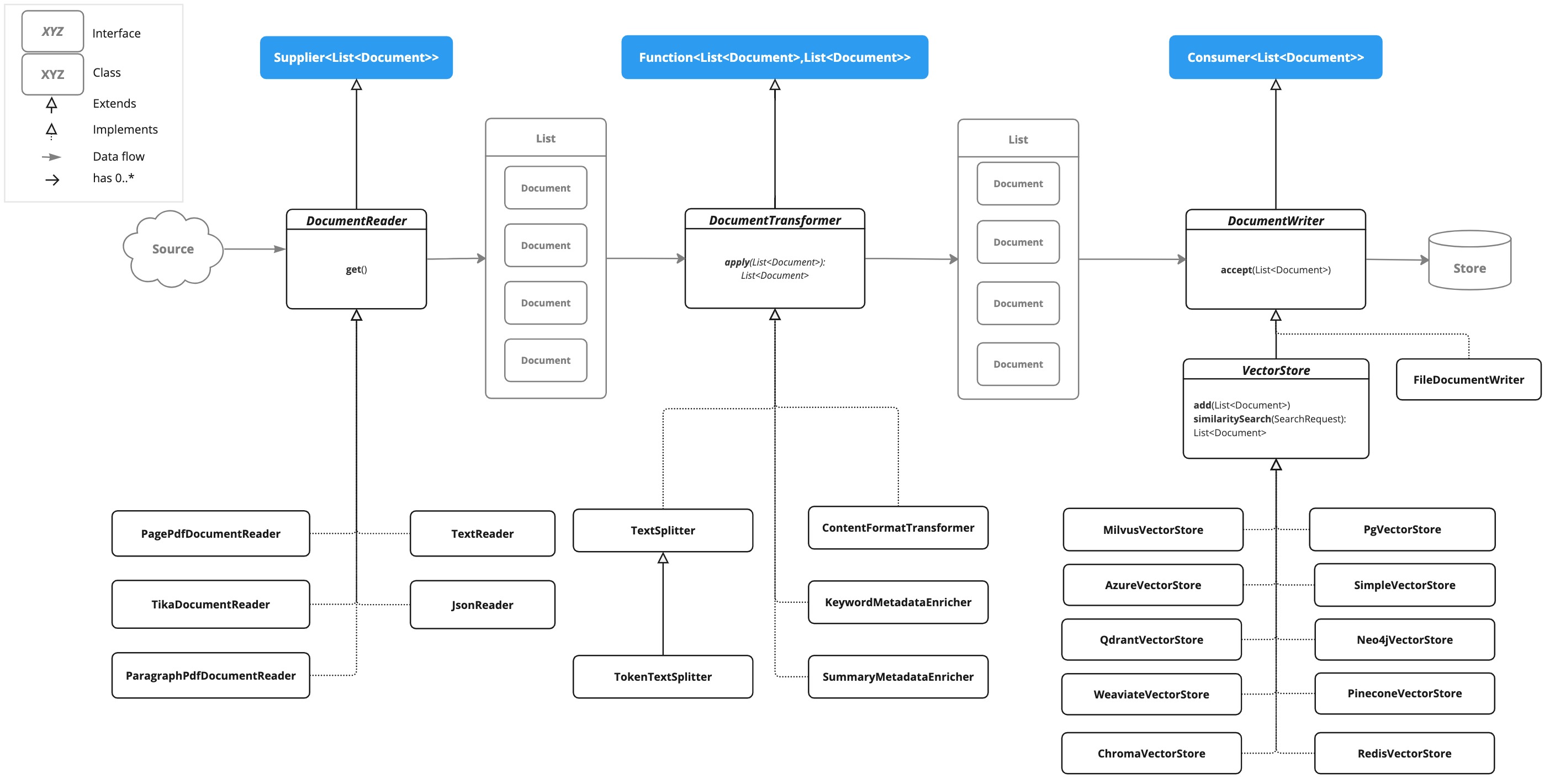
The three interfaces extend Java functional interfaces, and they also provide default methods whose names reflect their role in ETL.
| Stage | Interface | Extends | Methods | Example implementations |
|---|---|---|---|---|
| Extract | DocumentReader |
Supplier<List<Document>> |
get(), read() |
TextReader, JsonReader, PagePdfDocumentReader, TikaDocumentReader |
| Transform | DocumentTransformer |
Function<List<Document>, List<Document>> |
apply(), transform() |
TokenTextSplitter, KeywordMetadataEnricher, ContentFormatTransformer |
| Load | DocumentWriter |
Consumer<List<Document>> |
accept(), write() |
FileDocumentWriter, VectorStore implementations |
One thing to note about the load stage is that VectorStore extends DocumentWriter. That means you can use a vector store directly as the last stage of the pipeline, with no adapter.
DocumentReader: choosing a reader for the format
Spring AI provides readers for each format, so instead of writing parsing code yourself, you can pick the one that fits. TextReader and JsonReader are in spring-ai-commons, which every model starter includes, so you do not need to add a separate dependency. For the PDF, Markdown, HTML, and Tika readers, you add their dedicated modules. Step 1 of the Chapter 3 example runs four representative readers in turn.
    @Override
    public void run(String... args) {
        System.out.println("=== [Ch3] Step1: DocumentReader ===");

        List<Document> textDocs = simpleTextReader.readWithMetadata();
        printPreview("TextReader", textDocs);

        List<Document> bikeDocs = jsonDocReader.readBikesWithMetadata();
        printPreview("JsonReader", bikeDocs);

        List<Document> markdownDocs = markdownDocsReader.loadMarkdown();
        printPreview("MarkdownDocsReader", markdownDocs);

        List<Document> htmlDocs = webPageReader.readArticleContent();
        printPreview("WebPageReader", htmlDocs);
    }

    private void printPreview(String title, List<Document> documents) {
        System.out.printf("%n[%s] document count: %d%n", title, documents.size());
        documents.stream().limit(2).forEach(doc -> {
            String text = doc.getText().replaceAll("\\s+", " ");
            System.out.println("- " + text.substring(0, Math.min(text.length(), 120)));
            System.out.println("  metadata: " + doc.getMetadata());
        });
    }
The four components called in the code are example classes that wrap Spring AI readers. SimpleTextReader uses TextReader to read an entire file as a single Document and attaches the collection date, category, and version as metadata. JsonDocReader passes the JSON pointer /store/bikes to JsonReader, creates a Document for each bike, and copies the brand, model, and price into metadata. MarkdownDocsReader splits documents at horizontal rules, and WebPageReader extracts only the body paragraphs with the CSS selector article p. The formats differ, but the result is the same List<Document>, so printPreview() checks them all with just getText() and getMetadata().
If you do not know the format in advance or several formats are mixed, TikaDocumentReader, based on Apache Tika, is convenient. It detects the format from the file header and extracts text from dozens of document types such as Word, Excel, and HWP, but it loses structure such as tables and pages. To cite page numbers as sources in answers, you need a dedicated reader such as PagePdfDocumentReader, which records a page_number for each page. The book recommends adopting readers in stages: start quickly with Tika, then switch to dedicated readers once quality and source tracking become important.
For data that does not live in files, such as a database or a REST API, you implement get() of DocumentReader yourself to read it. If you put access control information such as department or job level into the metadata at this point, you can filter documents so that answers use only those that match the user's permissions.
DocumentTransformer: splitting, refining, and enriching
Documents that a reader has read are often larger than the context window or mixed with unnecessary information, so they are hard to use as they are. The quality of the data that goes in determines the quality of the answers, so you refine it with transformers.
The basic tool for chunking is TokenTextSplitter. It extends TextSplitter, an abstract class that implements DocumentTransformer, and splits text by the number of tokens counted with the CL100K_BASE encoding rather than by the number of characters (800 tokens by default). After cutting by token count, it moves the boundary back to the last punctuation mark in the chunk, as long as that mark lies past the minimum character count, which reduces the number of sentences that get cut off. The original metadata is copied to every chunk. This token count can differ from the count of the actual model's tokenizer, and Korean tends to use a lot of tokens, so it helps to take the language into account when you set the chunk size.
On the formatting side, DefaultContentFormatter defines the format for combining metadata and body text into one string, as well as the keys to exclude from the text used for embedding and from the text used for inference. ContentFormatTransformer applies this formatter to documents. KeywordMetadataEnricher and SummaryMetadataEnricher call ChatModel to add keywords and summaries to the metadata. The summary enricher can also create summaries of the previous and next chunks, which carries context across chunks with less storage than chunk overlap, where the neighboring text is stored redundantly. Since it calls the LLM once per chunk, however, you need to weigh the cost.
When you chain several transformers, the output of one stage becomes the input of the next, so order matters. Step 2 runs masking, formatting, and splitting in turn.
        List<Document> sourceDocs = knowledgeBase.loadRawDocuments();
        List<Document> maskedDocs = piiMaskingTransformer.transform(sourceDocs);
        List<Document> formattedDocs = contentFormatExample.formatDocuments(maskedDocs);

        var splitter = TokenTextSplitter.builder()
                .withChunkSize(180)
                .withMinChunkSizeChars(50)
                .withMinChunkLengthToEmbed(20)
                .withMaxNumChunks(20)
                .withKeepSeparator(true)
                .build();

        List<Document> chunks = splitter.split(formattedDocs);
loadRawDocuments() uses the four readers from Step 1 to load the document files in the data directory. PiiMaskingTransformer implements DocumentTransformer directly and masks email addresses and phone numbers with regular expressions. This has to happen before the documents are split, so that a phone number cannot be divided across two chunks and slip past the masking. Next, CustomContentFormatExample assigns each document a formatter that defines the keys to exclude and the template for displaying metadata. This rule also needs to be set before splitting so that every chunk inherits the same rule. Keyword and summary enrichment, which uses the LLM, has to be done for each chunk, so it comes after splitting. The full flow, continuing through enrichment, is in the DocumentProcessingPipeline example.
DocumentWriter and completing the ETL pipeline
Loading is handled by DocumentWriter. The final destination in RAG is a vector database, but during development, writing to a file with FileDocumentWriter lets you check with your own eyes whether chunks were split as intended and whether metadata was attached correctly. FileEtlPipeline is a small ETL pipeline that puts extract, transform, and load into a single method.
    public EtlResult runPipeline(Resource sourceFile, Path outputPath) {
        // 1. Extract: 리소스 읽기
        TextReader reader = new TextReader(sourceFile);
        // [중요] TextReader는 페이지 정보가 없으므로, 마커 테스트를 위해 강제로 값을 삽입
        reader.getCustomMetadata().put("page_number", 1);
        reader.getCustomMetadata().put("end_page_number", 1);
        List<Document> originalDocs = reader.read();

        // 2. Transform: 텍스트 분할
        TokenTextSplitter splitter = TokenTextSplitter.builder().build();
        List<Document> splitDocs = splitter.apply(originalDocs);

        // 3. Load: 파일로 쓰기
        createParentDirectory(outputPath);
        FileDocumentWriter writer = new FileDocumentWriter(
                outputPath.toString(),
                true,       // withDocumentMarkers: true (마커 포함)
                MetadataMode.ALL,
                false       // append: false (덮어쓰기)
        );
        writer.write(splitDocs);
        return new EtlResult(outputPath, splitDocs.size());
    }
It reads with TextReader, splits with a TokenTextSplitter in its default configuration, and writes with FileDocumentWriter. The constructor arguments are, in order, the output path, whether to use document markers, the scope of metadata to write, and whether to append. The marker shows a page range, but a text file has no page information, so the code sets page_number and end_page_number directly. In the run output shown in the book, target/chapter3-etl-output.txt contains the line ### Doc: 0, pages:[1,1], followed by metadata such as source and chunk_index and then the body text.
To load into another system, you implement accept() of DocumentWriter yourself. LoggingDocumentWriter, which runs in Step 3, is a custom writer that logs each document's ID and body length. The VectorStore used in RAG also receives the same list of Document objects, converts the text into vectors internally with an embedding model, and then stores them.
Where this fits in the 4-tier architecture
The Document model and the ETL pipeline belong to the Foundation (T4) tier. Among the underlying resources that the Orchestration and Capability tiers use, they take care of data, turning internal documents into searchable knowledge ahead of time. RAG, which finds this data at question time and puts it into the prompt, is a capability (T3) that the agent uses, and it is implemented in the From Naive RAG to Modular RAG article. Before that, the next article, Embedding Models and Vector Databases, looks at where the load step sends its data.
More in the book
Book sections 3.1-3.4
- A comparison table of RAG and tool calling, the work in each ETL stage, and the detailed steps of the transform stage
- JSON pointers and the metadata generator in
JsonReader, and the differences between the two PDF readers - Options for the Markdown and HTML readers, with results compared across settings
- The pros and cons of general-purpose and dedicated readers, and custom readers for databases and REST APIs
- How
TokenTextSplittersplits text and its parameter defaults, formatter templates, andMetadataMode - Custom templates for the keyword and summary enrichers, custom transformers, and
FileDocumentWriteroptions
References
- Prompt Stuffing: the prompt stuffing concept in the Spring AI reference
- Retrieval Augmented Generation: a flow diagram divided into offline ETL and runtime RAG
- ETL Class Diagram: a diagram of the ETL interfaces and implementation classes
- Apache Tika: the document parsing library that
TikaDocumentReaderuses