Designing Tool Calling: How LLMs Connect to the Real World
Summarizing documents or writing drafts can be handled with just the model's knowledge and the documents that RAG finds. But many of the business tasks you want to hand off to AI require acting on outside systems, such as checking today's inventory, submitting an approval request to the ERP, or sending an email to a customer. The Modular RAG from the previous article finds the knowledge an answer needs, but it does not change the state of external systems. Tool calling is the technology that bridges this gap.
This article covers tool calling design, the first part of Chapter 4. It starts with OpenAI's function calling flow to see what problem tool calling grew out of, then looks at the interfaces Spring AI uses to divide up that flow. After that, it goes through, in order, tool definitions that describe tools to the model, tool context that passes execution information without the model seeing it, return direct that keeps tool results from going back to the model, and converters that turn return values into strings.
The emergence of tool calling
There are three reasons an LLM cannot work with external systems directly. First, its knowledge stops at training time, so it does not know about anything after that. Second, it is a model that generates text, so it cannot execute code such as calling an API or inserting a record. Ask it about the weather in Seoul, and all it can offer is a sentence guessed from the season. Finally, enterprise ERP, CRM, messaging, and payment systems each have their own API specifications and authentication methods, so you cannot train the model on how to integrate with all of them or spell each one out in the prompt.
Early on, the current date or search results were pasted into the system prompt, but token costs grew as the information grew. RAG largely solved the knowledge cutoff problem, but it does not perform operations that change state. Writing code that calls an API is familiar work for developers. The hard part was designing a flow in which the model interprets a natural language request, decides on its own which API to call, when, and with what arguments, and then turns the result back into an answer.
The first to present this flow was function calling, which OpenAI released in June 2023. Functions were originally defined in a functions field, but as models expanded to cover a code interpreter and file search, this changed to a tools array. A function is now one kind of tool, defined with "type": "function". The key point is that the model does not execute the function. The model only proposes, in JSON, which tool to call with which arguments, and the application handles the actual execution.
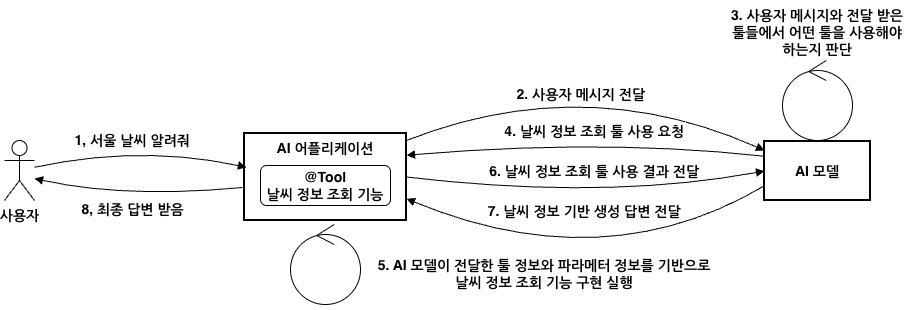
The figure shows what the application and the model exchange in a conversation that asks about the weather. The application sends the user message to the model along with the name, description, and parameter schema of the getCurrentWeather tool in the tools array (1-2). If the model decides this tool is a good fit, it extracts the location argument from the message and returns the call information in tool_calls (3-4). A finish_reason of "tool_calls" at this point means the model has not finished its answer but has paused to wait for the tool result. The application runs the weather lookup, appends the result to the conversation history as a role: "tool" message, and sends it back. The tool_call_id links each result to the call it belongs to (5-6). The final answer that the model builds from this result comes back in a response whose finish_reason is "stop", and the application delivers it to the user (7-8).
Before tool calling, developers specified the output format in the prompt and parsed responses with regular expressions, so parsing failed whenever the model broke the format. As more models officially supported tool calling, applications could reliably receive JSON. Frameworks now had to help developers focus on integrating business functions instead of parsing responses, and to unify the tool calling formats that differ from model to model.
Characteristics and flow of Spring AI tool calling
Tools do two kinds of work. Information retrieval fetches information from databases, web services, and search engines. Taking action triggers operations in a system, such as sending an email or creating a record. Where RAG is mostly about reading, tool calling does both reading and writing whenever the need arises during reasoning. Tool calling looks like a capability of the model, but the model has no authority to execute tools. The model only makes requests, and execution always happens in the application. This boundary is also significant for security.
Spring AI wraps this flow in an abstraction that is not tied to any particular provider. When you register a method or function as a tool, the framework handles conversion to the provider's format, detection of tool call requests, execution, and delivery of the results.
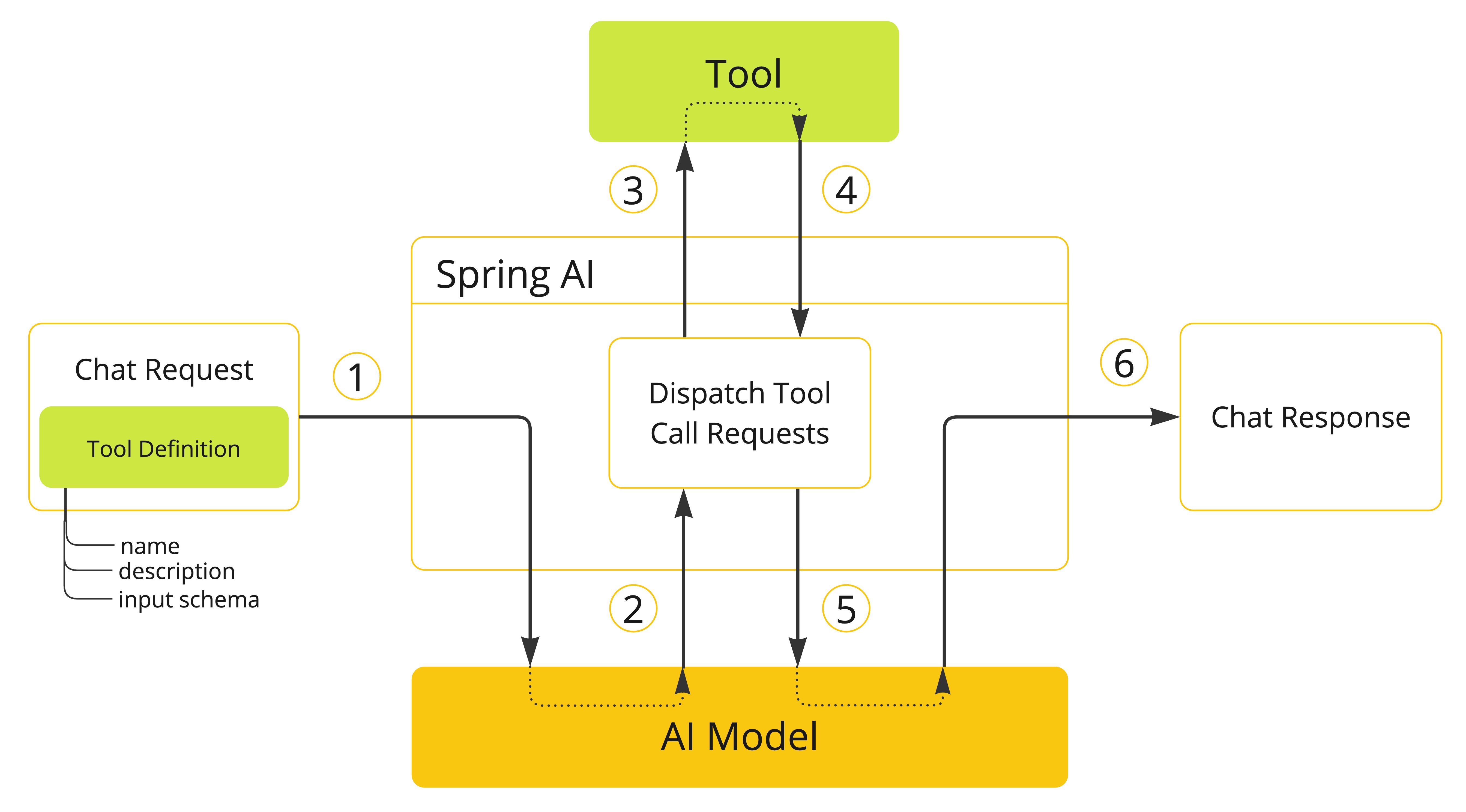
When a request carrying tool definitions (name, description, and input schema) is sent (1), the model responds with a tool name and arguments (2). The application finds the tool by that name and runs it (3, 4), then returns the result to the model (5), and the model uses the result as context to generate the final response (6).
If you implemented this process yourself, you would have to write JSON schemas by hand, branch every time on whether a response is text or a tool call, deserialize the arguments into Java objects, and then match tool names to methods with conditional statements. You would also have to serialize the results into tool messages, append them to the conversation history, and call the model again. Spring AI splits this repetitive work across three interfaces.
ToolCallback: Wraps the definition and execution of a single tool. The framework analyzes method or function signatures to create this definition automatically.ToolCallingManager: Manages the tool execution lifecycle. When a tool call response is detected in the advisor chain, it converts the arguments, runs the tool, and adds the result to the conversation history as a tool message so that the model is called again.ToolCallbackResolver: Resolves the tool name that the model sends as a string to the actualToolCallbackobject. You do not need a conditional statement for each name.
Developers just write business logic as methods and register them as tools, leaving the implementation details of the protocol for exchanging messages with the model to the framework.
Tool definitions: name, description, and schema
In Spring AI, every tool becomes a ToolCallback implementation, however it was created. This interface separates the definition, which is for the model, from the execution, which is for the application. getToolDefinition() returns the definition, and call() runs the actual code with the JSON input sent by the model.
The definition, ToolDefinition, consists of three elements: name, which must be unique within the set of tools passed to the model, description, which the model uses to decide when to use the tool, and inputSchema, which holds the parameter structure. The framework collects these definitions and builds a prompt that tells the model which tools it can use. So if a definition is vague, the model can easily go wrong as early as the step of choosing a tool.
    public static ToolDefinition manualCurrentDateDefinition() {
        return ToolDefinition.builder()
                .name(ToolNames.CURRENT_DATE)
                .description("오늘 날짜를 yyyy-MM-dd 형식으로 반환합니다.")
                .inputSchema("""
                        {
                          "type": "object",
                          "properties": {},
                          "additionalProperties": false
                        }
                        """)
                .build();
    }

    public static ToolCallback methodToolCallback(DateTimeTools dateTimeTools) {
        try {
            Method method = DateTimeTools.class.getMethod("currentDate");
            return MethodToolCallback.builder()
                    .toolDefinition(manualCurrentDateDefinition())
                    .toolMetadata(ToolMetadata.builder().returnDirect(false).build())
                    .toolMethod(method)
                    .toolObject(dateTimeTools)
                    .build();
        } catch (NoSuchMethodException ex) {
            throw new IllegalStateException("currentDate 메서드를 찾을 수 없습니다.", ex);
        }
    }
ToolDefinition.builder() sets the three elements directly, and the MethodToolCallback builder receives the definition, the metadata, and the method and object to execute as separate inputs. The code directly reflects the split between the information the model sees and the information the application uses for execution. The JSON in inputSchema is not the whole request but a fragment for the parameters, and because this tool takes no parameters, properties is empty. When sending to a provider such as OpenAI, Spring AI assembles the provider's format by placing the name and description at the top and this fragment under parameters.
However, if you edit the JSON string every time a parameter changes, mistakes with brackets and commas are common. So you usually let JsonSchemaGenerator analyze method parameters or object fields and generate the schema. Here are the same current_date tool and a current_datetime tool that takes a time zone, declared with annotations.
    @Tool(
            name = ToolNames.CURRENT_DATETIME,
            description = "현재 날짜와 시간을 IANA 시간대 기준으로 반환합니다. 시간대가 없으면 Asia/Seoul을 사용합니다.")
    public String currentDateTime(
            @ToolParam(required = false, description = "IANA 시간대 ID. 예: Asia/Seoul, America/New_York")
            String zoneId) {
        try {
            String normalizedZoneId = normalizeZoneId(zoneId);
            return ZonedDateTime.now(java.time.ZoneId.of(normalizedZoneId))
                    .format(DATE_TIME_FORMATTER);
        } catch (ZoneRulesException ex) {
            return "알 수 없는 시간대입니다. 예: Asia/Seoul, UTC, America/New_York";
        }
    }

    @Tool(
            name = ToolNames.CURRENT_DATE,
            description = "오늘 날짜를 yyyy-MM-dd 형식으로 반환합니다.")
    public String currentDate() {
        return LocalDate.now().toString();
    }
You add parameter descriptions with @ToolParam. If a parameter is an object, annotations you may already use are also recognized, such as Jackson's @JsonClassDescription and @JsonPropertyDescription or Swagger's @Schema, and schemas are generated the same way for nested types as well. A parameter without any marking goes into required. When a value is marked as required but the context has no information for it, the model is likely to make it up, so you mark values that can be omitted, such as zoneId, with required = false. If several markings that decide whether a parameter is optional overlap, they take precedence in the order @ToolParam, @JsonProperty, @Schema, @Nullable.
Tool context and return direct
Besides the arguments the model generates, a tool sometimes needs values that only the application knows, such as the logged-in user, a tenant ID, or a conversation ID. The model does not know who is logged in, so it cannot produce these values as arguments. Tool context carries these values with the request and hands them over only when the tool runs. Because the context is not sent to the model, tool logic can use it without exposing internal information.
Return direct (returnDirect) is a setting that changes where the result goes. By default, a tool result goes back to the model and becomes material for the final answer, but with this attribute turned on, the result returns straight to the caller. You use it when you want to show retrieved source material without a summary, when you need to stop the AI's involvement and hand over control, as when connecting a customer to a human representative, or when the model's wording is not needed, as with a tool that only has to deliver a download URL.
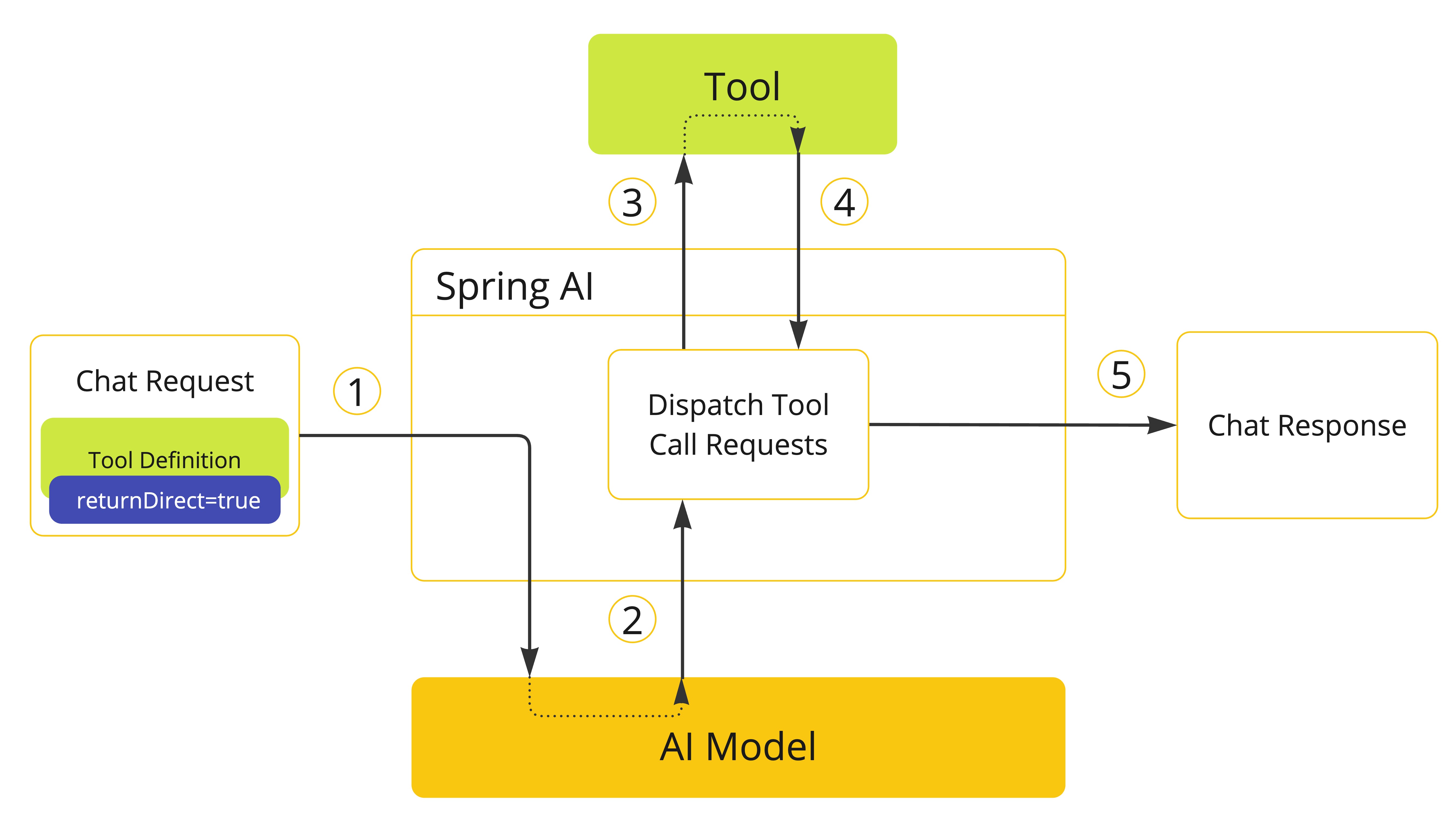
In the figure, the tool execution result becomes the response right away, without going through the model again. ToolCallingManager makes this branching decision based on the tool's returnDirect value. If the model requested several tools at once, the flow ends this way only when all of them are set to return direct. If even one is not, all the results are sent to the model.
    public static ToolCallback sessionSummary(boolean returnDirect) {
        BiFunction<SessionSummaryRequest, ToolContext, String> sessionFunction = (request, context) -> {
            Map<String, Object> values = context.getContext();
            Object userName = values.getOrDefault("userName", "anonymous");
            Object conversationId = values.getOrDefault("conversationId", "unknown");

            return """
                    세션 요약
                    - 사용자: %s
                    - 대화 ID: %s
                    - 학습 주제: %s
                    - 다음 액션: 툴이 필요한 작업과 순수 대화 작업을 구분해 CLI에서 테스트한다.
                    """.formatted(userName, conversationId, request.topic());
        };

        return FunctionToolCallback
                .<SessionSummaryRequest, String>builder(ToolNames.SESSION_SUMMARY, sessionFunction)
                .description("툴 컨텍스트에 담긴 사용자/대화 정보를 사용해 현재 학습 세션을 요약합니다.")
                .inputType(SessionSummaryRequest.class)
                .toolMetadata(ToolMetadata.builder().returnDirect(returnDirect).build())
                .build();
    }
The session summary tool receives ToolContext as the second argument of its BiFunction and reads the user name and conversation ID from it. The input generated by the model contains only topic. The Step 3 runner, Ch4Step3_ToolContext, registers this tool with sessionSummary(true) and passes the two values with .toolContext(Map.of(...)) on each request. Because return direct is turned on, the book's run also prints the summary created by the tool as is, with no follow-up answer from the model.
This code also shows how the two settings differ in nature. ToolContext is runtime data that changes with each request, while ToolMetadata, which holds returnDirect, is a fixed attribute set when the tool is registered. Return direct is less an option for making responses slightly faster than an execution strategy that decides where to cut off the reasoning loop. With this setting, you control token costs, latency, and how much is exposed to the model.
Tool call result conversion
Most model APIs accept tool results as strings. In Spring AI, the functional interface ToolCallResultConverter takes the object a tool returned and its return type, and converts the object into a string. Unless you specify otherwise, DefaultToolCallResultConverter serializes the result to JSON with Jackson. It sends "Done" when the return type is void and "null" when the result is null, which distinguishes successful completion from the absence of a value.
When the default JSON is not enough, you implement your own converter, for example when you need to mask sensitive information or need a format such as XML or CSV.
public class EmailMaskingToolCallResultConverter implements ToolCallResultConverter {

    private final ToolCallResultConverter delegate = new DefaultToolCallResultConverter();

    @Override
    public String convert(@Nullable Object result, @Nullable Type returnType) {
        // 기본 변환기로 JSON 문자열을 만든 뒤, 이메일 주소를 마스킹 문자열로 치환
        return delegate.convert(result, returnType)
                .replaceAll("[A-Za-z0-9._%+-]+@[A-Za-z0-9.-]+\\.[A-Za-z]{2,}", "[EMAIL]");
    }
}
Serialization is left to DefaultToolCallResultConverter, held as delegate, and only the email addresses in the resulting string are replaced with [EMAIL]. The customer contact lookup tool in Chapter4ToolCallbacks sets this converter with the builder's toolCallResultConverter(), so the model sees only the masked result. The unit test Chapter4ToolTests also checks that no original address remains in the result.
Where this fits in the 4-tier architecture
In the 4-tier architecture, a tool is the basic unit of the external capabilities an agent uses, that is, of the T3 Capability tier. Because the definition and execution are bundled into a single ToolCallback, a method and a function look like the same kind of tool to the T2 Orchestration tier, which chooses tools and runs the loop. The model chooses tools by looking only at their definitions, while the authority to execute them and internal information such as tool context stay in the application. The next article, Implementing Tools and Controlling Execution: From @Tool to ToolCallingManager, covers how to implement methods and functions as tools, and whether control over running the tool loop should sit with the framework, an advisor, or user code.
More in the book
Book sections 4.1-4.2
- The complete request and response JSON, traced through OpenAI's function calling specification, and the parallel tool calling option
- The source of the
ToolCallbackandToolDefinitioninterfaces, and the backward-compatible design of thecall()method that takesToolContext - The actual tool JSON payload that Spring AI sends to OpenAI
- A summary of the annotations that generate schema descriptions, with the library that provides each one and what it is for
- The rules for merging with default settings when you pass tool context through
ToolCallingChatOptions - How
DefaultToolCallResultConverterhandles each return type, includingRenderedImage
References
- OpenAI Function calling: OpenAI's explanation of function calling and tool calling
- Spring AI Chat Models Comparison: a table of which features, such as tool calling, each provider supports
- Tool Calling: the Spring AI reference documentation for tool calling